Free 1099 Expense Tracker Spreadsheet (Excel & Google Sheets)
A free 1099 expense tracker spreadsheet that fills in the Schedule C line and the deductible amount for every cost. Built around 21,048 real consultant receipts. Excel and Google Sheets.


A 1099 expense tracker spreadsheet is where an independent contractor logs each business cost so it lands on the right Schedule C line at tax time. The free one on this page fills in the tax line and the deductible amount for you, and adds logs for the home office and mileage deductions most contractors miss.
If you want one place to gather every document before you file, our free tax organizer template adds a printable prep checklist on top of a tracker like this one.
My wife runs a great little consulting company and gets paid as a 1099 contractor. She helps a few different companies out with project management, technical implementations and other fun things. You know what's not fun? Keeping track of all of her expenses so we take advantage of all the great 1099 tax deductions Uncle Sam built into the tax code.
Here's a free 1099 expense tracker spreadsheet I built for my wife that makes it easy. You type one row per receipt, pick a category from a dropdown, and the sheet fills in the Schedule C line and the deductible amount for you. It even comes with helpful tabs for two of the common deductions most 1099 contractors miss:
- The home office deduction
- The business mileage deduction
Copy the sheet to your Google Drive or download the Excel file, and it's yours.
Her pile of records looks like what most consultants deal with: meals, software subscriptions, mileage to client offices, a home office, and a new laptop this year. The spreadsheet has a column for each one. If you run a business with employees instead of solo 1099 work, the small business expense spreadsheet fits you better, because it adds income and payroll. And if you mow lawns or run a landscaping crew, the lawn care business expenses spreadsheet is built for that trade.
I run Shoeboxed, a receipt-scanning company, so before I built the categories I checked what consultants put in their accounts. One number in that data surprised me. It's in the box below, and the story behind it is further down.
"Across 21,048 receipts from 24 consultant accounts on Shoeboxed, every consultant tracked travel expenses, but only 4 ever recorded a payment coming in."
Shoeboxed customer data, June 2026
Get the 1099 expense tracker (Excel or Google Sheets)
Download the Excel file (.xlsx) →
Rather keep it in the cloud? Copy it to your Google Drive instead. Tap the link, sign in to Google, and pick Make a copy. The file opens in Excel, Numbers, or Google Sheets, and your numbers stay yours, since nothing you type lands in my copy.
You get four working tabs, plus a bonus:
- 1099 Expense Tracker. Open this tab first. Each receipt gets the next empty row: type the date, the vendor, what you bought, and the full amount you paid, then tap the Category cell and pick from the list that pops up. The sheet cuts business meals to the 50% the IRS allows.
- Schedule C Summary. Your totals rolled up by tax line, the one page you hand your accountant.
- Home Office Log. Both ways to figure the home office deduction, side by side, so you can see which one pays more.
- Mileage Log. Four fields per trip, and the sheet multiplies your miles by the IRS rate for you.
- Bonus: 25% off Shoeboxed , in case you'd rather have us do the typing.
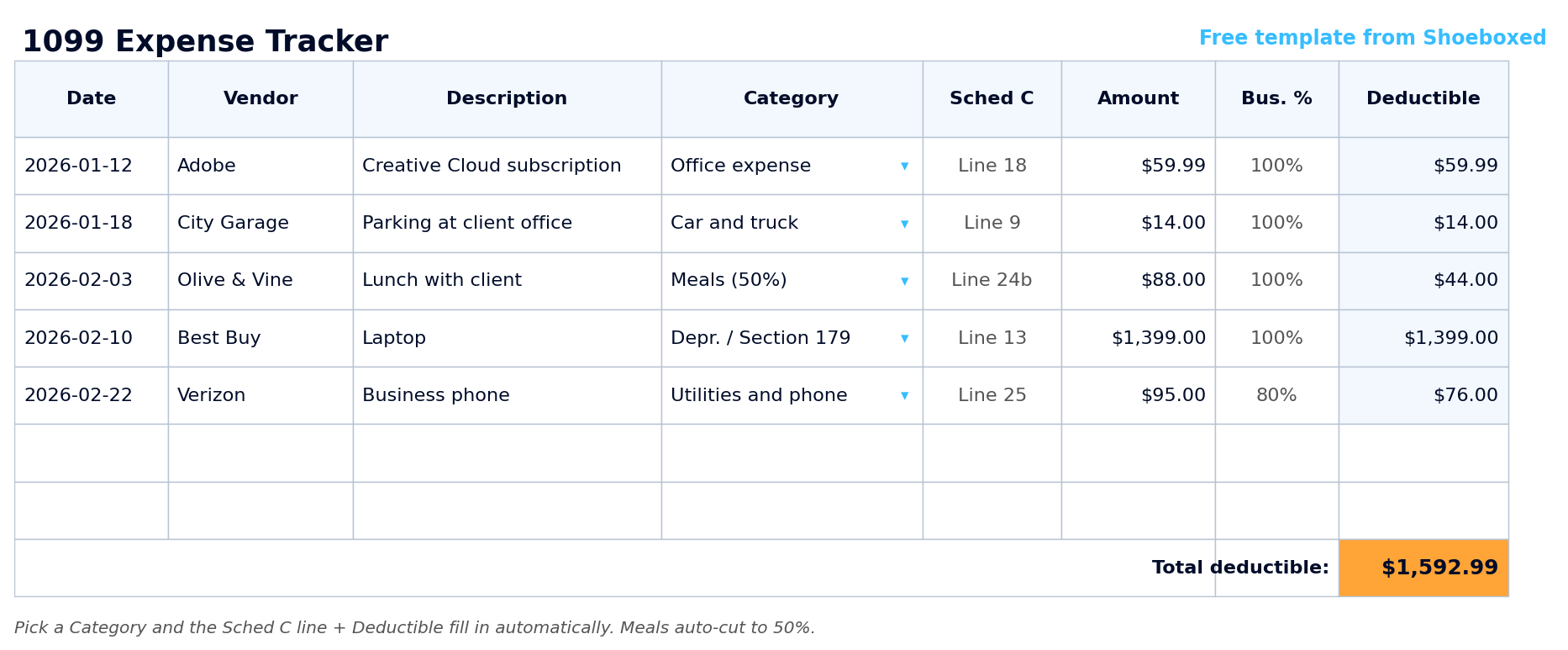 You type the date, vendor, amount, and category, and the sheet posts the Schedule C line and the deductible amount on its own. The $88 client lunch drops to $44, and the phone at 80% business use deducts $76 of the $95.
If you only do one thing on this page, take the template. The rest of the article explains the tax rules built into it, and the one habit our own data says most consultants skip.
What 24 consultants track (and the one thing almost nobody records)
Before I built the columns, I pulled our own data. We looked at 24 consultant accounts on Shoeboxed, 21,048 receipts over the last two years. These are our customers, not a national survey, but it's a real look at how working consultants keep their books.
All 24 tracked travel, 23 tracked meals, 18 logged mileage or other car costs, and 15 bought equipment like a laptop in that window. It's the same mix my wife's pile covers.
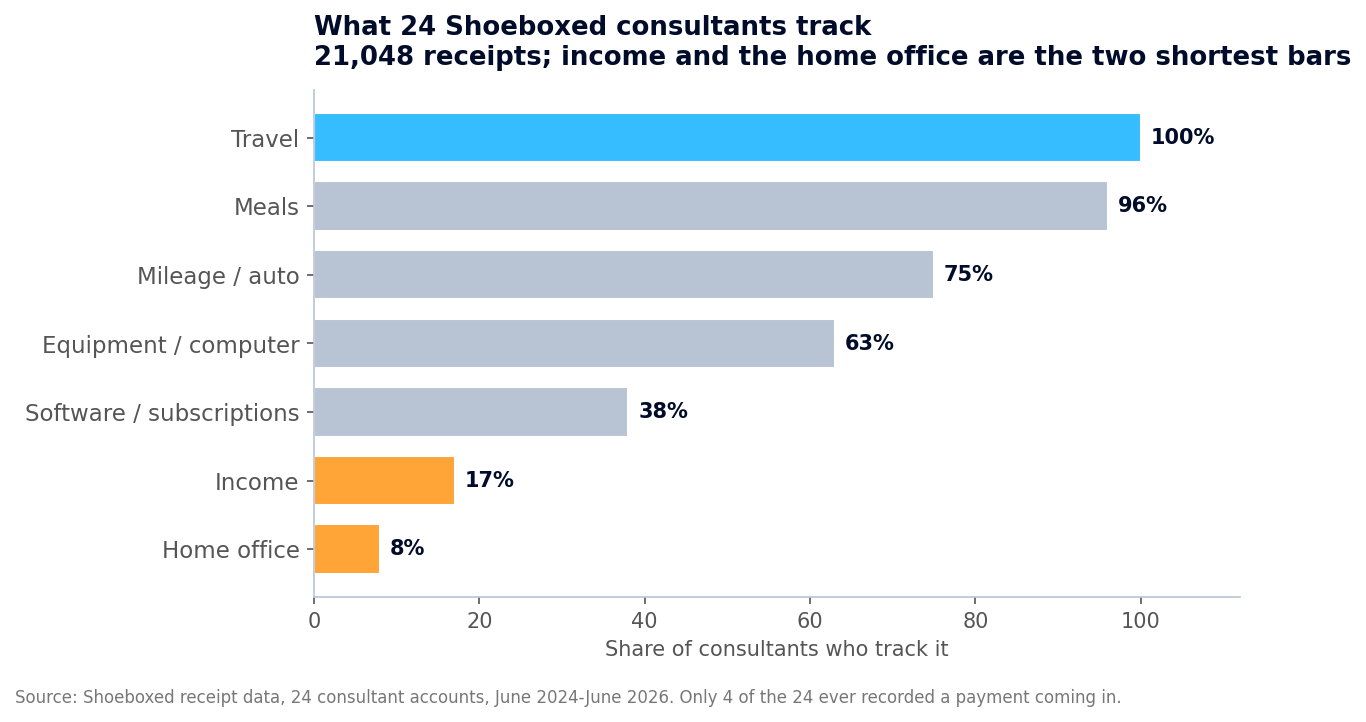 What 24 consultant accounts on Shoeboxed track, from 21,048 receipts over two years. Everyone logs the spending. The two shortest bars, income and the home office, are where the real money hides.
Only 4 of the 24 ever recorded a payment coming in, and not one logged an estimated-tax payment. That's the number that stopped me cold. Saving receipts feels like the homework, so consultants do that part and never write down the money that came in.
Most of us have that backwards. Your clients send the IRS a copy of every 1099 they issue you, so the IRS already knows what you got paid. Nobody sends them a copy of your receipts. The next section walks through how that matching works and what to do about it.
How the IRS already knows what you got paid
When a company pays you for 1099 work, it files a copy of that 1099 with the IRS. For payments made in 2025, the form kicks in at $600. For payments made after December 31, 2025, the threshold rises to $2,000. Either way, the IRS holds its copies before you file.
Then the IRS matches what your clients reported paying you against the income on your return. When the two numbers don't match, you get a CP2000 letter in the mail, with a proposed tax bill attached. The IRS spells out the trigger:
"The income or payment information we received from third parties, such as employers or financial institutions, doesn't match what you reported on your tax return."
Nobody runs that comparison on your expenses. No client mails the IRS a copy of your laptop receipt or your parking stub. So consultants polish the expense side, which no computer checks, and skip the income side, which the IRS matches against its own copies. A simple free invoice template keeps that income side in one place as you bill.
If that sounds scary, here's the good news: the fix costs you one evening in January. When a 1099 arrives, add up what that client paid you during the year from your bank statements, and compare your total to Box 1 on the form, the box that lists what they paid you. If the two numbers disagree, or a form never shows up, email the client and ask for a corrected copy. A wrong or missing form is how a surprise letter starts. And report every dollar you earned either way. Your Schedule C covers all of it, including payments too small to trigger a form.
Every consultant expense, mapped to its Schedule C line
Your Schedule C is the form where 1099 income and expenses meet, and every category in the template points at one of its lines. The dropdown fills the line in for you. The table below shows the whole map, so you can see where each dollar lands.
| What you spent money on | Examples | Schedule C line |
|---|---|---|
| Advertising | Ads, your website, business cards | Line 8 |
| Car and truck | Business miles (the Mileage Log tab), parking, tolls | Line 9 |
| Commissions and fees | Referral fees you pay out | Line 10 |
| Contract labor | A subcontractor you bring in on a project | Line 11 |
| Depreciation and Section 179 | Laptop, monitor, big equipment. Section 179 is the rule that lets you write these off in full the first year. | Line 13 |
| Insurance | Liability coverage, or the kind that protects you if a client sues over your advice | Line 15 |
| Interest | Interest on a business loan or credit line | Line 16 |
| Legal and professional | Your accountant, a lawyer | Line 17 |
| Office expense | Software subscriptions, printing, postage | Line 18 |
| Rent or lease | A coworking desk, rented equipment | Line 20 |
| Repairs and maintenance | Fixing the gear you work with | Line 21 |
| Supplies | Materials you use up doing the work | Line 22 |
| Taxes and licenses | Business license, permits | Line 23 |
| Travel | Flights, hotels, out-of-town client work | Line 24a |
| Meals | Business meals, deductible at 50% | Line 24b |
| Utilities and phone | The business share of your phone and internet | Line 25 |
| Wages | W-2 employees, if you have any | Line 26 |
| Other expenses | Bank and card fees, dues, anything that fits nowhere else | Line 27b |
| Home office | The space you run the business from (the Home Office Log tab) | Line 30 |
| The template uses these exact lines, so your totals already know where they go on the form. The IRS renumbers a line now and then, so check against the Schedule C for your filing year. |
Two of these deserve a closer look. If you use a phone, internet, or a car for both work and your own life, deduct the business share only. On the tracker tab, type the share into the Business % column, one spot to the right of Amount. Type 80% next to a phone you split between clients and family, and the sheet deducts 80% of the bill.
The other one is big-ticket gear, like the laptop my wife bought this year. Under the Section 179 rule, the IRS lets you deduct equipment in full the year you buy it instead of spreading it over several years, and your accountant can confirm yours qualifies. In the tracker, pick Depreciation and Section 179 from the dropdown, like the laptop row in the screenshot above, and all $1,399 lands on this year's return instead of trickling out over five.
The two deductions that never show up as a receipt
The home office and the miles you drive never print a receipt, and our data shows the cost of that. Only 2 of the 24 consultants tracked a single home-office expense, even though consulting is desk work and plenty of those desks sit at home.
People skip the home office deduction because they've heard it invites audits. The IRS builds a simplified method right into the form, and one rule protects you:
"Allowed only if that portion is exclusively used on a regular basis for business purposes."
Exclusive means the space does business and nothing else: a spare room you work from counts, while the kitchen table where the family also eats doesn't. Meet that test and the Home Office Log tab figures the deduction both ways. The simplified method pays a flat rate:
"Standard deduction of $5 per square foot of home used for business (maximum 300 square feet)."
A 150-square-foot office, the example the tab opens with, is a $750 deduction with no receipts to chase. The second way, the actual method, pays more for most renters and mortgage holders: you deduct the office's share of your rent or mortgage interest, utilities, insurance, and repairs, with no cap. Type two numbers into the Home Office Log tab, your home's total square feet and the office's square feet, and it figures both methods side by side so you can pick the bigger one.
Want the math done from your address? Our home office calculator pulls your home's square footage and figures the savings at your tax bracket.
Miles are the deduction more people know, and 18 of the 24 consultants do track car costs. For 2026, the IRS lets you deduct 72.5 cents per business mile. Drive 5,000 business miles between client offices this year and you take $3,625 off your taxable income, for driving you did anyway. The IRS wants four things per trip: the date, where you went, why, and the miles. The Mileage Log tab gives you those four fields and multiplies by the rate. If you'd rather skip typing trips, our mileage log template walks through the easier ways to keep the log, including letting an app record the drives for you.
Four mistakes that cost 1099 contractors real money
I've read a lot of contractor books, mine and the ones our customers keep, and the same four slips show up over and over. Each one has a cheap fix.
Receipts with no category. Even in our consultant group, 1 in 10 receipts came in with no category at all. How you lose the deduction: nobody remembers what the $63 charge was for in April, so it never makes it onto the return. Tag the receipt the day you spend the money.
Claiming the whole bill on the phone, internet, or car you also use personally. How you lose the deduction: a 100% claim on a shared cost invites questions you don't want, and you can forfeit money you deserved. Put an honest number in the Business % column and the claim stands on its own.
Letting receipts fade. Most receipts print on thermal paper, and the ink goes gray within a year. How you lose the deduction: the IRS expects you to keep records for three years after you file, and a blank slip proves nothing. Snap a photo the day it prints, because the digital copy outlives the paper.
Waiting until April to pay the IRS. Once you expect to owe $1,000 or more for the year, the IRS wants you to pay as you go, four times a year, using Form 1040-ES. Skip the quarterly payments and you can owe a penalty on top of the tax. Not one of our 24 consultants kept a single estimated-tax confirmation in their account. Some of them pay and toss the confirmation, but the record is your proof, so save it the way you'd save a receipt.
The easy way: stop typing receipts
The template is free, and it's the one my wife uses. But I'll tell you the catch, because our own data already did. Someone has to type every receipt into it, and when that turns into a chore, the categories go blank and the books fall behind.
That's the job Shoeboxed does. We're a 20-year-old receipt-scanning and mileage-tracking app. Snap a receipt with your phone, forward an email, or mail us the whole pile in our Magic Envelope. Our team in Durham scans the paper, the software pulls out the date, total, vendor, and category, and every cost lands in your account already sorted.
The mileage piece is my favorite. The app logs your drives by GPS, texts you the day's list, and you reply with which ones were business, so the log keeps itself.
Either way, the template is yours, no strings attached. If you'd rather hand off the typing, Shoeboxed Pro runs $29 a month with a 30-day money-back guarantee, and the bonus tab in your download takes 25% off any plan.


Frequently asked questions
How do I keep track of expenses for 1099 work? Keep one row per cost: the date, the vendor, the amount, and a category. Tag it the day you spend the money, snap a photo of the paper receipt, and record every payment that comes in right alongside the spending. The free template on this page handles the Schedule C lines and the math for you.
Is there an app that tracks 1099 expenses? Yes, and ours is called Shoeboxed. You photograph, forward, or mail in your receipts, and we scan them, sort them by Schedule C category, and track your drives by GPS. The template works fine on its own, and the app is there for the day the typing gets old.
What 's the best spreadsheet for tracking 1099 expenses? One that maps every cost to its Schedule C line, because that form is where your numbers have to land in April. The free template above fills in the line and the deductible amount for you, then rolls everything onto a one-page summary you can hand your accountant.
How do I track expenses as an independent contractor? Run your business spending through its own card or account, log each cost the day it happens, and write down what every client pays you. Then check your 1099s against your bank deposits each January. The IRS's copies and your return should tell the same story.
Do I report income if a client never sent a 1099? Yes. The form threshold, $600 for payments made in 2025 and $2,000 after that, only controls the client's paperwork, not what you owe. Your Schedule C reports everything you earned, including small payments no form covers, and self-employment tax, the Social Security and Medicare tax on consulting profit, applies once you clear $400 for the year.
About the author
I'm Doug. I bought Shoeboxed in late 2025 with an SBA loan and 5% down, so I run a small business and sweat the same tax bill you do. My wife consults on a 1099, which means the spreadsheet on this page gets tested at my own kitchen table. I write these guides because the surest way to grow Shoeboxed is to help people keep more of what they earn.
30 Seconds Could Save You Thousands on Taxes
Self-employed? Get an instant, personalized tax-savings estimate.




 4.4 / 5 on