Printable Expense Tracker: Free 3-Page PDF Pack for 2026
Download a free printable expense tracker PDF pack: a monthly tracker, a business tracker with Schedule C categories printed in, and a 2026 mileage log. No email needed.


Updated June 2026.
A printable expense tracker is a sheet you print and fill in by hand: one line per expense, with the date, what you bought, where, and the amount. The free three-page pack on this page adds the piece tax time needs, the IRS's own Schedule C categories, printed right into the column.
Download the free printable expense tracker pack (PDF)
Three pages: a monthly expense tracker, a business expense tracker with the Schedule C categories printed in, and a 2026 mileage log. No email, no signup. Print the page you need, as many copies as you want.
Imagine you run a cleaning business, and every receipt from this year lives in a shoebox on the dryer. Or maybe you coach clients three towns over and would rather track expenses with a pen than fight a spreadsheet. Did you know one column on that tracker decides whether each expense counts at tax time? It's the category column, and most free trackers leave it blank. The pack above fills it in for you.
Paid every two weeks? The bi-weekly budget template for Excel budgets one paycheck at a time, with the same Schedule C thinking built in. Want a running total as you go? The daily expense tracker adds up your spending the moment you type it, in Excel, Sheets, or a printable page.
I am Doug. I own Shoeboxed, and since 2007 we have scanned over 57 million receipts for more than 552,000 small businesses. So when I tell you what trips people up at tax time, it comes from those receipts.
"Across 3,416,093 receipts scanned for 12,597 active Shoeboxed accounts since January 2024, 38.1% arrived with no category assigned."
Shoeboxed customer data, May 2026
Why most printable expense trackers fall apart at tax time
A category column only helps you at tax time if it already names the categories the IRS uses, and almost every free printable leaves that column blank or fills it with grocery-budget labels instead. I have seen free trackers that print a tidy category column and then leave it empty. So you make up your own. But your tax preparer can't put "stuff for work" on a tax form, so that line turns into a problem in April.
Our own numbers show how often that column loses. Out of every hundred receipts our customers send in, 38 arrive with no category at all. And that count comes from software that asks for the category on every single receipt. A paper sheet never asks you, so even more lines end up blank.
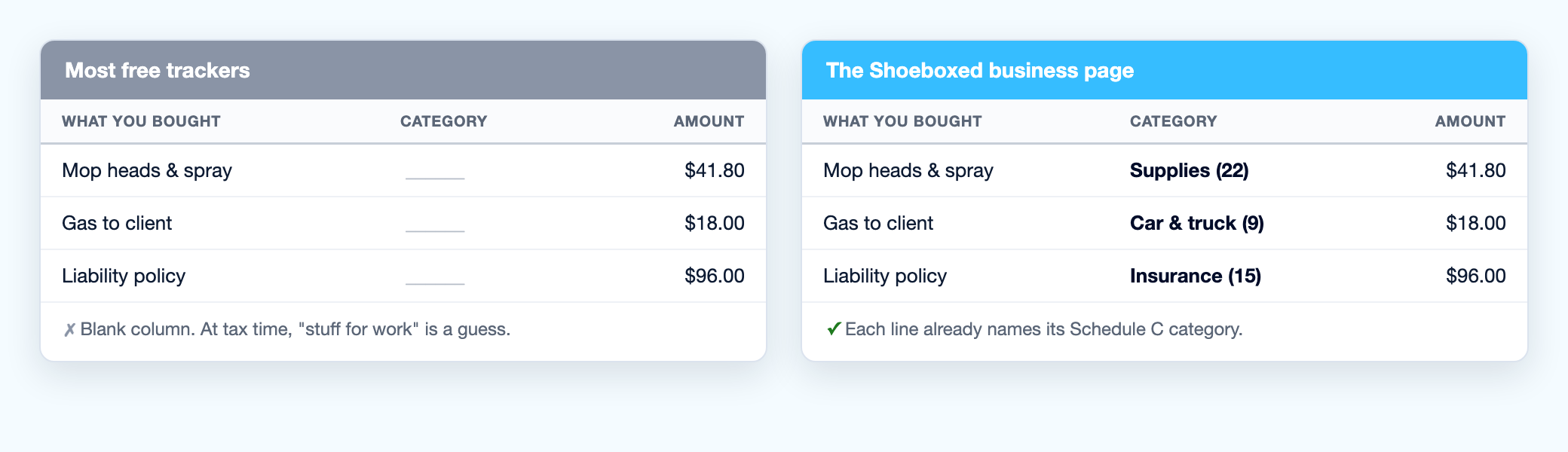 Same three expenses, two trackers. The blank column on the left turns into a guess in April. The Schedule C labels on the right are ready to file.
A blank category costs you in April. Your preparer reads a year of your sheets, and every line with a clear category goes straight onto Schedule C (the form sole proprietors use to report business profit or loss). Every vague line means a question, a guess, or a line that gets left off the return.
So we printed the IRS's categories into the tracker. Now you don't have to make up a label. You read the receipt, find the matching category on the sheet, and write its line number down.
What's inside the free printable pack
The pack is three pages, and each page has one job.
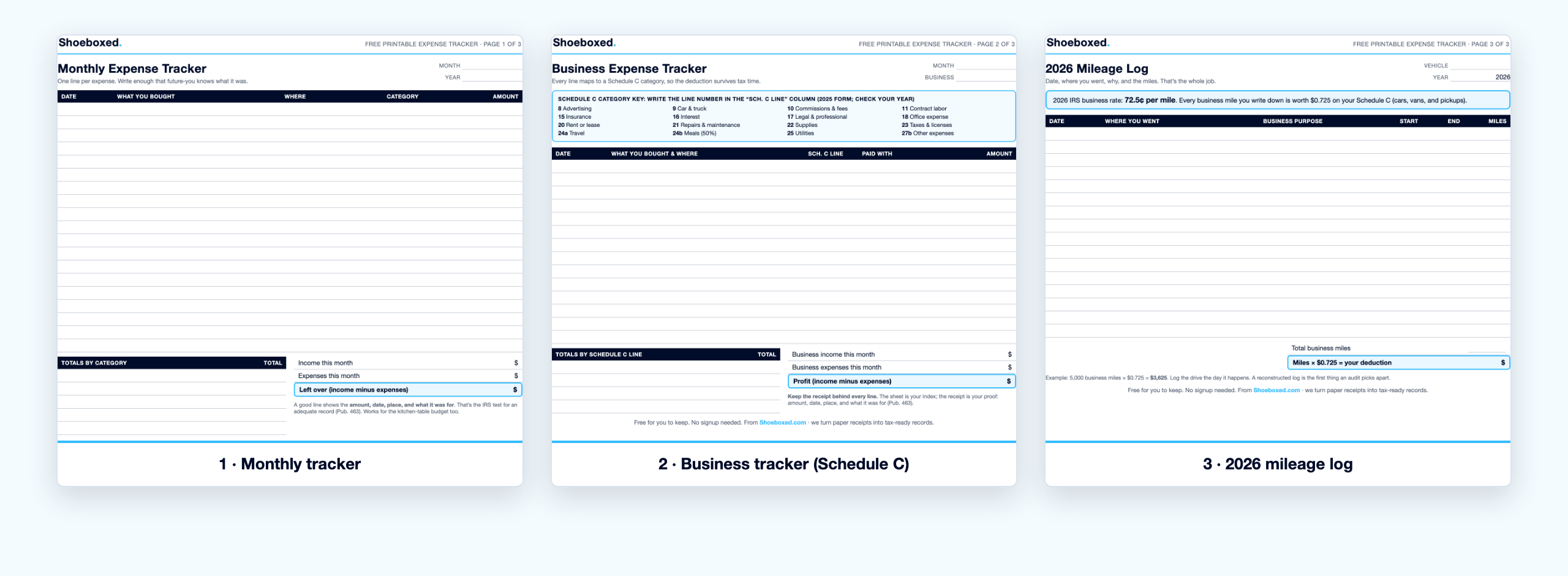 The three pages of the pack. Print one, print all three, print fifty copies. They are yours.
- Page 1 is the monthly expense tracker. One line per expense: date, what you bought, where, category, and amount. The bottom of the page totals the month by category and subtracts expenses from income, so you can see what's left. It works for a business, and it works for the kitchen-table budget. If you'd rather track it on a computer, our free small business expense spreadsheet does the same job.
- Page 2 is the business expense tracker. Built for Schedule C. A short list of categories sits at the top of the page with the IRS line numbers on it, and you write the matching number next to each expense (buy mop heads, write 22). The bottom row totals your profit: income minus expenses.
- Page 3 is the 2026 mileage log. You write the date, where you went, why, and the miles. The 2026 IRS rate of 72.5 cents per business mile is printed on the page, and the totals row turns your miles into a dollar deduction.
We open shoebox after shoebox of receipts, and the blank-category problem shows up in most of them. I built the business page so the fix happens the moment you write the expense down, not eleven months later in your tax preparer's office.
What to write in the category column
You don't invent categories. You match each expense to a category the IRS already named on Schedule C, so the deduction survives when your tax preparer reads the sheet. The business page of the pack prints this list at the top, and here is the same map with plain-English examples.
| Schedule C line | What the IRS calls it | What it looks like in real life |
|---|---|---|
| 8 | Advertising | Facebook ads, yard signs, business cards |
| 9 | Car and truck expenses | Business miles from page 3 of the pack |
| 10 | Commissions and fees | Referral fees, marketplace fees |
| 11 | Contract labor | The helper you hire in busy season |
| 15 | Insurance (other than health) | Liability policy, bond premium |
| 17 | Legal and professional services | Your tax preparer's bill, attorney fees |
| 18 | Office expense | Printer ink, postage, the planner you write in |
| 20 | Rent or lease | Storage unit, booth rent, equipment rental |
| 21 | Repairs and maintenance | Fixing the mower, servicing the steam cleaner |
| 22 | Supplies | Cleaning supplies, mop heads, craft materials |
| 23 | Taxes and licenses | Business license renewal, sales tax paid |
| 24a | Travel | Hotel for the trade show |
| 24b | Deductible meals | Lunch with a client (50% deductible) |
| 25 | Utilities | Business phone line, shop electricity |
| 27b | Other expenses | Bank fees, software, anything that fits nowhere else |
These line numbers come from the 2025 Schedule C, the most recent the IRS has published. The IRS renumbers a line now and then (it moved "Other expenses" to 27b), so if your form's numbers don't match, go by the category name instead. The names don't move.
If you track a household instead of a business, ignore the line numbers and pick five or six buckets you can stick with: groceries, gas, eating out, kids, house, everything else. The habit matters more than the labels, and for a business, the labels are the habit.
What to record for every expense so it holds up
The IRS spells out what makes a record good enough, straight from Publication 463:
"Documentary evidence will ordinarily be considered adequate if it shows the amount, date, place, and essential character of the expense."
IRS, Publication 463
Four things: the amount, the date, the place, and what the money was for. Every column on the pack's pages maps to one of those four, so a filled-in line passes the test on its own.
How you lose the deduction: a line that says "supplies, $40" with no date, no store, and no receipt behind it. Write the whole line the day you spend the money, then clip the receipt to the back of the sheet. That $40 stays deducted, and you stay calm if anyone ever asks about it.
Don't forget the income side: a pile of expenses is half a ledger
Logging expenses without logging income hands your accountant a guessed profit number, and a wrong profit number means a wrong self-employment tax bill. You pay tax on profit, not on revenue, and profit needs both halves: what came in and what went out.
We see the missing half in our own data. When we looked at one group of 68 real estate accounts, 50 of them (73.5%) tracked expenses but never logged a single dollar of income. It happens because income doesn't arrive as a receipt. It arrives as a deposit or a closing statement, so it never lands in the pile you save.
Both tracker pages in the pack carry an income line, and the business page ends in a profit row: income minus expenses. Fill in both halves, and the number you hand your tax preparer is a record instead of a guess.
The mileage line most solo owners never write down
Try to remember every client visit, supply run, and bank trip you drove last year. You can't, and neither can anyone else, which is why the miles never make it onto the return. The IRS lets you deduct 72.5 cents for every business mile you drive in 2026, whether you drive a car, a van, or a pickup. That rate comes straight from the IRS's 2026 rate announcement.
Here is one ordinary week from a cleaning business, written on page 3 of the pack:
| Date | Where you went | Business purpose | Miles |
|---|---|---|---|
| Tue 6/2 | New client's house | Walkthrough to quote a deep clean | 18 |
| Wed 6/3 | Supply store | Restock cleaning supplies | 7 |
| Fri 6/5 | Bank | Deposit client checks | 4 |
| Week total: 29 miles at 72.5 cents a mile | $21.03 |
Twenty-one dollars sounds small until you run the year. Fifty weeks like that one is 1,450 miles, which takes $1,051 off your taxable profit (1,450 miles at 72.5 cents = $1,051.25). Drive 5,000 business miles and the deduction is $3,625. Write the drive down the day it happens. A log you rebuild from memory is the first thing the IRS questions. When one page of log isn't enough, our full mileage log template covers a whole year, and the current IRS mileage rate page stays updated when the rate changes.
When the paper pile outgrows the page
A printed sheet captures the numbers, but you still need the receipt behind each line. The IRS wants the record and the proof, and storing that proof is the job we built Shoeboxed to do.
Here is how it works. You get receipts into Shoeboxed five ways: snap a photo in the app, upload from your desktop, forward an email, let the Gmail plugin pull them in, or stuff a Magic Envelope and mail it to us. Our team in Durham scans the paper, and our software reads the vendor, date, and total off each one. We keep the receipt image for as long as you have an account. So your sheet says "supplies, $42.17, June 3, Smith Hardware," and the matching receipt sits in your account, there when you need it.
Plenty of our customers started where you might be now: a tracker on the fridge and a shoebox filling up behind it. The sheet keeps the habit going, and we keep the proof.
Prefer a spreadsheet?
Some people would rather type than handwrite, and nobody here will scold you for picking the keyboard. The same Schedule C thinking lives in our free spreadsheet versions: the Excel expense spreadsheet, the Google Sheets expense tracker, and the bigger accounting spreadsheet template. They add everything up for you, which is the one thing paper can't.
One more deduction while you're here: if you do your books at a desk or corner of your home you use only for the business and nothing else, that space may count as a home office. IRS Publication 587 has an exception for the administrative work you do at home, and our free home office calculator runs the number for you in about a minute.
Printable expense tracker FAQ
Is the pack free, or is there an email wall?
It is free, there is no wall, and the download link opens the PDF directly. No form, no account, and you can print as many copies as you want.
Should I track monthly or weekly?
Print the monthly page and write on it all month. If your business runs busy enough to fill the page in a week, print four copies and staple them together. The totals work either way.
What categories should I use?
For a business, use the Schedule C lines from the table above. The business page prints the key at the top of the sheet. For a household budget, pick five or six buckets you can stick with all year.
Is there a fillable digital version?
The PDF prints and fills in by hand. If you want typing and automatic math, use the Excel version or the Google Sheets version. Same categories, same thinking.
What do I do with the sheets at tax time?
Total each category, hand the totals to your tax preparer, and keep the sheets with the receipts behind them. The IRS can ask about a return years later, so store the pages with that year's tax records instead of tossing them.
Grab the pack, write the IRS category on every line through the year, and you will walk into April with a sheet your tax preparer can use instead of a shoebox of guesses.
When the shoebox wins anyway, Shoeboxed can take it from there. We scan your receipts, read the vendor, date, and total off each one, and file them by category so your numbers are ready at tax time. See how it works.
About the author. I'm Doug. I bought Shoeboxed in late 2025 with an SBA loan after fifteen years of running other people's companies as CEO. I'd used Shoeboxed myself back in 2010 at a previous gig and called it magical even then. I use it daily now. Small business owners deserve every dollar they're legally entitled to keep, which is why I bought Shoeboxed and work hard to make it better.
Sources
- IRS: 2026 standard mileage rate announcement
- IRS: Instructions for Schedule C (Form 1040)
- IRS: Publication 463 (recordkeeping rules)
- IRS: Publication 587 (business use of your home)
- Shoeboxed customer data: 3,416,093 receipts across 12,597 active accounts (May 2026); real estate cohort of 68 accounts (May 2026)




 4.4 / 5 on