Free IRS Mileage Log Template (PDF, Excel, Sheets), Updated for 2026
Three free mileage log templates plus the exact four fields the IRS requires per trip. Print-ready PDF, editable Excel, or copy-to-Drive Google Sheets. Built for 2026 standard-mileage filers.

Last updated: April 2026
My friend Chris drove almost 3,000 miles for work last year. Client meetings, team meetings, partner meetings and some sales meetings. He runs a travel sports website called TravelSports.com out of a (home office) but didn't realize he could expense that mileage.
Want your expenses and miles on one printout? The printable expense tracker pack bundles a 2026 mileage log with a monthly and a Schedule C expense tracker.
At $0.725 per mile he lost out on over $2K of tax deductions. If he's in the 24% tax bracket that's over $500 in cash he needlessly sent to the IRS. Dang.
That stuck with me. It really chaps my hinder to watch people like Chris sending extra money to the IRS because the paperwork felt too annoying. So I put together three free templates, wrote down the exact four fields the IRS requires per trip, and made the whole thing zero-signup. If you drive for work and are self-employed, grab one below. Don't pay the tax man more than you need to, keep that cash in your bank account, where it belongs. Or, if you want us to make it dead simple for you, give our app a try.
Download the free mileage log template
Four formats, no signup, no email wall:
- Mileage Log for Google Sheets (one-click copy) : opens a "Make a copy" prompt; the copy lands in your own Drive. Auto-totals your miles and shows the deduction at the 2026 IRS rate.
- Mileage Log PDF (print-ready) : one page, fits on a clipboard, good for the glove box
- Mileage Log Excel (.xlsx) : auto-totals and deduction formula, works in Excel and Numbers
- Mileage Log CSV : plain text, opens anywhere, no formulas
Pick whichever you'll actually use. The best template is the one you fill in.
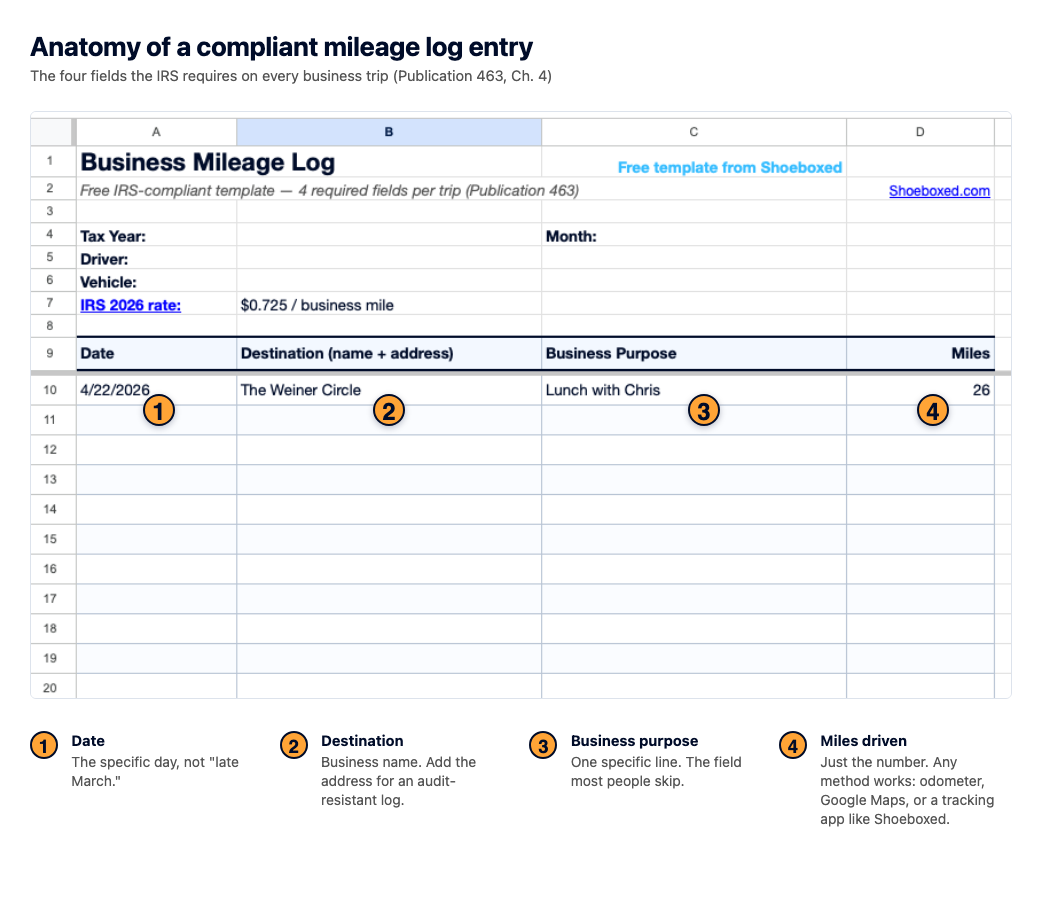
The 4 fields the IRS requires per trip
Under the standard mileage rate method (which most Schedule C filers use and which this template is built for), each business trip acts like its own receipt. You don't need a percentage of total vehicle use, you don't need year-start and year-end odometer. You need the four fields below, recorded at or near the time of the trip.
One catch for food trucks: most are too heavy for the standard mileage rate. The food truck expense spreadsheet covers why the truck runs on actual costs while the supply car takes the per-mile rate.
Here's the IRS stating the core rule:
" The law requires that you substantiate your expenses by adequate records or by sufficient evidence to support your own statement."
And on what "adequate records" looks like:
" You should keep the proof you need in an account book, diary, log, statement of expense, trip sheets, or similar record. You should also keep documentary evidence that, together with your record, will support each element of an expense."
Every top-ten search result for this keyword lists somewhere between three and nine fields, with no agreement between them. Here's the accurate list.
1. Date of the trip
The specific date. Not "late March." Not "sometime in Q2." If the IRS asks, they want a calendar entry. This is the field that makes a log look contemporaneous or back-filled, so fill it in the day of, not the Sunday after.
2. Destination
Business name and address, not just "downtown" or "the client." If I drove to Ed's Hardware on Main Street for job-site supplies, I write "Ed's Hardware, 212 Main St." The address is what turns "I think it was around 12 miles" into a verifiable mileage number.
3. Business purpose
This is the field most people skip, and the one the IRS checks first. One line is enough: " Client meeting with Stewart Architecture to review project files." Or " Pick up printer cartridges at Staples." A trip without a purpose line is a trip the IRS can disallow. No exceptions.
4. Miles driven
Just the number. However you count them. Odometer math (start reading minus end reading) works, a Google Maps route screenshot works, a GPS tracker that logs your trip automatically works. The IRS doesn't care how you got the number, only that the number is right and you wrote it down at or near the time of the trip.
That's the whole thing. Four fields per trip, sum the business miles at year-end, multiply by the 2026 rate of $0.725. Done.
About the annual-odometer question
A lot of articles claim you need year-start and year-end odometer readings. That's only true for the actual expense method (gas, insurance, depreciation) where you multiply total expenses by a business-use percentage. Under standard mileage, which most Schedule C filers use, your per-trip log is the whole record.
How to use the template (step by step)
The template works if you use it. The habit matters more than the format. Here's a weekly routine that takes about five minutes, and it's the same rhythm I designed into the Shoeboxed mileage tracker for customers who'd rather not write things down at all.
Step 1: Log the trip before you start driving
Open the template on your phone (Google Sheets version) or grab the PDF from the glove box. Write down the date, where you're going, and why. Three lines, ten seconds.
Step 2: Capture the miles at arrival
Read your odometer when you park (phone photo works), screenshot the Google Maps route from your phone, or just note "Google Maps: 14.2 mi" and keep the screenshot with your records. Store it with the trip.
Step 3: Reconcile weekly
Sunday evenings are mine. I sit down for five minutes, fill in any trips I missed, double-check the weekly total, and save the sheet. Weekly reconciliation beats monthly catch-up, because your memory is better at a few days than at a few weeks.
Step 4: Monthly total
Running totals matter more than perfect per-trip records. The template auto-sums in Excel and Sheets. For the PDF version, write the monthly subtotal at the bottom of each page.
Step 5: Year-end total
Add up your 12 monthly subtotals. That's your total business miles. Multiply by the 2026 rate ($0.725) and that's your deduction. Report it on Schedule C, or hand the total to your CPA.
Which logging method suits you?
| Method | Best for | Weakness |
|---|---|---|
| Paper / PDF | Low-tech, glove-box people. Clipboard-and-pen folks. | Hand-calculated totals; easier to back-fill by mistake |
| Excel (.xlsx) | Office-based work. You open your laptop every day. | Not handy in the car |
| Google Sheets | Phone-first. Drives a lot. Wants auto-save. | Needs internet when you're filling in on the road |
| Automatic tracker | Anyone that hates paperwork or remembering to track stuff. | Small monthly cost ($9/mo for the Shoeboxed app), but pays for itself fast if you drive enough |
None of these is wrong. The one you'll actually maintain is the right one.
How long to keep your mileage log
Three years from the filing date is the standard IRS rule. If there's a substantial income understatement (defined as more than 25% of what you reported), the retention window stretches to six years. A lot of CPAs recommend keeping seven years as practice, which covers the worst-case and is what we suggest.
Storage is simple. A paper folder labeled by year, or a Google Drive folder named the same way. Whichever you'll actually keep organized. The IRS doesn't care about the format. They care that you have the records when asked. See the IRS Recordkeeping guidance for the full text.
At Shoeboxed we store your mileage records for you forever, as long as you have an active plan. We try to make it as easy as possible to stay IRS-compliant.
Real deduction math: what 12,000 business miles actually saves you
Here's the number most people don't run. The current IRS mileage rate for 2026 is 72.5 cents per business mile (up from 70¢ in 2025; see the IRS Standard Mileage Rates page for the official rate table). The average self-employed American drives about 12,000 business miles a year, per IRS Schedule C data.
Do the math:
12,000 miles × $0.725 = $8,700 deduction
If your marginal federal tax bracket is 24% (typical for most sole proprietors in a reasonable income range), that's about $2,088 back in your pocket at tax time. Add state tax savings on top, depending on where you live.
Compare that to Chris from the intro. 3,000 miles of driving, no log, zero deduction, zero back. He gave $500 to the IRS that he didn't have to. Multiply that over a few years and the cost of not having a log adds up fast.
Writing down four fields per trip for fifteen minutes a week is one of the highest-dollar-per-hour activities available to a Schedule C filer.
Looking for a Schedule C–shaped worksheet to pair with this mileage log? Our free Income and Expense Worksheet tracks both sides — income (Schedule C Part I) and expenses (Part II) — in one file with two tabs.
Drive a commercial truck (Class 7 or 8, over 6,000 lb GVWR)? The standard mileage rate doesn't apply to your rig — heavy trucks must use the actual expense method (IRS Pub 463 §4). For that workflow, our free trucking expense spreadsheet for owner-operators tracks fuel, maintenance, depreciation, and a per-diem log all in one place.
Audit-proofing: 3 small habits that hold up under review
A compliant log and an audit-proof log are not quite the same thing. The difference is what convinces a skeptical IRS agent that your log is real, not reconstructed. Three habits make the difference.
Habit 1: Consistency beats precision
The single biggest tell of a back-filled log is uniformity. All entries in the same pen, all written on the last day of the year, all rounded to clean numbers like 25 or 50 miles. The IRS sees that and moves to actual-expense-method verification, which is a longer audit. Weekly reconciliation (Step 3 above) solves this. Your log shows the rhythm of real driving, not a December all-nighter.
Habit 2: Keep a parallel digital timestamp
Your calendar entries, Google Maps timeline, and email records already document where you went and when. These don't replace the log, but they back it up. If the IRS ever questions a trip, pulling up the calendar invite that says "2:00 PM Stewart Architecture project review" alongside the log entry closes the conversation fast.
Habit 3: Note anomalies in one sentence
If you drove 400 miles in a single day, write one sentence next to the entry: " Drove to Chicago for InfoComm trade show." That sentence is what turns an outlier into a credible business day. Trips without context are the ones the IRS challenges. Sentences cost nothing.
The biggest audit trigger to avoid
Claiming exactly the same mileage year after year (12,000 miles in 2023, 12,000 in 2024, 12,000 in 2025) is the single most common trigger for a mileage audit. Real driving fluctuates. A good year might be 13,200 miles; a slower year might be 10,800. If your log shows perfect consistency across multiple tax years, that's a pattern. Keep the log weekly, report what your log actually says, and let the numbers vary. Accuracy protects you more than a clean-looking round number does.
If you'd rather not log by hand (what we built at Shoeboxed)
Templates work if you're disciplined about the weekly reconcile habit. I know myself. I'd be the guy whose clipboard ends up in the back seat under a coffee cup by mid-February. A lot of our customers are the same. So we built the automatic mileage tracking into our mobile app.
Here's what it does:
- Tracks trips via GPS. Once you turn it on, your phone's background location detects driving. We filter out walks and stalls (5 to 100 mph), ignore anything under half a mile, and treat a 15-minute stop as the end of one trip. That matches how the IRS thinks of a "trip."
- Sends a daily SMS summary. At the end of the day you get a text: " You drove 45 miles in 4 trips today." Reply with which ones were business. One text a day, and your log writes itself.
- Generates the receipt PDF. Each business trip becomes a PDF in your Shoeboxed account with map snapshot, date, route, miles, and rate applied. A valid record by IRS standards (see the Pub 463 quote above).
The pitch isn't "our app is cooler than a template." It's: if you know the clipboard won't stick, the four fields still need to get captured somehow. The phone is usually the answer. Just turn on tracking and answer a text when you have a business trip and we do the rest.
Either way, the four fields are what the IRS checks. Whether you write them on a paper form or your phone records them automatically, the standard is the same.
If you drive for Uber or Lyft, our Uber driver expenses spreadsheet pairs this log with platform fees, car washes, and every other rideshare deduction, each mapped to its Schedule C line.
FAQ
How do I create a mileage log?
Download one of the templates above, record the four required fields for every business trip (date, destination, business purpose, and miles driven), and reconcile the log weekly. The IRS doesn't mandate a format (paper, spreadsheet, or app), only that the content is complete and contemporaneous. Or, give our app a try.
Is a mileage log required by the IRS?
Yes, if you want to claim the standard mileage deduction. The IRS requires contemporaneous records showing the four per-trip fields above, kept for at least three years from the filing date. You can also use the actual-expense method (tracking gas, maintenance, insurance, depreciation), which requires its own set of records and the year-start and year-end odometer readings. But the standard-mileage method is usually simpler and produces a bigger deduction for most Schedule C filers, and the log is non-negotiable for both methods.
Does the IRS accept mileage tracker apps?
Yes. The IRS rules are format-agnostic. Paper, spreadsheet, PDF, and app records are all acceptable as long as they capture the four required fields. Many apps actually beat paper on contemporaneousness, because trips are logged automatically with timestamps the moment they happen. We built the Shoeboxed tracker around this exact standard.
Why did the IRS not accept my mileage log?
The four most common reasons: missing business-purpose field on some or all trips; the log looks back-filled (same pen, round numbers, dates added all at once); per-trip miles missing or clearly approximated; and conflicting records (calendar says one thing, log says another). Fix by being consistent week-to-week, being specific about purpose, recording miles at or near the time of each trip, and checking your log against your calendar every quarter.
Can I use a spreadsheet instead of a printable log?
Yes. The IRS doesn't require a specific format, only specific content. Excel and Google Sheets are both fine. Most people find Google Sheets easier because it auto-saves, is accessible on the phone, and can be shared with a bookkeeper or CPA without emailing files back and forth.
What counts as a "business trip" for the mileage deduction?
Any trip with a business purpose that's not your regular commute. Office-to-client: deductible. Home-to-your-regular-office: not (that's commuting). Home-office-to-client: deductible if your home office is your principal place of business. Bank deposits, supply runs, trade shows all count. When in doubt, write the purpose in the log. A documented trip you decide not to deduct is fine; an undocumented one you want to deduct is not.
Does the standard-mileage method work if I lease my car?
Yes, if you use it from day one of the lease. On a leased vehicle you can't switch between standard-mileage and actual-expense the way you can on an owned one. Pick one method in year one and keep it for the whole lease term.
Wrap
The template gets you started. The four fields keep you audit-proof. Pick whichever format you'll actually maintain and fill it in this week, not this year. And if you'd rather we just do it for you, we built an automatic mileage tracker into the Shoeboxed app.
Drive safe.
Mileage is one piece of the travel deduction picture. The full travel expense report template covers lodging, meals, per-diem, and the rules for mixing personal days into a business trip.
Driving the farm truck to the co-op or the vet? Those miles belong on Schedule F line 10. Our farm expense spreadsheet walks through which farm drives count.




 4.4 / 5 on