Daily Expense Tracker: Free Template (Excel, Sheets, Print)
A free daily expense tracker that adds up your spending as you type. Download it for Excel or Google Sheets, or print a blank one. Plus the one habit that makes daily tracking stick.


A daily expense tracker is a simple sheet where you write down what you spend each day, one line per expense, so you can see where your money goes before it runs out. The free one on this page keeps a running total as you type, so at any moment you know how much you have left for the month. Use it in Excel, copy it to Google Sheets, or print a blank one and fill it in by hand.
I run Shoeboxed, a 20-year-old receipt app, so I watch how people track their money all day. One thing matters more than which tool you pick: write each expense down the day you spend it. Wait a week and you won't remember what the $14 charge was for. The template below makes that part easy.
Want to track by the week instead? Our weekly expense tracker does the same job on a 7-day rhythm. This page is for catching every coffee and parking meter the day it happens.
Get the daily expense tracker (Excel, Google Sheets, or print it)
Download the Excel file (.xlsx) →
Rather keep it in the cloud? Copy it to your Google Drive instead. Tap the link, sign in to Google, and pick Make a copy. The file opens in Excel, Numbers, or Google Sheets, and your numbers stay yours, since nothing you type lands in my copy.
Want to fill it in by hand? Print the blank version (PDF) and tape it to the fridge, the same way you'd use any printable expense tracker.
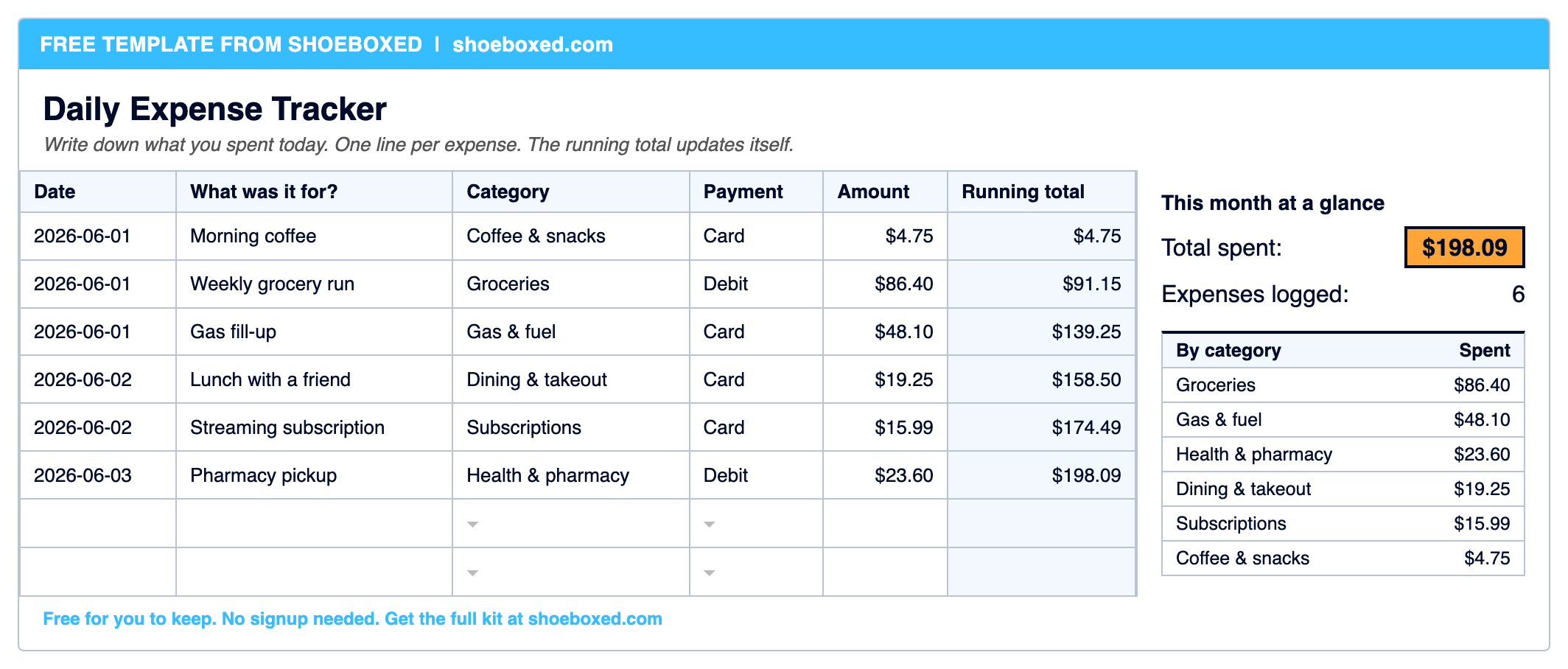
Here's how it's built:
- Daily Expense Tracker. Open this tab first. Each expense gets the next empty row: the date, what it was for, the amount, and a category you pick from a dropdown. The running total climbs as you type, so you always know where the month stands.
- Monthly Summary. Your spending rolled up by category, so you can see at a glance that takeout was bigger than you thought.
- Two bonus tabs, a Home Office Log and a Mileage Log, that turn into real tax deductions if any of your income comes on a 1099. More on that next, it's worth actual money.
If you only do one thing here, grab the template. But before you scroll on, one thing about it can put real money back in your pocket at tax time.
If you got paid on a 1099, you may unlock two amazing tax breaks
Did you get paid this year without taxes taken out, on a 1099 instead of a regular W-2 paycheck? That covers a huge range of people: freelancers, contractors, consultants, drivers, tutors, anyone with a side business, even from one small job. If that's you, the IRS already treats you as a business, even if you also hold a regular W-2 job. And a business gets tax breaks a paycheck never does.
Two of these deductions are big, and not many people know about them:
- The miles you drive for that work. For 2026 the IRS lets you deduct 72.5 cents for every business mile. Say you drove 4,000 of them this year. That's a $2,900 deduction (4,000 × $0.725), and you pay no tax on that $2,900. Depending on your bracket, that's roughly $500 to $900 you keep instead of handing to the IRS.
- A home office (or extra room). This is the big one, and the one people lowball. One rule matters: the space has to be used only for the work, like a desk or a spare room, not the kitchen table you also eat dinner at. There are two ways to claim it. The quick way is $5 a square foot, so a 150-square-foot office is a $750 deduction. The bigger way, the actual method, deducts the business-use share of your real housing costs: rent or mortgage interest, utilities, and insurance. If your office takes up 10% of your home, you deduct 10% of all of it, which often runs into the thousands. That math is a pain to do by hand, so we built a free home office calculator that pulls your home's numbers from your address and figures both ways for you, renters and owners alike.
Now the part that makes daily tracking worth it. Every one of those costs is a deduction, which means it comes straight off the income you pay tax on. Write them down all year and they add up to a big chunk of tax you simply don't owe. Skip them and you hand the IRS money for nothing.
You are not a rare case here. Nearly 31 million Americans file taxes as self-employed on a Schedule C, and a single 1099 is all it takes to join them.
This tracker keeps your everyday spending straight. For the tax side, we built two more free tools:
- Our free 1099 expense tracker spreadsheet drops every cost onto the right tax line for you, built from 21,048 real receipts.
- Our home office calculator figures your deduction from your address, renters and owners both.
The Home Office Log and Mileage Log tabs in your download get you started on both.
Why track expenses daily instead of weekly or monthly?
Because money leaks out in small amounts, and small amounts are exactly what leave you short before payday.
A monthly look at your bank statement tells you the rent and the car payment, which you already knew. It hides the $6 here and $11 there that quietly add up to a few hundred dollars you can't account for. Daily tracking catches those while you still remember what they were.
There's a second reason, and our own data shows it better than I can argue it. The people who use Shoeboxed signed up on purpose to keep their spending straight, the same reason you're on this page. Even then, across more than 3 million receipts from 12,597 accounts, 38% came in with no category on them at all.
Across 3,416,093 receipts from 12,597 accounts on Shoeboxed, 38% arrived with no category assigned.
Shoeboxed customer data, 2024 to 2026
That's not laziness. It's timing. A receipt with no category is usually one that got logged days late, when nobody remembered whether the $63 was groceries or a gift. The fix isn't a fancier tool. It's writing the expense down the same day, while the memory is fresh. That's the real argument for tracking daily: you fill in the category while the coffee is still in your hand.
How to track your daily expenses in 5 steps
You can start today with the template above and these five steps.
1. Pick one place to log everything. One sheet, one app, one notebook. The fastest way to give up on tracking is to spread it across three half-finished places. Open the template and make it the one place.
2. Log each expense the same day. This is the whole game: tap in the date, what it was for, and the amount before you go to bed. Thirty seconds a day beats an hour of detective work at the end of the month, and it's the difference between a tracker that lasts and one you abandon by the 12th.
3. Give every expense a category. Groceries, dining, gas, bills, subscriptions, and so on. The template has a dropdown so you're not typing the same words over and over. Categories are what turn a list of numbers into "oh, that's where it goes."
4. Watch the running total. The template keeps a live total and a by-category breakdown, so a glance tells you how the month is tracking against what you meant to spend. Watching the total climb while a purchase is still fresh is what makes you think twice next time.
5. Look back once a week. Spend five minutes on a Sunday asking what surprised you. The Monthly Summary tab stacks your categories so the surprise jumps out, and that weekly glance is where daily tracking turns into real decisions.
That's it. No envelopes, no app to learn, no budget software to fight.
What to put in each column
Keep it to the few things that matter and you'll fill it in. Here's what each column is for.
| Column | What goes there | Why it earns its spot |
|---|---|---|
| Date | The day you spent the money | Ties spending to a day, and proves you logged it on time |
| What was it for? | A short note: "coffee," "school shoes" | The reminder your future self needs in three weeks |
| Category | Groceries, gas, dining, bills, etc. | The bucket that tells you where the money actually goes |
| Payment | Card, cash, debit, transfer | Catches the cash your bank statement never sees |
| Amount | What you paid | The number everything else adds up from |
| Running total | Fills itself in | Your live "where the month stands" number |
When I built the category dropdown, I capped it at 19 everyday buckets instead of the 50 you'll find in some budgeting apps. That's a choice I made on purpose, and our data is the reason. The accounts that keep their books current are almost never the ones with the most categories. They're the ones who can tag an expense in a half-second and move on. A list so long you have to hunt through it is a list you stop using.
The Payment column is the one people skip and shouldn't. Cash is the money that disappears without a trace, so a tracker that captures it is doing the one job your bank statement can't.
The daily habit that makes tracking stick
We built a whole product around this next idea, so I've chewed on it more than just about anything else in the business.
On the mileage side of Shoeboxed, we send people one text at the end of the day with the drives we logged, and they reply with which ones were for work. One question, once a day, and we built it that way on purpose. Early on we could have used AI to guess the answer and skip the question, and we tried it. People stopped trusting it, because the guesses were wrong often enough to matter, and once they stopped trusting it they stopped tracking at all. One small daily question they could answer in a tap beat a clever system they didn't believe.
The same thing is true for your own spending. The habit that sticks is the one that asks almost nothing of you each day: a single line in a sheet before bed. Not a 20-minute budgeting session on the weekend that you'll dread and then skip. Make the daily ask tiny and you'll still be tracking in March. Make it big and you'll quit in January, the same way most resolutions die. The template is built around the small daily ask on purpose.
The easy way: stop typing receipts
The template is free and it works. But I'll tell you its catch, because our own data already did: someone has to type every line into it, and the day that turns into a chore is the day the sheet goes stale.
That's the job Shoeboxed does. Snap a receipt with your phone, forward an email receipt, or mail us a shoebox of them in our prepaid Magic Envelope. Our team in Durham scans the paper, and the software pulls out the date, total, vendor, and amount, so every expense shows up in your account with those fields filled in and the receipt image saved next to it. We keep all of it for as long as you have an account, and you can export the whole pile any time, even if you leave.
It won't replace a budget you keep in your head. But it does replace the typing, which is the part that kills the habit. The template is yours either way, no strings, no email needed. If you ever want to hand off the data entry, Shoeboxed runs $29 a month with a 30-day money-back guarantee, and your download includes a 25%-off code for any plan.


Frequently asked questions
What is a daily expense tracker? It's a simple sheet where you write down what you spent each day, one line per expense, so you can see where your money goes. The free template on this page adds up a running total and a by-category breakdown as you type, in Excel, Google Sheets, or on paper.
How do I track my expenses daily? Pick one place to log them, then add each expense the same day you spend the money: the date, what it was for, a category, and the amount. The template does the adding-up for you, so the only daily job is one line before bed.
Is there a free daily expense tracker for Excel and Google Sheets? Yes. The one on this page is free for both, with a blank version you can print and fill in by hand. It keeps a running total, a this-month summary, and a by-category breakdown, and there's no signup.
What's the best way to track daily expenses? The best tracker is the one you'll keep up day after day. Log each expense same-day, give it a category, and look back once a week. A simple sheet you actually open beats a feature-packed app you forget about.
What should I include in a daily expense tracker? Four things per expense: the date, a short description, a category, and the amount. That's enough to total your spending and spot patterns. The template adds a payment column and a running total on top of those four.
Can I deduct a home office if I rent? Yes. The home office deduction is for renters too, not just homeowners. If you use a spot in your home only for work you got paid for on a 1099, you can deduct part of your rent (or your mortgage interest, if you own) for it. Our home office calculator does the math from your address.
About the author
I'm Doug. I bought Shoeboxed in late 2025 with an SBA loan and 5% down, so I run a small business and sweat my own budget just like you do. I write these guides because the surest way to grow Shoeboxed is to help people keep more of what they earn, whether or not they ever pay us a dime.




 4.4 / 5 on