Bookkeeping: what it is, and a step-by-step guide for small business owners (with a free Shoeboxed spreadsheet)
What bookkeeping is, in plain words, and one real month of it worked through a free spreadsheet. Written for the owner whose tax preparer said 'do your bookkeeping.'

Imagine you own a small business. Maybe you paint houses, see clients in a spare bedroom, or sell at a farmers market. Your tax preparer told you last week that you need to do your bookkeeping. You nodded. You still do not know what that means, or how to do it.
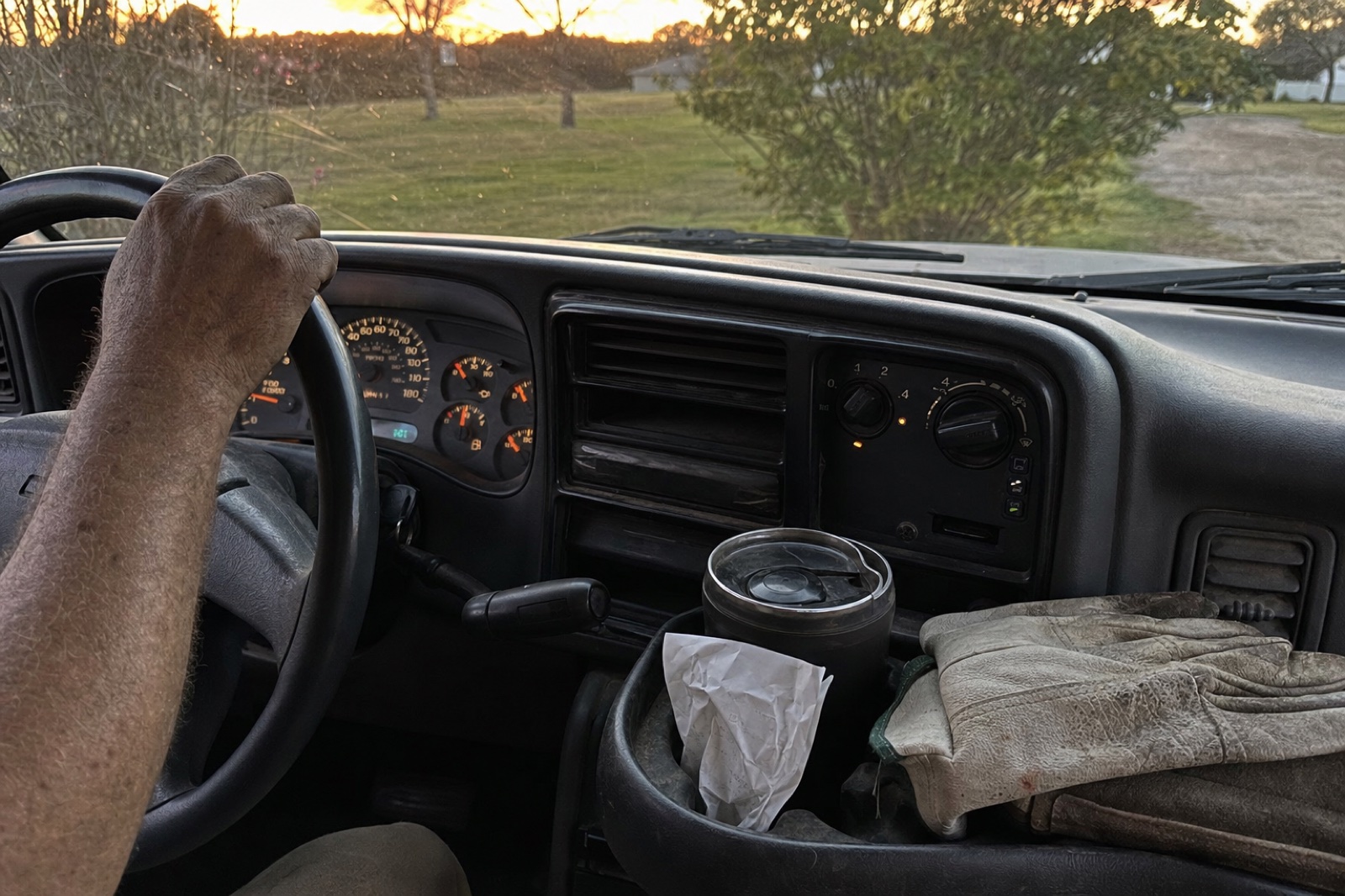
Or maybe you run a landscaping crew. You unloaded the truck at 9 p.m. tonight and left a Home Depot receipt curled up in the cupholder, and then forgot about it.
Did you know you can knock out your bookkeeping in about an hour a month? Keep reading for the simple way to do it.
I'm Doug, and I own Shoeboxed. I used to put off doing my own books until tax day in April, and then paid extra to my accountant for sorting everything out. I wrote this page for the owner I was back then and hopefully to help you.
"Over the last six months, 3,838 businesses sent Shoeboxed 642,320 receipts, and 293,088 of them arrived with no category on them."
Shoeboxed customer data, September 2026
What bookkeeping is, in plain words
You already get paid, and you already buy things. Bookkeeping means you write down each payment and each purchase, and you keep the receipt.
What counts as proof? IRS Publication 583 names five things: receipts, invoices, canceled checks, bank statements, and credit card slips.
Your accountant calls that list a ledger, and when she checks it against your bank statement, she reconciles it. When she says cash basis, she means you count money on the day it moves, not the day you sent the invoice.
Your tax preparer puts these numbers on Schedule C, the form you file with your own tax return when you work for yourself. Our list of bookkeeping terms explains the rest of the words in plain English.
The five records every small business has to keep
You already have everything that goes on these five lists, most of it in your truck or your inbox tonight.
- Money in. Write down every payment, including cash and app payments such as Zelle.
- Money out, with the receipt. Write down every purchase, give it a category such as Fuel or Supplies, and keep the receipt that proves it.
- Bank and card statements. Download them every month.
- Miles. Log every drive for work, with the date, the place, and the reason.
- Home office. If you use one room only for work, write down its square footage and what you pay for rent, utilities, and insurance.
Most people stall at the receipt list. Of those 3,838 businesses, 773 never put a category on a single receipt in six months. An uncategorized pile is normal, and you are not behind.
What a year of receipts looks like for a landscaping business, from 15,825 real receipts
I use landscapers as the example because their receipts look like everyone's: fuel, supplies, a phone bill, and lunch. Swap the mulch for paint or printer paper, and your year looks the same. I pulled the receipts of 14 landscaping, lawn, and tree businesses that use Shoeboxed, from September 2024 to September 2026. That came to 15,825 receipts, and I added them up as one group.
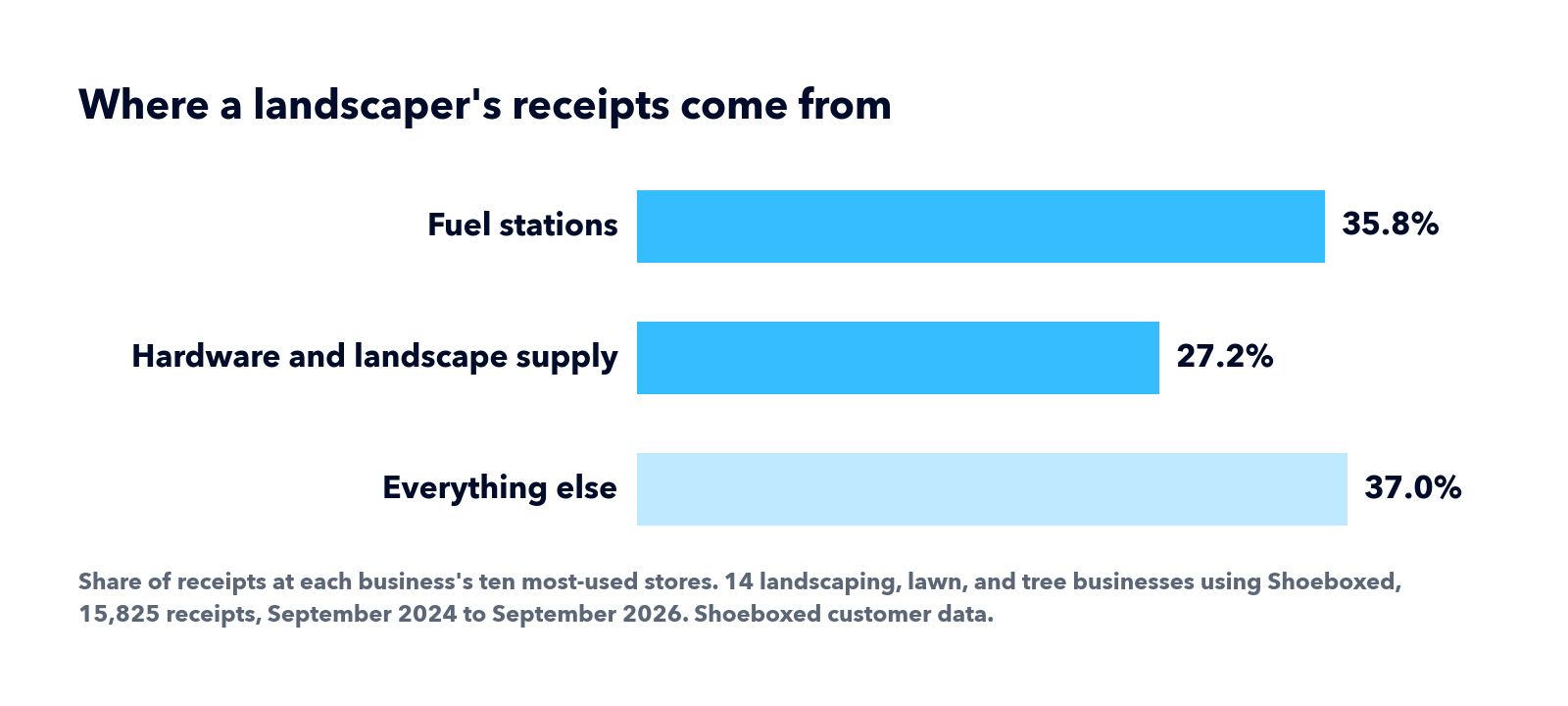
Most of the receipts come from gas stations, hardware stores, and auto parts counters. Home Depot shows up more than any other store, and Exxon, Lowe's, and Shell come next. At the ten stores each business used most, 35.8% of the receipts came from gas stations and 27.2% came from hardware and landscape supply stores.
The typical business sent us 22 receipts a month, or one a workday, and a few big crews sent most of the rest. More than a third of those receipts never got a category. And 85% of them arrived on paper in a Magic Envelope, the prepaid envelope we mail you. A landscaper does not stop to photograph a receipt in the middle of a job.
Each of those receipts needs a category and one place to keep it. If you run a lawn or landscaping business, our lawn care expense spreadsheet already has the categories you will use.
How to start your bookkeeping tomorrow, in three steps
1. Open a business checking account. Put every business dollar in it and keep your personal money out. Bring your driver's license and your Social Security number, and ask for a business checking account. If the IRS gave your business an EIN, bring that instead. An EIN is the free tax ID number for a business. Ask for a savings account at the same time, for the tax money you will set aside every month.
The IRS tells new owners to open the account first. When business money and grocery money share one account, a bookkeeper has to sort them apart later, and you pay for every hour of that sorting.
2. Pick one place where every receipt goes. Start with one folder for paper receipts, write Receipts on the tab, and skip the software for now. In Gmail, open a receipt email, tap the three dots, tap Label, and type Receipts. On your phone, open Photos, tap Albums, tap the plus sign, and name the new album Receipts.
If you do not want to build the folders, Shoeboxed does this step for you. You can get a receipt to us five ways:
- Snap a photo in the app.
- Drag it from your computer onto your Shoeboxed account in a web browser.
- Forward the email to the Shoeboxed address in your account settings.
- Turn on the free Gmail receipt sync, which finds receipts in your Gmail on its own.
- Mail the paper in a Magic Envelope. Our Magic Envelope page explains how to get one.
Our team in Durham, North Carolina opens every envelope by hand and scans the paper. Then our software reads the store, the date, the total, and the category. We keep every receipt image for as long as you have an account.
3. Put one hour on the calendar. Open your phone calendar, add an event called Books on the 10th of next month, and set it to repeat monthly. I do mine on the 10th because my bank statement lands a few days before, and I do it at the kitchen table with the bank app open.
If you already have a drawer full of old paper, that is a separate job for later, and our guide to organizing receipts for taxes covers it.
How to do one month of bookkeeping in one hour, step by step, in the free Shoeboxed spreadsheet
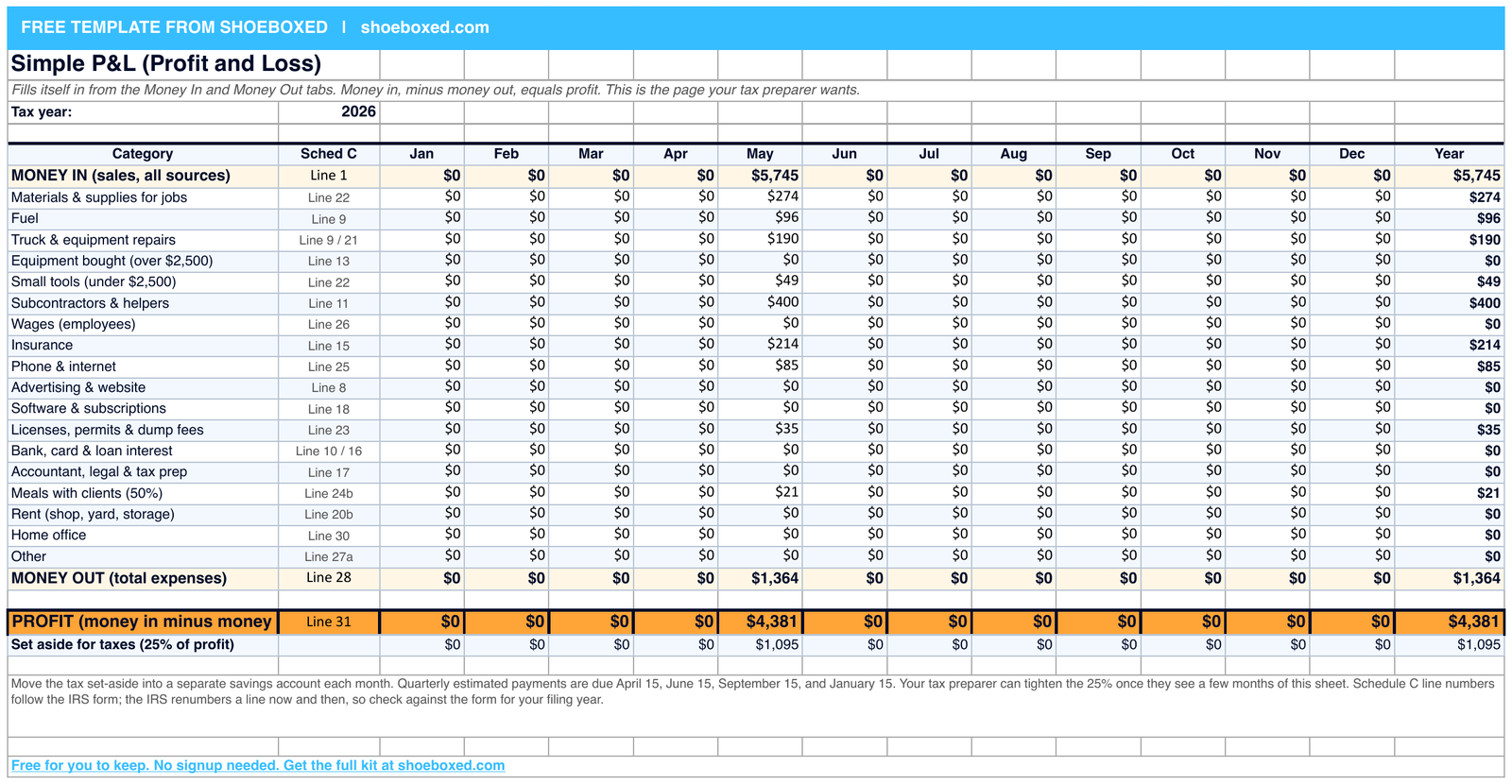
I worked one real month of that landscaper's books in the Shoeboxed Simple P&L Template. P&L stands for profit and loss, one page that shows money in, money out, and what is left.
I built the spreadsheet with three working tabs and two bonus tabs. You switch tabs along the bottom of the screen. You type into Money In and Money Out, and the Simple P&L tab fills itself in. The bonus tabs log your miles and your home office costs.
Grab the sheet first if you want to follow along. Click this link to the Shoeboxed Simple P&L Template, and Google asks you to make a copy in your own Google Drive. Click Make a copy, and the sheet is yours. You do not have to give us your email.
If you paint houses, your rows will say Sherwin-Williams, drop cloths, and ladder rental instead of mulch and diesel. If you see clients, they will say rent, software, and license renewal. Click any category cell and a list drops down. I built that list so all three of those businesses find their rows in it.
Step 1: Type every payment you got in May into the Money In tab
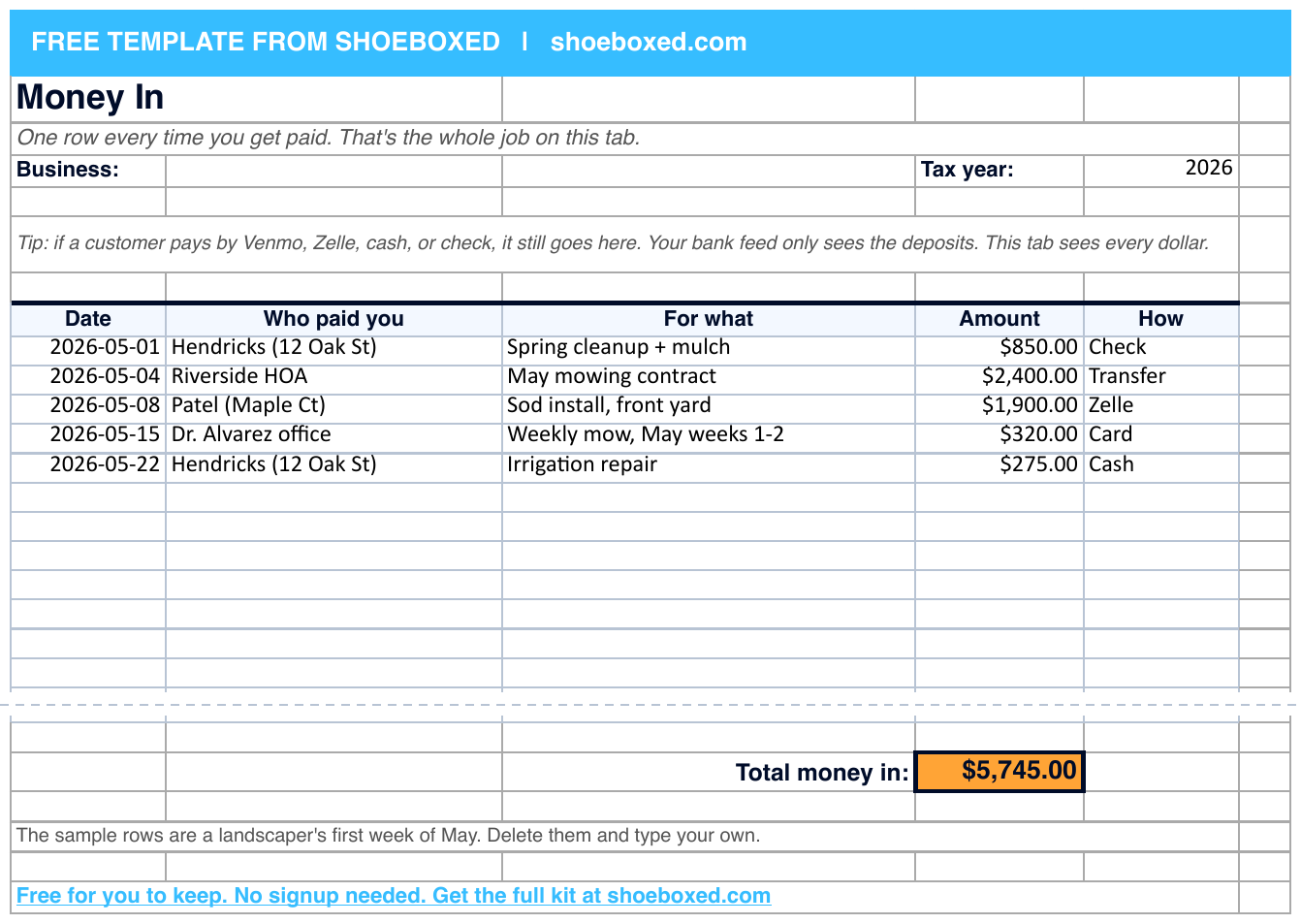
Click the first empty row under the header. Type May 1 in the Date column, Hendricks and the job in the second column, $850 in Amount, and Check in How. Then do the same for every payment in May. Say you got paid five times.
| Date | Who paid you, and for what | Amount | How |
|---|---|---|---|
| May 1 | Hendricks, spring cleanup and mulch | $850 | Check |
| May 4 | Riverside homeowners association, May mowing | $2,400 | Transfer |
| May 8 | Patel, sod install | $1,900 | Zelle |
| May 15 | Dr. Alvarez office, two weekly mows | $320 | Card |
| May 22 | Hendricks, irrigation repair | $275 | Cash |
| Total money in | $5,745 |
Hendricks paid the $275 in cash, and that cash never reached the bank, so the statement will not show it. This tab lists every payment.
Step 2: Type every receipt into the Money Out tab and give each one a category
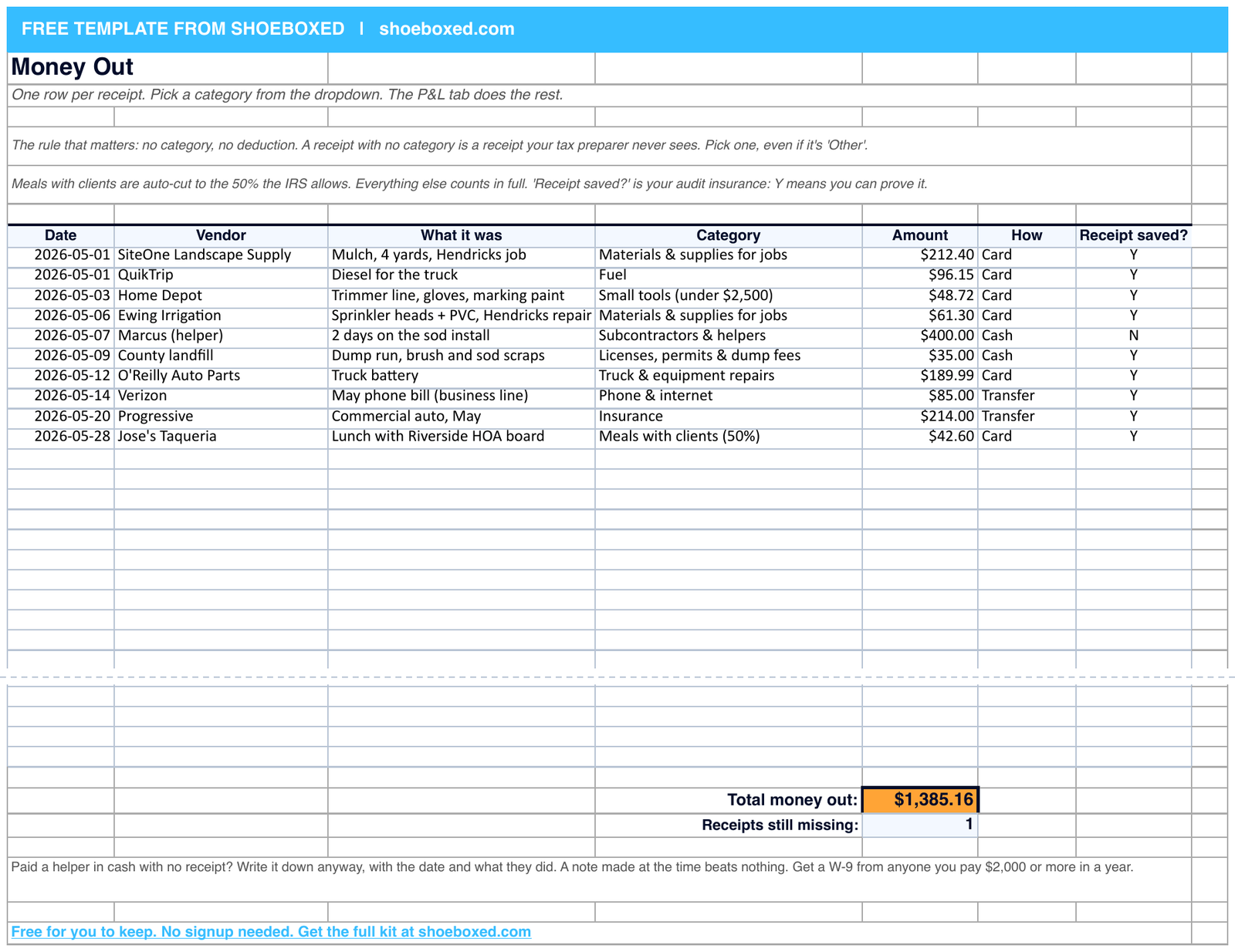
Grab the receipt pile. Open the Money Out tab, type the SiteOne mulch at $212.40, pick Materials & supplies for jobs from the category dropdown, and move to the next row.
| Date | Vendor | Category | Amount |
|---|---|---|---|
| May 1 | SiteOne Landscape Supply, mulch | Materials & supplies for jobs | $212.40 |
| May 1 | QuikTrip, diesel | Fuel | $96.15 |
| May 3 | Home Depot, trimmer line and gloves | Small tools under $2,500 | $48.72 |
| May 6 | Ewing Irrigation, sprinkler parts | Materials & supplies for jobs | $61.30 |
| May 7 | Marcus, two days on the sod install | Subcontractors & helpers | $400.00 |
| May 9 | County landfill, dump run | Licenses, permits & dump fees | $35.00 |
| May 12 | O'Reilly Auto Parts, truck battery | Truck & equipment repairs | $189.99 |
| May 14 | Verizon, business line | Phone & internet | $85.00 |
| May 20 | Progressive, commercial auto | Insurance | $214.00 |
| May 28 | Jose's Taqueria, lunch with the homeowners association board | Meals with clients, 50% | $42.60 |
| Total money out | $1,385.16 |
The sheet also shows three more columns to the right of these: What it was, How you paid, and Receipt saved. Mark Yes in that last column once you file the receipt in the one place you picked. The sheet leaves 200 blank rows under the sample, and the total adds every row.
The Small tools category stops at $2,500 because the IRS lets you write off an item that costs $2,500 or less in the year you buy it. A bigger purchase goes in the Equipment row.
Two rows need extra care, Marcus and the lunch. If you have no helper, skip the next two paragraphs.
Your helper Marcus took $400 in cash and handed you no paper. Put what he did in the What it was column the same day, and that note becomes your record. Before you pay him again, print a Form W-9 from the IRS site, one page where he writes his name and Social Security number. You will need it in January. Once you pay him $2,000 or more in a year, you send him a 1099, a short form that tells the IRS what you paid him. Your tax preparer files it from that W-9.
You also need to settle whether he is a contractor or an employee. The IRS calls him a contractor if he controls his own hours and how he does the job, and an employee if you control both. If you control both, call your tax preparer before his next payday and ask for payroll setup.
The other row is the $42.60 lunch. The IRS lets you count only half of a business meal as an expense, and the spreadsheet cuts it in half for you.
Step 3: Check both tabs against your bank statement
Log in to your bank's website, click Statements, and download May as a PDF. Print it, or open it on a laptop next to the sheet. Then match each line on the statement to a row in the Money In or Money Out tab by date and amount, and tick each matched line with a pen, or highlight it on the laptop.
Every card, check, and transfer line in this example matches, and the two cash rows never show up on the statement. But say your statement shows $63.40 at Tractor Supply and the sheet has no row for it. Add the row, and go find that receipt in your email, your Receipts album, or the truck. If it never turns up, read what to do about expenses without receipts. Say the sheet shows the $400 you paid Marcus and the statement shows nothing, because you paid cash. Leave the row alone, since your note is the record.
Do this while May is fresh, because in December you will not remember what the $63.40 was.
Step 4: Read your profit on the Simple P&L tab and set aside the tax money
| May | Amount |
|---|---|
| Money in | $5,745 |
| Money out | $1,385 |
| Minus half of the lunch, which the IRS does not allow | $21 |
| Money out after the lunch rule | $1,364 |
| Profit | $4,381 |
| Set aside for taxes, 25% of profit | $1,095 |
The sheet rounds to the dollar.
Open your bank app, tap Transfer, and move the $1,095 into the savings account from step 1. If you have not opened it yet, move the money the day you do. I use 25% as a starting number. Self-employment tax is the Social Security and Medicare tax you pay when no employer pays half of it, and it takes 15.3% on its own. Income tax takes the rest of that 25%. Your tax preparer can raise or lower it once they see a few months of this sheet.
No employer takes taxes out of your pay when you work for yourself, so the IRS wants a payment every quarter. The due dates are April 15, June 15, and September 15, 2026, and January 15, 2027. To pay, go to irs.gov/payments, choose Pay from your bank account, pick Estimated Tax as the reason, and pick tax year 2026.
If you missed a payment this year, pay the next one and tell your tax preparer. The penalty grows the longer you wait.
Marcus gave you no receipt, so nine of the ten rows have paper. File those nine in the one place you picked, and that closes the month.
That hour does the whole job for a one-person business. If you send invoices or run payroll, the monthly bookkeeping checklist adds those tasks and prints the whole routine on one page.
What bookkeeping costs when you do it yourself, buy software, or hire a bookkeeper
| Option | What it costs | Who it fits |
|---|---|---|
| Do it yourself | $0 and one hour a month | One person, one bank account, no payroll |
| Bookkeeping software | $38 a month and up, and you still type every row | Owners who send a lot of invoices |
| Hire a bookkeeper | $129 to $600 a month and up | Payroll, inventory, or more than one location |
I looked up four price lists on September 14 so you do not have to. QuickBooks Online Simple Start, the software most bookkeepers will ask you about, lists $38 a month. Cloud 9 Accounting lists plans from $149 to $499 a month, plus $100 to $250 for every 100 transactions. A transaction means one payment or one purchase. Heard, which serves therapists, charges $129 to $255 a month and $99 for every month of catch-up work. Visor starts at $600 a month. At 22 receipts a month I would start with the free sheet, and hire one of those firms when payroll or inventory shows up.
Search Google for bookkeeper, your trade, and your town. Ask the first one you call how many clients they have in your trade, because a landscaper's categories do not match a therapist's. A one-person business with about 22 receipts a month does not need a bookkeeper yet. Hire one when you skip the hour three months in a row.
I own Shoeboxed, and we handle one step of this: the receipts. We do not keep your books, and we do not sell bookkeeping software. You send us the paper, and we send it back read and categorized. You type that into your spreadsheet or hand it to your bookkeeper.
How to catch up if you are two years behind on your bookkeeping
The owner of a small accounting firm in Florida sends us catch-up boxes, one Shoeboxed account per client. She told me her clients show up one to three years behind, with the paper in a box, and she mails each box to us in a Magic Envelope. She pulls the old bank statements, enters each month's money in and money out, matches each month to the bank, and finishes one month before she starts the next, the same four steps every catch-up firm uses. The monthly bookkeeping checklist walks all four.
People quit at the receipt pile, because typing two years of receipts eats weeks of evenings, and I would not type them either. Mail the box instead, and count the receipts first so you pick the right plan. The Pro plan, $29 a month, scans 50 paper receipts a month, so a catch-up box needs the Paper Plus plan at $179 a month. That plan scans 300 paper receipts a month, so a box of 500 receipts takes two months. Once we scan the box, you can move to a smaller plan. The pricing page lists every plan with its limits. We mail you the envelope with the postage paid, you put the whole box in it, and you get back every receipt with a category on it. When a purchase has no receipt at all, read what to do about expenses without receipts.
How a home office and a mileage log cut the owner of TravelSports.com's taxable income by $5,860 a year
My friend Chris Pauly runs TravelSports.com from a spare room in his house and drives about 40 miles a week to rinks, fields, and meetings. He is a one-person business with a few contractors, the way many of you are. For years he claimed neither the home office nor the miles, because he had heard the home office was an audit red flag and he never wrote the miles down.
I walked him through both, and I wrote up the numbers in the TravelSports case study. Here is what the two deductions come to for him in a year.
| Chris's deduction | Off his taxable income | Cash he keeps at a 24% rate |
|---|---|---|
| Home office | about $4,400 | about $1,060 |
| Miles, 2,000 a year | about $1,450 | about $350 |
| Both | about $5,860 | about $1,400 |
Both deductions run on the same records this page already told you to keep. The IRS wants proof of what you spent, and it wants you to keep that proof for three years after you file. Paper fades, so take a photo or mail the paper in, and keep the digital copy.
The home office
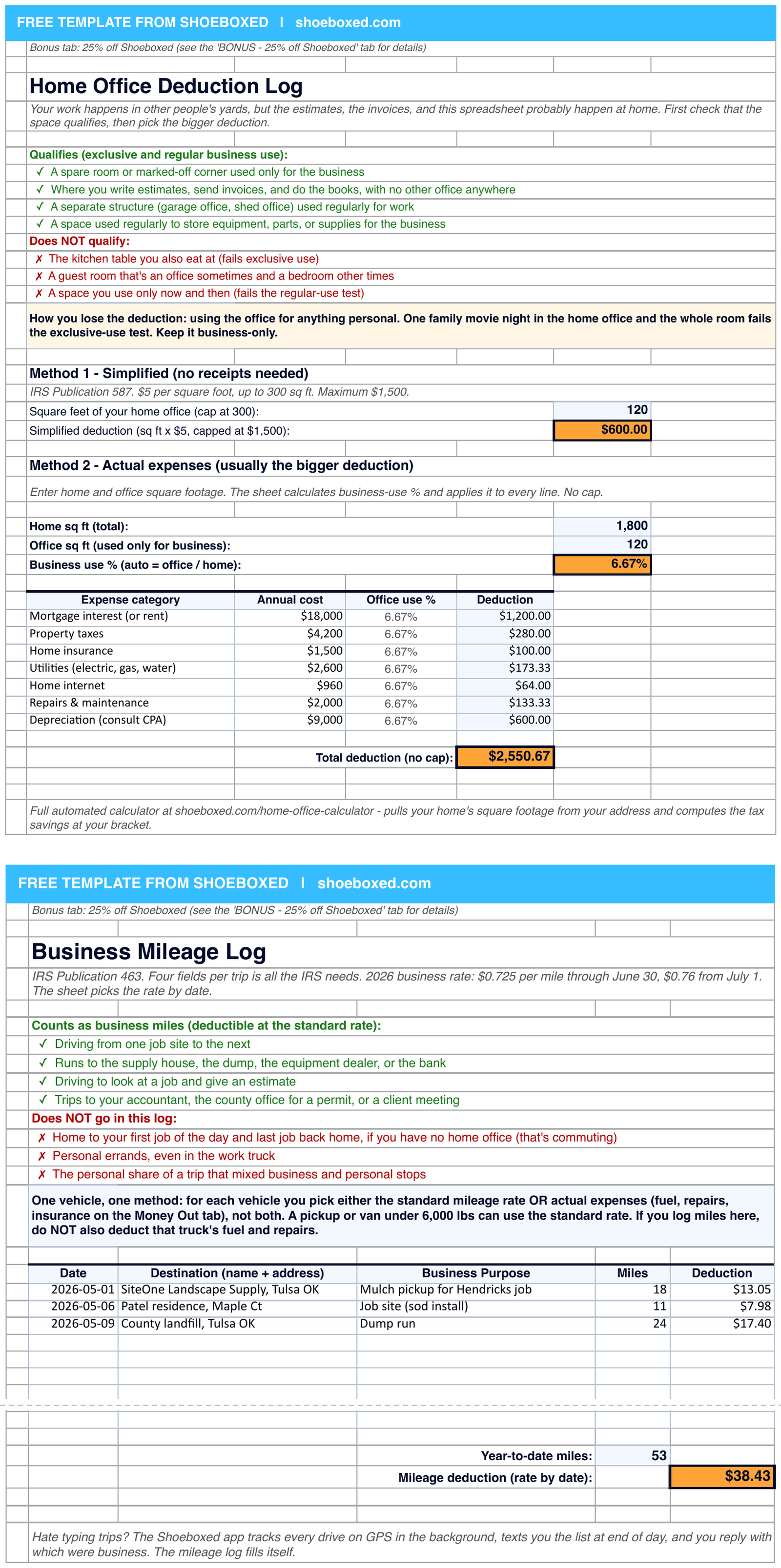
The IRS gives you two ways to figure the home office deduction. The simplified method gives you $5 per square foot, up to 300 square feet. The actual method starts with your real rent or mortgage interest, utilities, and insurance for the year. If the office takes up 10% of your home, you deduct 10% of those bills. Pick whichever method gives you the bigger number. Say your office is 150 square feet in a 1,500-square-foot home, and your rent, utilities, and insurance came to $21,600 for the year.
| Home office, one year | Simplified method | Actual method |
|---|---|---|
| How the IRS figures it | 150 square feet × $5 | The office is 10% of the home |
| Rent, utilities, and insurance for the year | not counted | $21,600 × 10% |
| Deduction | $750 | $2,160 |
IRS Publication 587 sets two tests for the room. You use it only for work, and you use it on a regular basis. If you do your invoices, your scheduling, and your books there and have no other office, the room counts as your main place of business. Open our home office calculator and type your address, and it pulls your home's square footage and does the math for you. Chris's $4,400 came out of that calculator.
The miles
The IRS lets you deduct 72.5 cents for every business mile you drove through June 30, 2026, and 76 cents a mile from July 1. You can use that rate for a car, a pickup, or a van. You cannot use it for a truck over 6,000 pounds. For that truck, IRS Publication 463 has you deduct the real fuel and repair bills instead, and the Money Out tab already has rows for both. The sticker inside the driver's door shows the weight.
You can count every supply run, every drive to see a client, and every drive to look at a job. Chris counts the drive to his developer and the drive to the rink. The IRS wants a log for every trip, and Chris never kept one until the app kept it for him. Download the Shoeboxed app from the App Store or Google Play, tap the Mileage tab, and tap Set Up Mileage Tracking. The app asks for your name, your phone number, and location permission. Then it tracks your drives on GPS and texts you a list each day. You reply with which trips were work, and the app builds the log from your replies.
The difference between a bookkeeper and an accountant, and which one you need
A bookkeeper writes down what happened. An accountant tells you what it means and files your return. I do the first job myself, and I pay my CPA, a certified public accountant, for the second. If you work for yourself with no employees, that split works for you too.
| A bookkeeper | An accountant or CPA | |
|---|---|---|
| Does | Records every dollar in and out, categorizes it, and matches the books to the bank | Reads the books, plans your taxes, and files the return |
| How often | Weekly or monthly | Quarterly and at tax time |
| You need one when | You have payroll, inventory, or no time | You file a business return |
Only three kinds of people can represent you in front of the IRS: a CPA, an attorney, and an enrolled agent, which is a tax preparer the IRS licenses. A bookkeeper keeps the records and does not argue your case with the tax man.
The one habit that keeps your bookkeeping at one hour a month, and the $9 tool that makes it easy
Do the three setup steps tomorrow, and the month after that takes an hour. Receipts get away from you. Photograph them in the app, forward the emails, or drop the paper in a Magic Envelope, and you will never spend an April weekend on them the way I did.
Shoeboxed starts at $9 a month for the Starter plan, and I give every new customer 30 days to get a full refund if it is not for them. Start a Shoeboxed account →
If you want to start on your phone instead, the app gives you 7 days free before it charges anything:


If you are a bookkeeper or an accountant reading this, we built a page for you.
Answers to six common bookkeeping questions from small business owners
Can I do my own bookkeeping for my small business?
Yes, if you are one person with one business bank account and no payroll, you can do your own books. The typical landscaping business in our data sends us about 22 receipts a month, and one hour closes the month. Hand it off when you add payroll or carry inventory.
How much should small business bookkeeping cost?
It depends on who you hire. Cloud 9 Accounting, Heard, and Visor list $129 to $600 a month and up, and software such as QuickBooks starts at $38 a month. Doing it yourself costs one hour a month and a free spreadsheet.
What are the three golden rules of bookkeeping?
An accounting textbook gives three rules about debits and credits. You can skip them if you run a one-person business and count money when it moves, because debits and credits are the two columns a trained bookkeeper writes every dollar in. Write down every dollar in and every dollar out, and then make the books agree with the bank.
Can ChatGPT do my bookkeeping?
ChatGPT can help you name a category or explain a term. It cannot see your bank account, your receipts, or your statements, so it cannot produce the record the IRS asks for. The IRS wants the receipt itself, per Publication 583.
How do beginners learn bookkeeping?
Run one real month in the free spreadsheet above. Your own rows teach you more than a class. Then read our bookkeeping terms for the words your accountant uses. Our page on the types of bookkeeping explains single-entry and double-entry and tells you which one fits a one-person business.
Is AI replacing bookkeepers?
Software took over part of the job. The Bureau of Labor Statistics projects 6% fewer bookkeeping clerk jobs from 2025 to 2035. Software does more of the typing every year, and a person still decides what each number means.
Three things to read next
- The monthly bookkeeping checklist prints your whole monthly routine on one page.
- Our guide to organizing receipts for taxes handles the paper already in the drawer.
- The home office calculator does the home office math from your address.
Who wrote this page
I'm Doug. I bought Shoeboxed in late 2025 with a Small Business Administration loan and 5% down, so I run a small business and pay the same taxes you do. Shoeboxed started scanning receipts in 2007, and I still do my own books at the kitchen table on the 10th of the month.
Sources for every number on this page
- IRS Publication 583: Starting a Business and Keeping Records
- IRS: How long should I keep records?
- IRS Publication 463: Travel, Gift, and Car Expenses (the 50% meal rule and the 6,000-pound truck rule)
- Bureau of Labor Statistics: Bookkeeping, Accounting, and Auditing Clerks
- IRS: Tangible property regulations (the $2,500 de minimis safe harbor)
- IRS Publication 587: Business Use of Your Home
- IRS: Estimated taxes, IRS: Payments, IRS: Self-employment tax, and Form 1040-ES (2026)
- IRS Announcement 2026-11: revised standard mileage rates effective July 1, 2026
- IRS: About Form W-9, IRS: Independent contractor or employee, and 26 U.S. Code § 6041 (the $2,000 1099 threshold for 2026)
- IRS: Understanding tax return preparer credentials
- Price lists: QuickBooks Online, Cloud 9 Accounting, Heard, Visor, and Shoeboxed, retrieved September 14, 2026
- Shoeboxed case study: TravelSports.com, Chris Pauly's home office and mileage figures
- Shoeboxed customer data: 642,320 receipts from 3,838 accounts, March 18 to September 14, 2026; 15,825 receipts from 14 landscaping, lawn, and tree businesses, September 2024 to September 2026. We report totals only. The $750 and $2,160 home office figures are our own example.




 4.4 / 5 on