Income and Expense Worksheet: Free for 2026
Free income and expense worksheet for small business — Google Sheets, Excel, PDF, CSV. Two tabs (income + expenses), Schedule C–shaped, built from 3.4M real receipts.

Income and Expense Worksheet: Free for 2026
By Doug
Last updated: May 2026
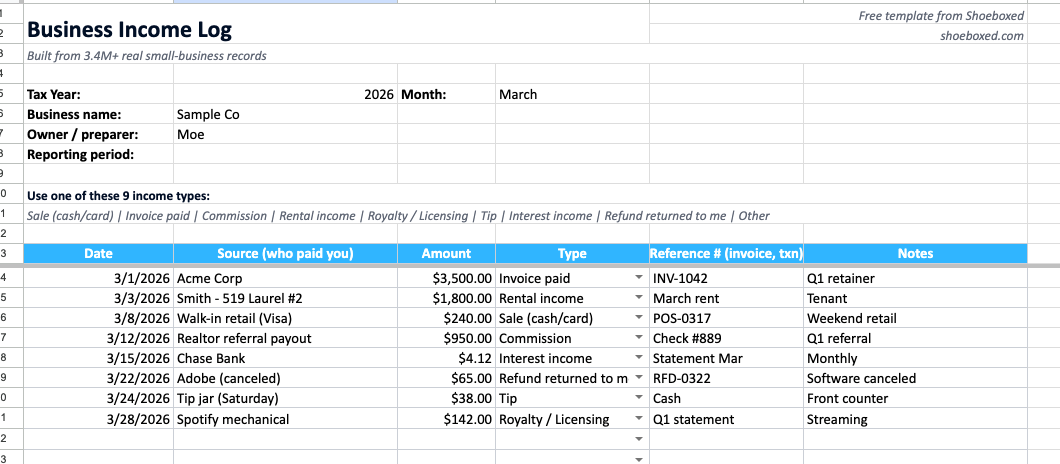
The free Shoeboxed Income and Expense Worksheet, Income tab open in Google Sheets. Source, amount, type, and reference number for every entry. Eight categories in this sample, all from the 9-item dropdown.
When you're ready for a monthly rhythm, our printable monthly bookkeeping checklist lists the 8 tasks in order.
And if you're wondering which kind of bookkeeping you need at all, the types of bookkeeping guide answers it in 30 seconds.
Doug here, Shoeboxed owner. I've been lucky enough to jump in and take over as CEO of five different companies. One of the very first things I do as CEO, actually the very first thing, is get a really good handle on both income and expenses.
Why? Because a company has to make money to exist, or at least not run out of cash while you work your magic on getting it growing and profitable again.
There's no better way to really understand a business than by watching every incoming and outgoing income and expense for the first few months.
For income, I want to see exactly where the money's coming in, how fast it comes in, and if we have any delinquencies paying. I watch the bank account and the underlying revenue sources on a daily basis to get a real sense of where money is coming in.
Same thing for expenses, I want to see EVERY expense that goes out, no matter how small. For every single one I ask, "why do we need this?"
Quick story: when I evaluated buying Shoeboxed, I watched every single expense come in for three months to make sure I understood exactly where and why all expenses were coming from. Three months is enough to catch quarterly bills and random one-off charges. I also made dang sure I understood how much annual vs. monthly billing, and how that billing tied to actual cash flow.
That's why we built this for you. A free Income and Expense Worksheet, with both tabs in one file. It's aimed at Schedule C filers (self-employed, contractors, SMB owners, etc.), and we used actual Shoeboxed data to get real insight.
Here 's how to grab your free income and expense sheet:
- Copy the worksheet into your Drive (or grab the Excel, PDF, or CSV).
- Fill the Expenses tab row by row from your receipt pile.
- Fill the Income tab row by row from your invoices, deposits, and sales.
- Total at month-end. Keep the source documents for at least 3 years.
Get the free Income and Expense Worksheet
All four formats share the same structure and the same dropdowns. Pick the one that fits how you work.
- Google Sheets (one-click copy). Hit the link, click Make a copy , your copy lands in your Drive. Auto-totals as you type. Share with your accountant in two clicks.
- Excel (.xlsx). Same tabs, same dropdowns, same formulas. Opens in Excel 2010 and later.
- PDF. Print-ready, two pages (Income on page 1, Expenses on page 2). Fill in by hand.
- CSV. Raw rows for QuickBooks, Xero, or your own spreadsheet.
The worksheet belongs to you the moment you click. No email, no signup, no trial running in the background. We built it because every free income-and-expense template we found broke one of two ways. Some shipped without income tracking at all. Others smashed both sides into a single ledger that gets muddy at tax time.
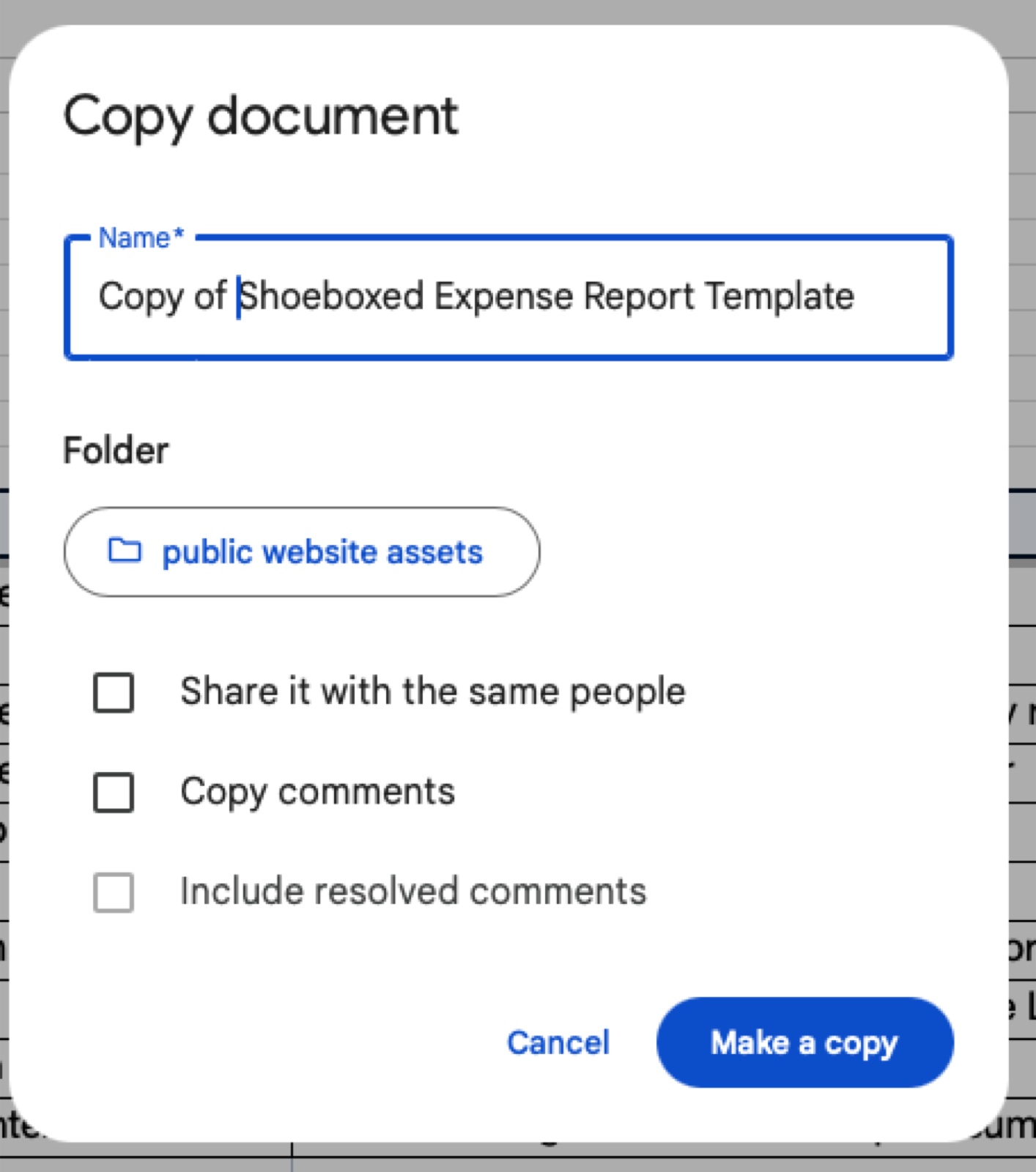 One click, one Make a copy, the worksheet lives in your Drive.
The income side most small businesses don't track
Here's what surprised me when I went looking through our Shoeboxed data.
Across 12,597 small businesses with at least one receipt in Shoeboxed since January 2024, only 207 accounts — 1.6% — have categorized a single receipt as income-side. That's invoices, sales, commissions, deposits, rental income, anything money-in.
Almost everyone tracks expenses obsessively. Almost nobody logs income.
The usual reason: "the bank statement is my income log." Except the bank statement doesn't tell you who owes you what. It doesn't show which client paid on time and which one is 30 days late. It doesn't break out which revenue source is growing and which is dying. It's a deposit list, not an income log.
The second thing the data surfaced: the 1.6% who DO log income can't agree on what to call it. 214 different category labels across 207 accounts. Rent shows up as Rent , Rental Income , Rent Income , Office Rent , Rent/Lease , and Rent / Mortgage — six different labels for the same line. Deposits show up as Deposit , Cash Deposit , Bank Deposit , Security Deposit , and DEPOSIT RECEIPT — five labels for the same line. Sales splits into Sales , Ticket Sales , Sales Hard Materials , and Team - Sales. Commission shows up as Commission , subcontractor invoice , and NM commission worksheet detail.
This is the same pattern as the Excel sister article's COGS spelled four ways. Free-text fields drift. Pre-defined dropdowns hold the line. The Income tab in this worksheet ships with 9 fixed types and a Data Validation dropdown on the Type column. You pick from the list. Your records stay clean.
Want to track business expenses in Excel with the tax line built in? Here is the template.
The 9 income types and 15 expense categories real small businesses use
Income tab — 9 types
I pulled the top income-side categories used in our data, then collapsed them into a clean 9-item list:
- Sale (cash/card) — point-of-sale revenue
- Invoice paid — service businesses, freelancers, consultants
- Commission — real estate, sales reps, affiliate income
- Rental income — 78 of our 207 income-tracking accounts are landlords, so this earned its own line
- Royalty / Licensing — IP income, music, books, software licenses
- Tip — restaurant, salon, service industry
- Interest income — bank interest, lender returns
- Refund returned to me — vendor refunds, returned overpayments
- Other — for the edge case
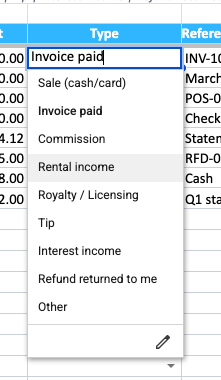 The 9 income types live as a Data Validation dropdown on the Type column. Pick one, no free-typing, no "214 different labels for income" drift.
Expenses tab — 15 categories
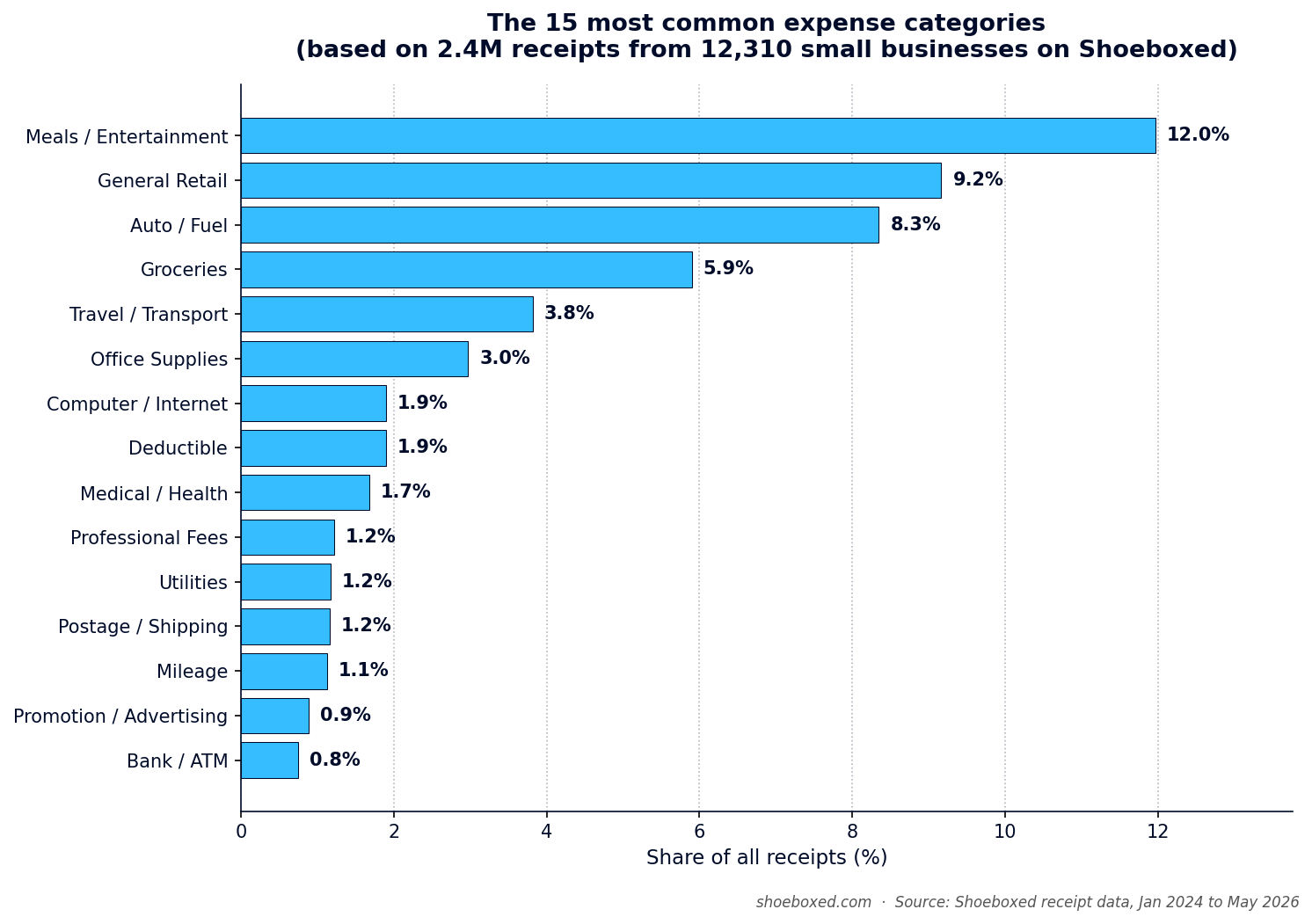
These are the same 15 we shipped in the Excel and Sheets sister templates, drawn from analysis of 3.4 million receipts across 12,310+ small businesses:
| Rank | Category | Share of receipts |
|---|---|---|
| 1 | Meals / Entertainment | 12.0% |
| 2 | General Retail | 9.2% |
| 3 | Auto / Fuel | 8.3% |
| 4 | Groceries (personal, usually not deductible) | 5.9% |
| 5 | Travel / Transport | 3.8% |
| 6 | Office Supplies | 3.0% |
| 7 | Computer / Internet | 1.9% |
| 8 | Medical / Health | 1.7% |
| 9 | Professional Fees | 1.2% |
| 10 | Utilities | 1.2% |
| 11 | Postage / Shipping | 1.2% |
| 12 | Mileage | 1.1% |
| 13 | Promotion / Advertising | 0.9% |
| 14 | Bank / ATM fees | 0.8% |
| 15 | Insurance | 0.4% |
Here's the harder number from the same pull: 38.1% of those 3.4 million receipts have no category assigned at all. Almost four in ten get filed without a tag. The fix is the same as on the income side — pre-defined dropdowns instead of free text. Both tabs in this worksheet validate input. You pick from the list, your records stay readable, your accountant doesn't email you in April asking what Meals 4 means.
Why two tabs beat one column
Most free income-and-expense templates use a single ledger with a +/− column or a "Type" field where each row is either income or expense. We tried that shape internally and threw it out.
Schedule C splits income and expenses into two separate parts of the tax form. Part I covers gross income, returns, and other income. Part II covers expenses. Each part asks for different fields, validates differently, and needs different documentation. When you smash both into one column, you lose:
- Clean totals. Two tabs means total income and total expenses are each one cell. Net is one subtraction. On a single-column ledger you need a pivot or a sumif to separate them.
- Separate sharing. You can share the Income tab view-only with a sales VA without exposing your expense detail. Or share Expenses with your bookkeeper without showing them what you billed. Tab-level permissions in Google Sheets make this trivial.
- Right documentation per side. An income entry needs a source — who paid you, what the invoice number was. An expense entry needs a business purpose — why this expense counts as business. Each tab asks for the right field.
That's why this worksheet uses two tabs.
How to use the worksheet
Here's the workflow most of our customers settle into.
Step 1: Copy the worksheet into your Drive
Click the Google Sheets link above. Google opens a Copy document prompt. Click Make a copy.
Rename the file with a year that sorts: Income & Expenses 2026, not Income & Expenses. You'll thank yourself in three years.
Step 2: Start with the Expenses tab
Most folks already have a pile of receipts, including the carbon copies from a receipt book. Start there. Pull everything together — paper from the kitchen counter, email confirmations from Uber and Amazon, phone photos in your camera roll, the parking-garage stub still folded in your jacket pocket from that February meeting.
Don't sort yet. Gather first. Then fill one row per receipt: date, vendor, amount including tax, category, business purpose, notes. (If you already use Shoeboxed, you can export this same shape as a report in one click.)
Step 3: Then fill the Income tab
Even if you only have one invoice or one deposit, log it. The Income tab takes Date, Source (who paid you), Amount, Type (pick from the 9-item dropdown), Reference # (invoice number, transaction ID), and Notes.
If you're a service business: one row per invoice paid. If you're a retailer: one row per day's sales total. If you're a landlord: one row per month per unit.
Step 4: Pick from the dropdowns
Don't free-type. The dropdowns protect you from the 214-labels-for-Income trap. Consistency makes your year-end totals usable.
Step 5: Save the source document
For expenses, save the receipt (photo, scan, or paper). For income, save the invoice PDF, deposit slip, or payment confirmation. The worksheet works as the index. The source document proves the transaction to an auditor.
Step 6: Total at month-end and share
Each tab auto-totals at the bottom. Click Share in the top right, paste your accountant's email, set them to Viewer. They watch the records build all year and ask questions in March instead of April.
The whole loop runs in less than 15 minutes a month for most one-person businesses.
The 4 things every entry needs (per the IRS)
The IRS spells out what counts as adequate records. Different rules for expenses vs income, but both come down to four fields per entry.
" You should be able to prove the elements of an expense or use of property… Generally, you must have documentary evidence, such as receipts, canceled checks, or bills, to support your expenses."
Source: IRS Publication 463.
Expense entry needs:
- Date — the day you paid
- Amount — what you paid, including sales tax
- Vendor — who you paid
- Business purpose — why this expense counts as business (this is the one auditors care about)
Income entry needs (perIRS Publication 583, "Starting a Business and Keeping Records"):
- Date — the day you received payment
- Amount — gross, before any fees
- Source — who paid you
- Type or reference — Sale, Invoice #1042, Commission Q1, etc.
The worksheet ships with a column for each on both tabs. " Lunch with prospect to discuss Q3 contract" beats a blank business-purpose field every time. " Invoice #1042, Acme Corp, March quarterly retainer" beats a blank source field every time.
Real money math: tracking both sides in 2026
Walk through the numbers with me.
Expense side
100 business receipts a year averaging $50 each is $5,000 in deductions. At a 24% federal bracket (typical for self-employed earning $80K to $160K), that $5,000 cuts your tax bill by $1,200.
Apply the 38% of receipts that arrive with no category from our data. That means $1,900 of your $5,000 in deductions sits in a what was this? pile at tax time. Your accountant marks those entries "Other" or drops them altogether. You paid an extra $456 in tax on receipts you already had.
Income side
The income side pays you back differently — it makes your quarterly estimated taxes accurate.
The IRS expects Schedule C filers to pay estimated taxes four times a year. The IRS underpayment penalty runs roughly 7–8% per year on the shortfall. Most self-employed folks either underpay (and owe the penalty) or overpay (and hand the IRS a free loan). Both options cost real money.
A weekly income log tells you how much you've earned through any given quarter. Multiply by your effective rate, set that amount aside in savings, and write the quarterly check on time. You pay no penalty and the IRS gets no free loan.
Scale gets bigger fast. According to IRS Statistics of Income data on sole proprietorships, Schedule C filers claim $104.2 billion in vehicle and mileage deductions every year and $11.15 billion in home office deductions. Those are the two buckets with the most upside from clean records.
Don't forget mileage. It's still the biggest gap.
The same data pull surfaces a gap that costs Schedule C filers more than any other line. Auto/Fuel ranks #3 at 8.3% of receipts. Mileage ranks #12 at 1.1%.
People log fuel receipts and forget to log the miles those receipts represent. The IRS lets you claim either actual auto expenses (fuel plus maintenance plus depreciation) or the standard mileage rate. For most small business drivers, the mileage rate wins by a wide margin.
The IRS pays 72.5 cents per business mile in 2026. The average self-employed driver covers 12,000 business miles a year. That earns you an $8,700 deduction , or roughly $2,088 back at a 24% bracket. (Filing in Canada? Use the 2026 CRA mileage rate instead — different numbers, same idea.)
We built a free IRS mileage log template using the same approach as this worksheet. Excel, Sheets, and PDF, all free, no email. Use both together for a complete Schedule C kit.
Run an owner-operator trucking business? The owner-operator version of this template has a dedicated Per-Diem Log tab that auto-calculates the $80/day transportation industry meal allowance — a deduction worth roughly $17,920/year that most truckers leave on the table.
What 20 years of receipts taught us about both sides
Shoeboxed launched in 2007. We've processed receipts for almost twenty years and we see what real small-business money flow looks like at scale every day.
The 42-pound shipment in the photo at the top of this post came from one customer, in one mailing. That pile became digital records before any of those expenses could survive an IRS review.
Here's what happens after a customer mails receipts to us. The one-tap experience in the app runs on far more human hands than people realize.
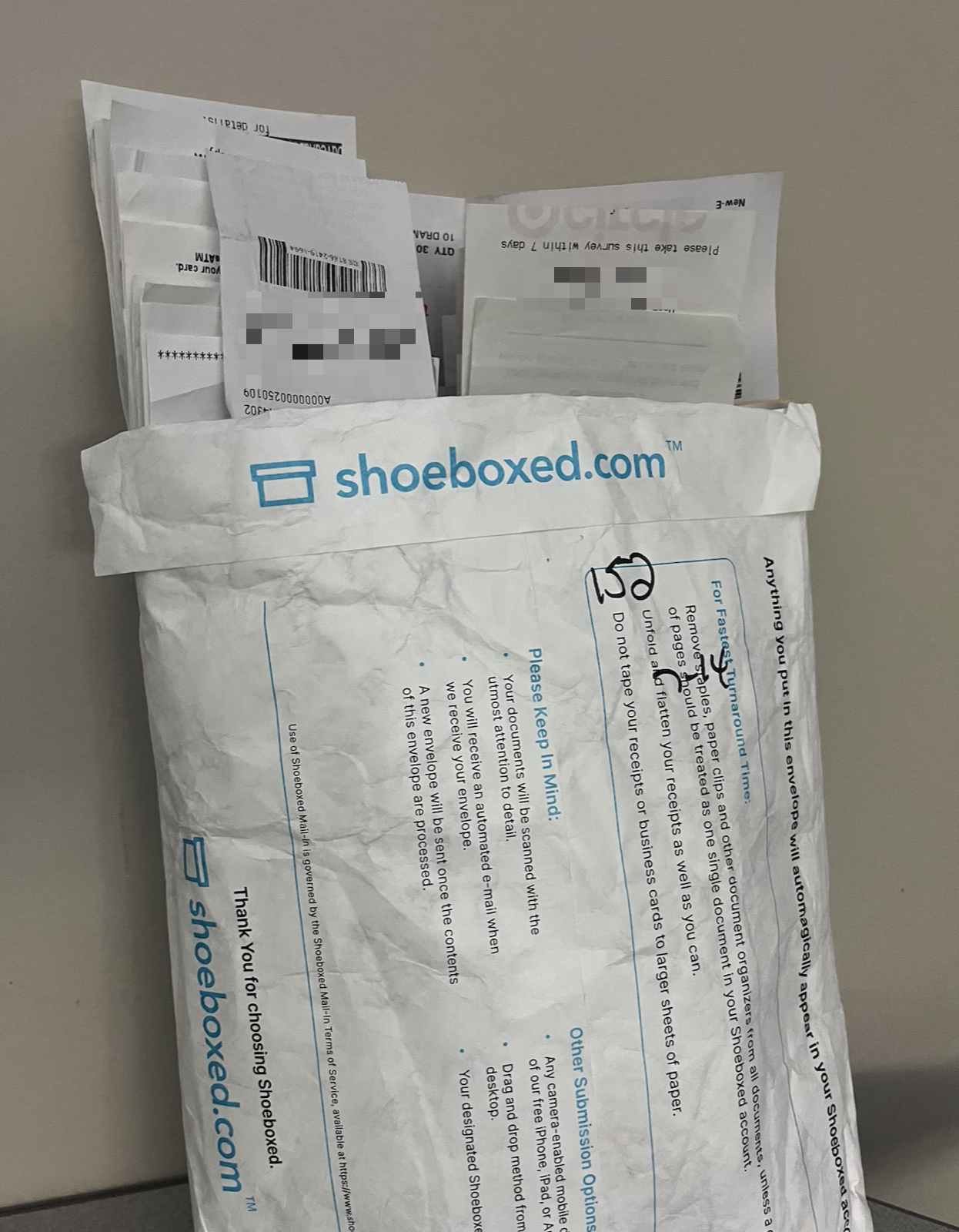 A Magic Envelope arrives. This one held 152 receipts. The customer wrote the count on the outside, which we appreciate.
 Each customer 's envelope goes into a sorted slot. We process them one at a time so receipts never get mixed across accounts.
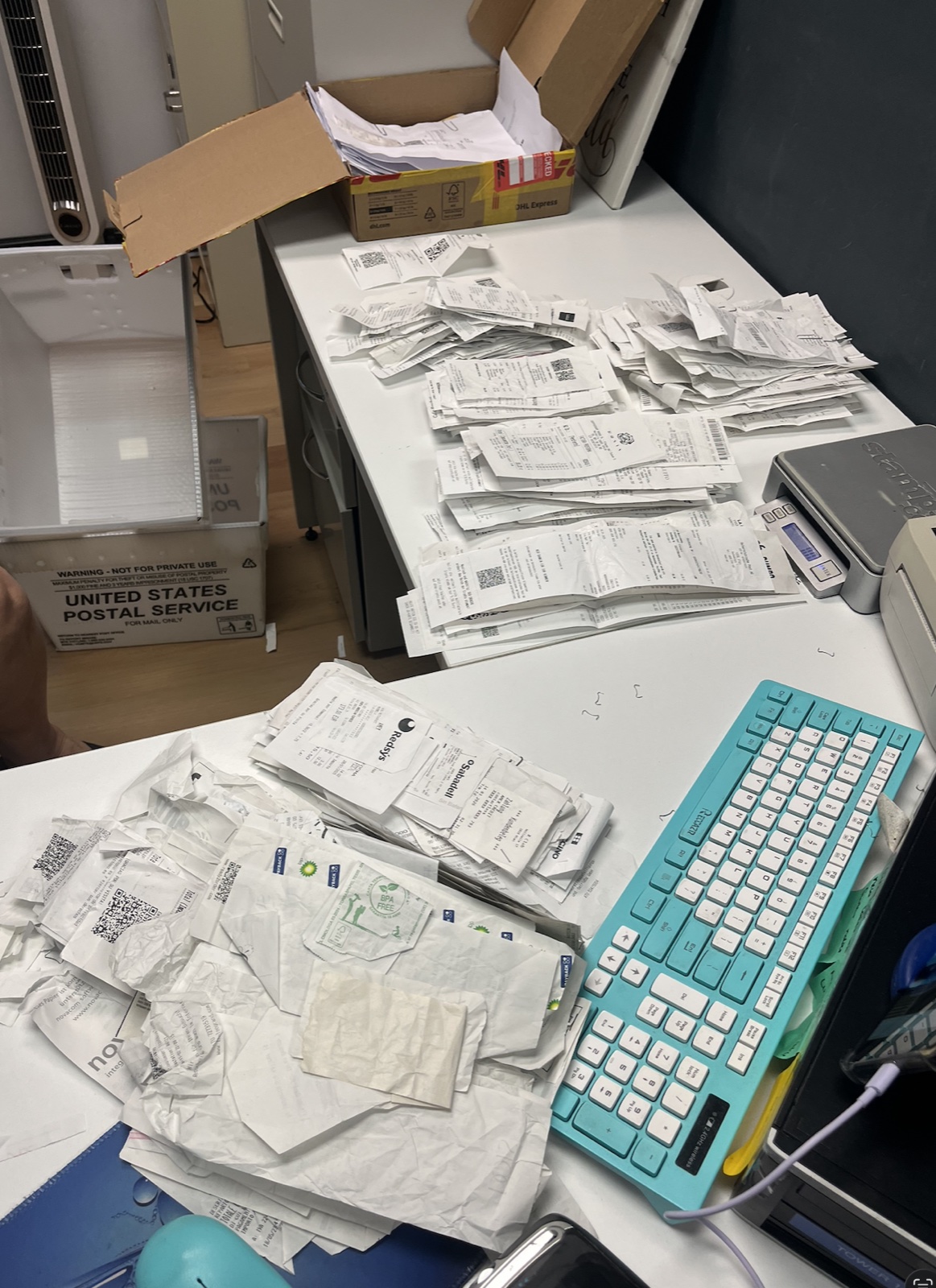 A customer 's envelope, opened. Every receipt gets sorted, prepped, and scanned by hand by someone in our office before it touches the OCR.
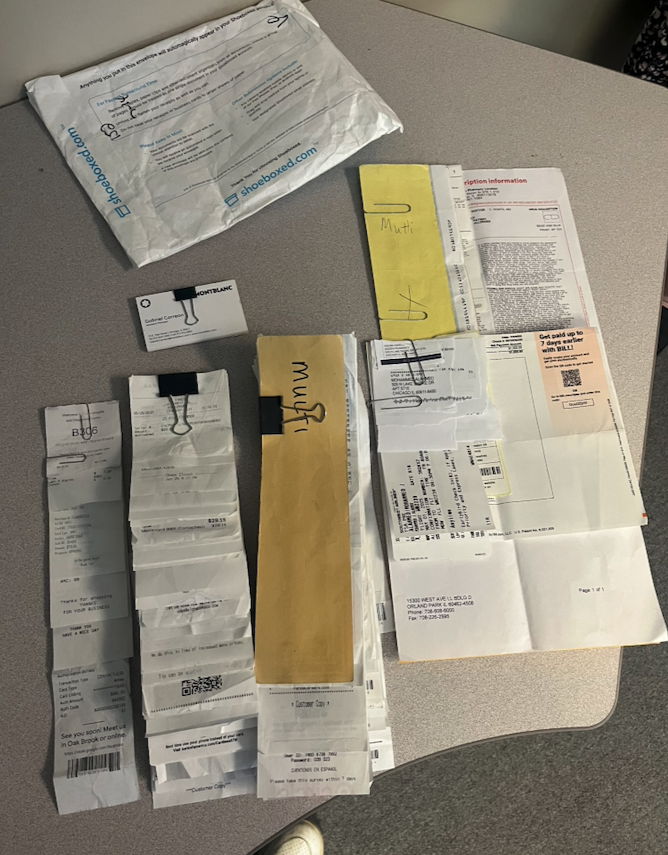 One customer, one mailing. Restaurant tabs, parking stubs, hardware store receipts, and yellow Magic Envelopes — laid out for scanning.
 Receipts feed through the scanner one at a time.
Here's what's different for income vs expenses in our customer data. Expenses arrive on paper — receipts in a Magic Envelope, photos in the app, email confirmations forwarded in. Income arrives electronic — Stripe deposits, Zelle transfers, invoices paid through QuickBooks, ACH from clients. Two doors lead the money in, two workflows handle each side, and the worksheet keeps the records on two separate tabs.
Audit-proofing: 3 small habits that hold up under review
The IRS doesn't audit randomly. They flag returns where the records look thin. Three habits cover most of what holds up under review.
Habit 1: Photograph thermal receipts the day you get them
The thin paper receipts from CVS, gas stations, and restaurants fade in 6 to 12 months. By tax time the next year, half read as blank slips. Snap a photo the same day, before the ink walks off.
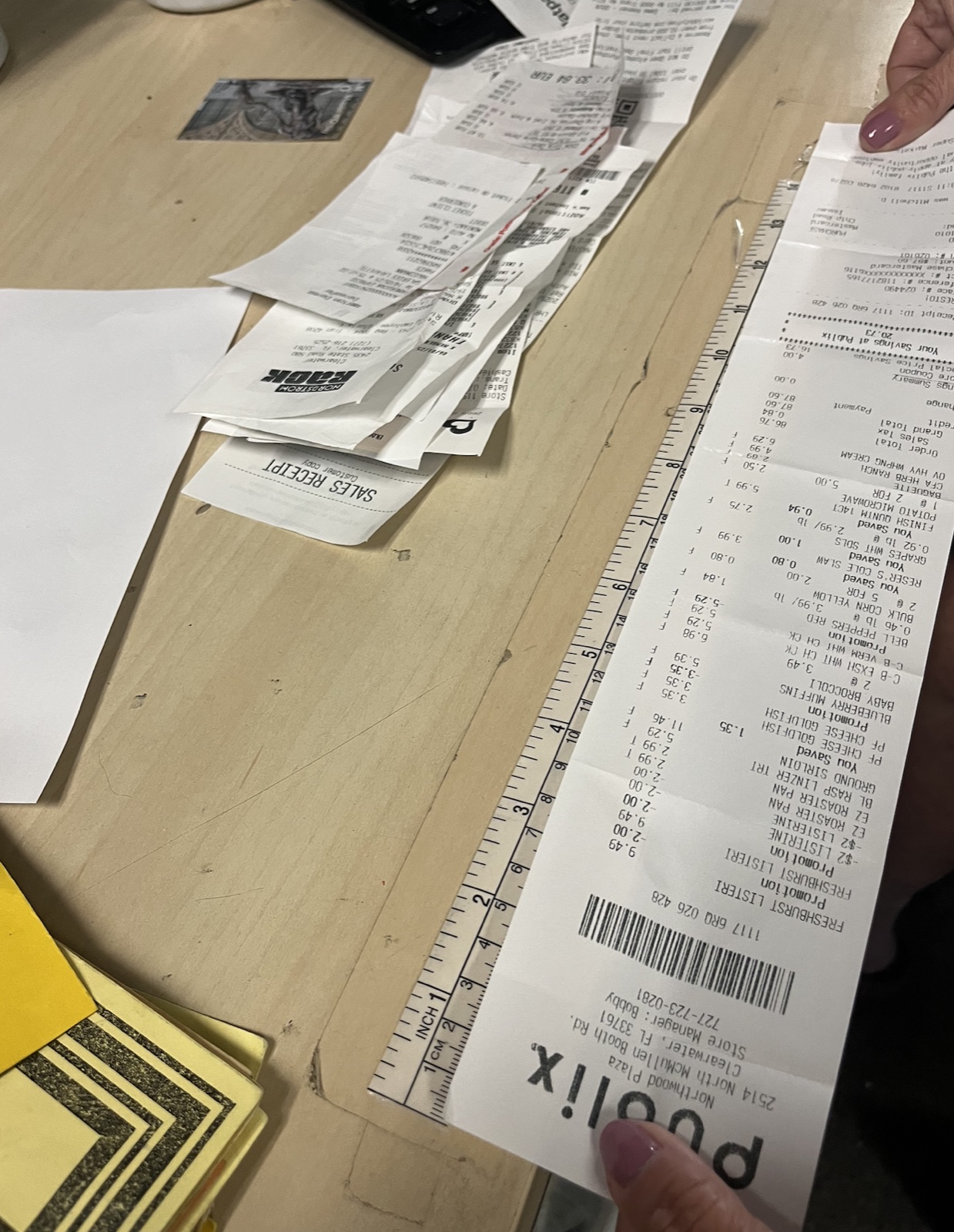 A real customer sent us this receipt, photographed against a 12-inch ruler. The whole thing prints on thermal paper from one store run. A phone photo saves you when the ink fades 12 months later.
Habit 2: Categorize as you go, not at year-end
Remember that 38% of receipts arrive with no category? Almost all of those came from last-minute filers trying to remember in March what a $42 charge in July covered. Two minutes at point of purchase beats two hours of forensics in April.
Habit 3: Log income the week you receive it
You will not remember which client paid you in week 14 of last year. Bank statements show the deposit; they don't tell you which invoice it cleared. Log it the same week and the source is fresh.
Small habits at the moment of the transaction pay off big at tax time.
If you run a home office, our free home office calculator can help. It walks through what a defensible home office claim looks like in about two minutes.
What's the difference between an income worksheet and an expense worksheet?
An income worksheet tracks what comes in. An expense worksheet tracks what goes out. Net income — the number you pay tax on — is income minus expenses.
Most small businesses need both. Tracking only expenses is the common mistake; it tells you what you spent but not what you earned. Tracking only income is the rarer mistake; it tells you what came in but not what stayed. The worksheet above puts both in one file, two tabs, so they line up for your accountant.
Does Google Sheets have a built-in income and expense worksheet?
Google Sheets ships with a Monthly Budget and an Annual Business Budget template in its Template gallery. Both track planned vs actual spending by category. Neither logs income per transaction.
The worksheet above is Schedule C–shaped from the first cell: per-transaction rows on both tabs, IRS-required fields on each entry, dropdowns drawn from real small-business data.
Work one specific trade? There’s a tuned version for agents: the real estate agent expense spreadsheet, with commissions and realtor write-offs mapped to the form.
Is there a free income and expense worksheet?
Yes — the one above is free in all four formats: Google Sheets, Excel, PDF, and CSV. We don't ask for your email, we don't run a trial in the background, and we don't gate the download behind a signup.
We built these because a free worksheet that ships with the wrong shape does more harm than good. Our shape comes from looking at 3.4 million actual small-business records.
How do I create an income and expense worksheet from scratch?
If you'd rather build one yourself:
- Open a new spreadsheet with two sheets — name them Income and Expenses.
- On the Income tab, add columns: Date, Source, Amount, Type, Reference #, Notes.
- On the Expenses tab, add columns: Date, Vendor, Amount, Category, Business Purpose, Notes.
- Add Data Validation dropdowns on Type (Income) and Category (Expenses) so you don't end up with 214 spellings of Income.
- Add a
=SUM(C:C)formula at the bottom of each tab.
Or grab the one above — same shape, formulas already in, dropdowns already populated, three seconds in your Drive.
If you don't want to type at all
 Our Durham headquarters. We 've processed receipts since 2007.
I'll be straight with you — typing entries into a worksheet is the slowest way to do this. Some people like the control. Most people skip the typing when they can.
Here's what we built at Shoeboxed for the second camp:
- Magic Envelope. Stuff your receipts in the postage-paid envelope, mail it to us, and our team in Durham scans and categorizes each one into your account. Think of it as a bookkeeper sitting in your mailbox.
- Mobile app. Snap a photo of any receipt — expense or income. Our team reads vendor or source, amount, date, and category and writes them into your account. You never type a number.
- Both sides of the ledger. Shoeboxed tracks expense receipts and revenue receipts both. Send us your invoices, your deposit slips, your Stripe payouts as PDFs, and they land in your account categorized.
- Automatic mileage tracking. The app logs your business trips by GPS in the background, then texts you a daily summary. Tap the trips that count as business.
- Real US support. When you have a question, you reach a real US support team in our same Durham office. More about the team.
A recent App Store review puts it better than I can:
" Not only is this app super easy to use, but REAL people answer your questions quickly and efficiently. Client for life!"
MN SBO, App Store review, May 2026
" Shoeboxed has helped me automate and streamline record keeping for my business. The receipt and mileage trackers are convenient and easy to use. Highly recommend!"
Gifuzz12, App Store review, May 2026
I bought Shoeboxed in late 2025 with an SBA loan after fifteen years of running other people's companies as CEO. I'd used Shoeboxed myself back in 2010 at a previous gig and called it magical even then. I use it daily now. Small business owners deserve every dollar they're legally entitled to keep, which is why I bought Shoeboxed and work hard to make it better. More on why I bought it.
If the worksheet is enough, keep the worksheet. If you ever want to stop typing:
- Free home office calculator. No signup. If you run a home office, please use it. Most home-based filers leave four figures on the table every spring.
- Try the Shoeboxed app. Seven-day free trial on iPhone and Android.
Either way, the worksheet above belongs to you.
If most of your income arrives on 1099s, the spreadsheet for 1099 consultants pairs the expense tracking with the tax lines.
Wrap
The worksheet comes in four formats — Google Sheets, Excel, PDF, and CSV. The single file splits into two tabs: Income on the left, Expenses on the right. Nine income types and fifteen expense categories all come from real small-business records, and every row asks for the four fields the IRS requires.
Grab whichever format fits how you work. It's yours the moment you click. We'll be here either way, almost twenty years into this.
If you want a complete set of books, with a profit and loss statement and a balance sheet, step up to our Google Sheets accounting template.
Once you outgrow the Schedule C and elect S-corp status, strategies like the Augusta Rule (rent your home to your business up to 14 days a year, tax-free) open up.
If you farm or ranch, the farm expense spreadsheet tracks the same way but lines up with Schedule F, including the feed, fertilizer, and livestock categories.




 4.4 / 5 on