Earth Class Mail Review: An Honest Take From the Former CEO Who's Still a Customer
An honest 2026 review of Earth Class Mail (now LZ Virtual Mail) from a former CEO and 8-year customer. Real screenshots, real pricing, real verdict.

Earth Class Mail Review: An Honest Take From the Former CEO Who's Still a Customer
By Doug
Last updated: May 2026
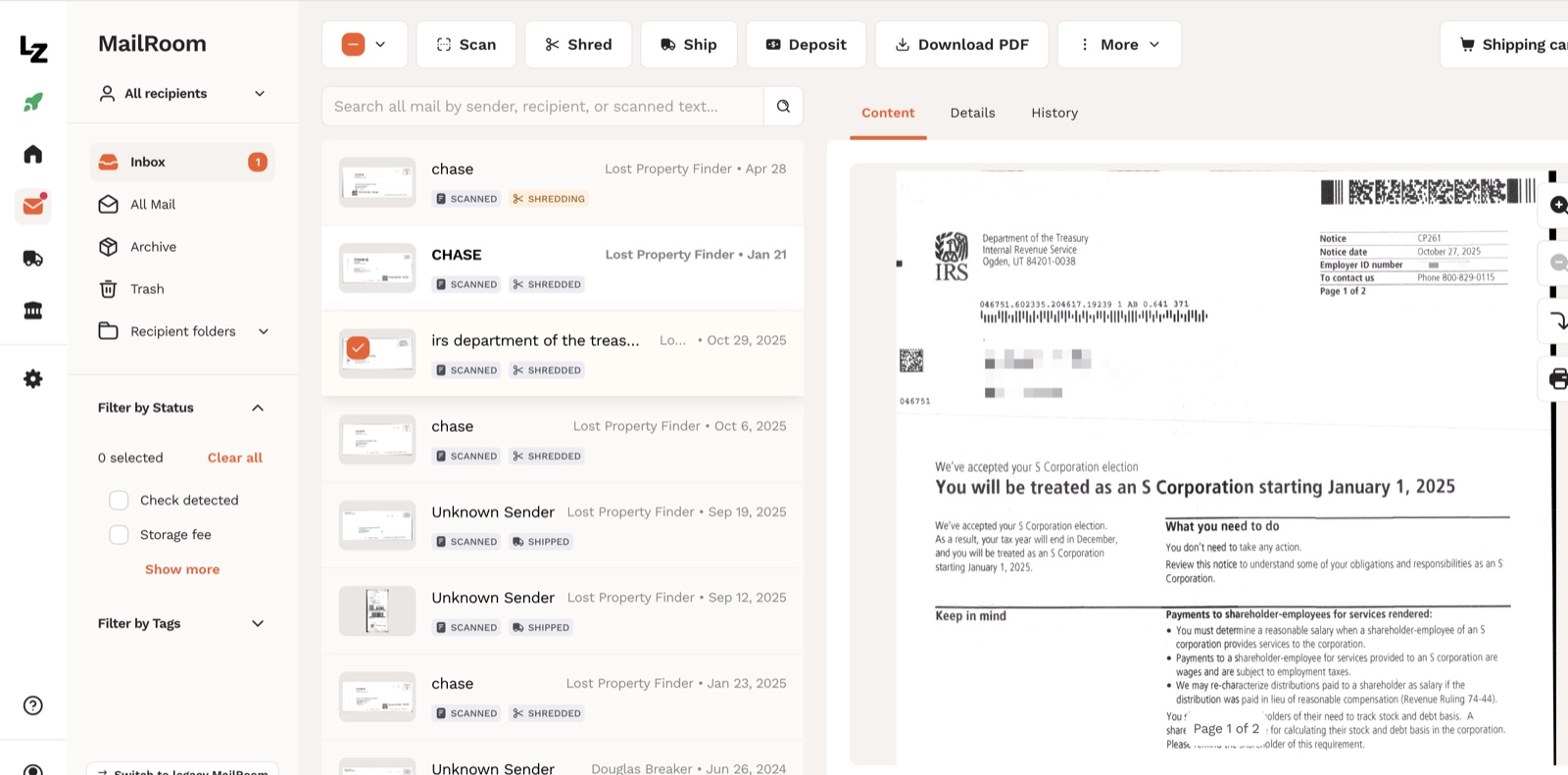
This is an IRS letter that landed in my Earth Class Mail dashboard last October. It told me I'd be treated as an S Corporation starting January 1, 2025. A letter you cannot afford to miss.
You want to know the cool thing about that letter? It did NOT arrive at my house. It arrived at a building on West Grand Avenue in Chicago. Then it got scanned and dropped it into my digital inbox, safe and sound.
If you're like me, you like your privacy. By using a virtual address, my home address stays off official LLC filings,out of public records, and off the Google search for my business. That is what a virtual address is supposed to do, and that is why I have been paying for one since 2015.
I was CEO of Earth Class Mail (I will call it ECM for short from here on) from July 2015 to November 2017. Xenon Ventures recruited me to turn the company around after Chapter 11 bankruptcy, and Xenon sold the company to Scaleworks in 2016 while I was still in the seat. Years later I bought Shoeboxed myself, which is the company I run today.
I left ECM in November 2017, so I had nothing to do with the Shoeboxed acquisition in August 2018 or the $63 million LegalZoom acquisition in November 2021. Both transactions closed after I had moved on.
This is a customer review, not an insider review. The CEO chair gave me a useful map of how the business works underneath, but 10+ years in the customer chair are what I am writing from today.
TL;DR — the verdict in five bullets
- The product still does the core job. A real US street address, mail scanned and digitized the day it arrives, forwarding when you want it, check deposit when you need it.
- LegalZoom finished the acquisition. The customer interface is now branded "LZ Virtual Mail," though the URL earthclassmail.com still resolves and most reviews still call it Earth Class Mail.
- Add-ons get pricey. The base plan is fair, but the check-deposit subscription costs the same as the base plan, and long-term mail storage is per-piece.
- Best fit: a business that already has an ECM address on bank accounts and state documents, plus owners who deposit paper checks.
- Look elsewhere if you are forming a new LLC today, want the cheapest option, handle more than 50 pieces of mail a month, or want one tool that bundles your mail with your bookkeeping.
Do you need a virtual address?
If you already know the answer, skip to What Earth Class Mail does. If you are still on the fence, three reasons to consider one, especially if you work from home.
Virtual Address Reason 1: Your home address goes public the day you form an LLC
When you form an LLC, your registered address goes onto a public Secretary of State filing. The SBA covers the state registration process here, and every state Secretary of State runs a free public business search (here is California's, for example). Anyone with thirty seconds and a search bar can pull up your filing, get your address, and know where you and your family live.
Most small business owners do not realize this until they see their home address on their own Yelp page or Google Business Profile. Yelp's privacy policy acknowledges that a publicly displayed business address is often the owner's home, and Yelp will not remove a business page once it has been created. Once your home address is up there, it stays up there.
Google Business Profile gives you an option to hide a home address by marking the business as service-area-only. But Sterling Sky's published test shows that hiding the address drops your local search ranking. The tradeoff most home-based business owners do not see coming: expose your home address, or lose visibility.
A virtual address solves both halves of the problem because you never put your home address on the filing in the first place.
Virtual Address Reason 2: Critical mail gets buried in junk mail
My friend Jeff ran a company. One day a letter from his health insurance carrier got buried under junk mail at his office, he missed it, and the company lost coverage.
Critical mail looks like junk mail. The IRS envelope is white with a window in the front and a barcode along the bottom, and it sits in the stack between a Capital One offer and a flyer for gutter cleaning. State employment offices use the same boring window envelopes. Bank verification letters, business license renewals, and court notices all show up looking like the credit card offers stacked next to them.
strong>Aside: junk mail is a separate problem.** We built a free sister tool for that called PostalDetox. You forward your USPS Informed Delivery email to us, and we file the opt-outs with each junk mailer on your behalf, one at a time, free.
When that critical mail goes to a virtual address instead of your house, the operator opens it, scans it, tags it, and drops it into your digital inbox the same day. Look at the IRS letter at the top of this article. I caught it the day it arrived, and if it had landed at my house I might have caught it or I might have tossed it with the gutter-cleaning flyer.
A real business address looks more professional than a UPS Store mailbox
I see plenty of small business owners use a UPS Store mailbox as their business address. Banks notice, vendors notice, and customers who Google your address notice. The UPS Store mailbox works fine for receiving packages, but the optics tell a prospective customer "side gig" instead of "real company." Plus, it's a pain to have to remember to go grab your mail. You're still dealing with physical mail that's easy to lose, instead of having everything digitized right away so you can securely store it in Google drive or another safe spot.
A real business-center address, with a real suite number in a real commercial building, looks like the office a client could walk into.
The math has to work, of course. A virtual address runs $30 to $50 a month for the segment I recommend, which is $360 to $600 a year. One missed IRS letter costs more than a year of service, and one home-address scrape that escalates into a stalking case costs much more than that.
The benefit is worth the spend. The next question is whether Earth Class Mail is still the right one in 2026.
What Earth Class Mail does
Every screenshot below is from my own account, pulled in May 2026.
The address itself
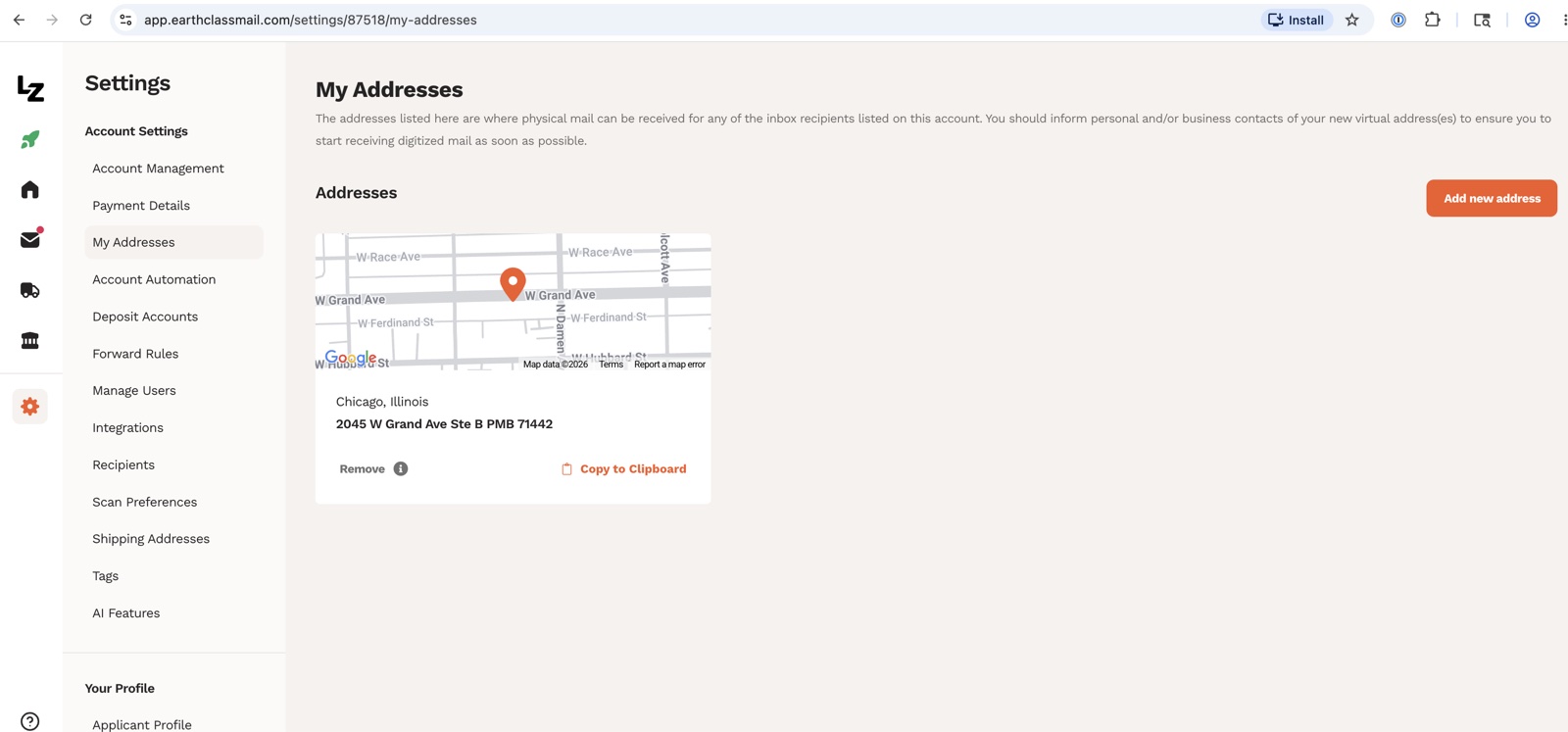 My virtual address. Real building, real suite, real commercial mail center. Type it into Google Maps and a business center comes up, not a post office.
My address is 2045 W Grand Ave Ste B PMB 71442, Chicago Illinois. The "Ste B" is a real building suite, the PMB (private mailbox) number is my slot inside that suite, and the operation runs out of a real mail center on the near west side of Chicago. Type the address into Google Maps and you see the storefront and the office building it sits in.
A quick note on a confusion I see often. Some virtual mailbox providers use addresses that resolve back to a USPS post office, where the "suite number" is a PO Box number underneath. The USPS Customer Agreement for Premium PO Box Service is explicit on this: " You may not use the PO Box 'street address' option as your physical residence or place of business in legal documents." If you're deciding between the two, here's a plain-English PO box vs virtual address breakdown.
A real CMRA storefront uses a private mail-handling business with a USPS license, and ECM uses this model. (CMRA stands for Commercial Mail Receiving Agency.) Banks and Secretary of State offices accept CMRA addresses, and post-office-disguised-as-suite addresses often get rejected.
If you are shopping for any virtual mailbox provider, Google the address and see what pops up before signing up. This is what prospects and partners will search and see.
The dashboard
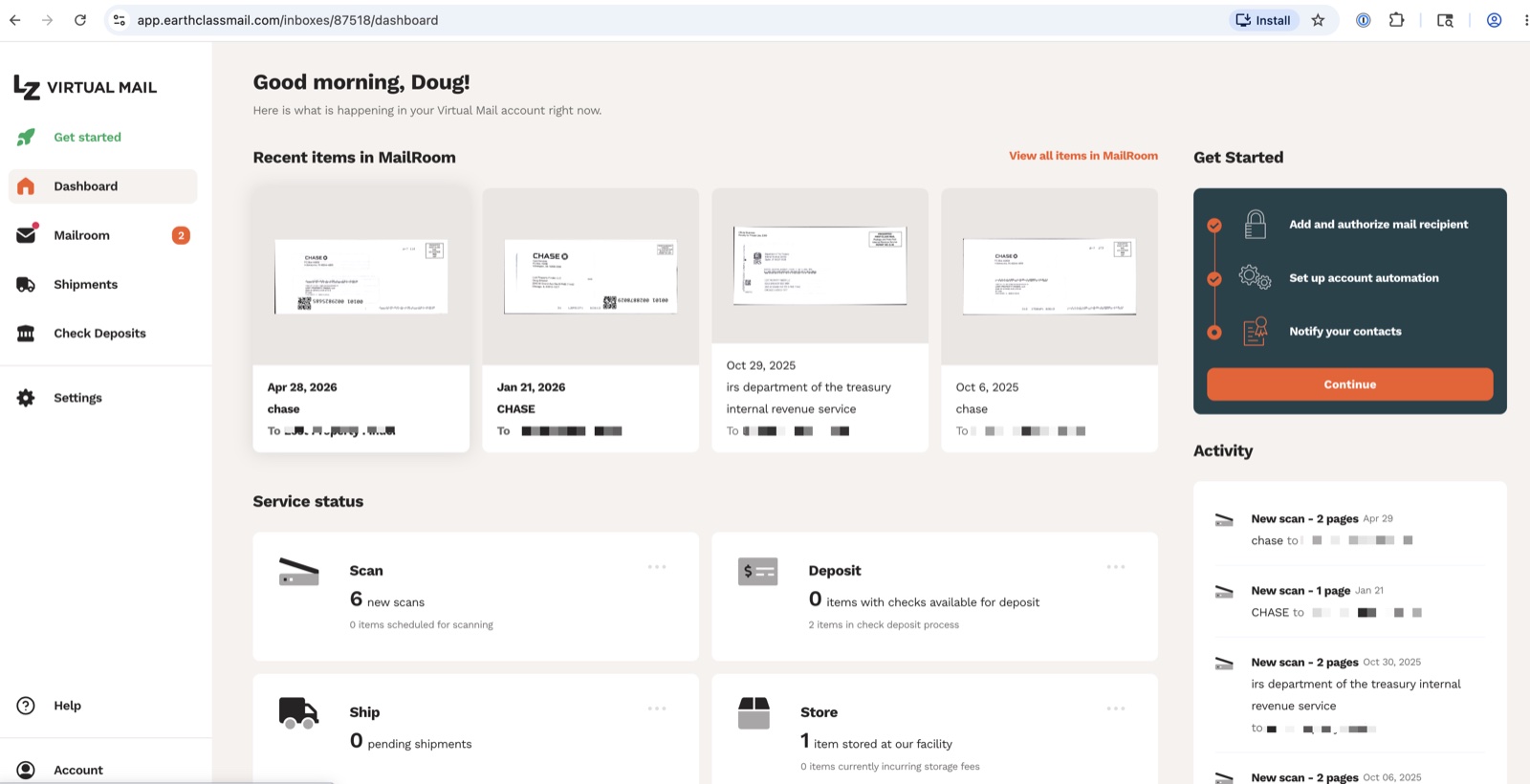 The dashboard when I log in. Recent mail at top, service-status tiles below, recent activity on the right. Notice the LZ Virtual Mail logo in the top left.
When I log in, recent mail pieces sit at the top of the screen as thumbnails. Four service-status cards below show what is in flight: scans queued, check deposits pending, shipments in motion, and items in storage. The activity feed on the right runs a clean chronology of recent events.
The logo in the upper left no longer says Earth Class Mail; it says LZ Virtual Mail. LegalZoom bought the company in November 2021 and has now retired the Earth Class Mail brand inside the product, though the URL earthclassmail.com still resolves.
The mailroom
Mail comes in, the operator scans the outside of each piece and tags it to the right recipient, and the piece shows up in my Mailroom view within hours. From there I can request a full open-and-scan of the contents, ask them to ship the physical piece to me, or send it to the shred pile with one click.
The IRS letter at the top of this article is what this product was built for. If that letter had landed under credit-card offers at my house, I might have lost it. Sitting in a digital inbox with a timestamp and a tag, I caught it.
Check deposits
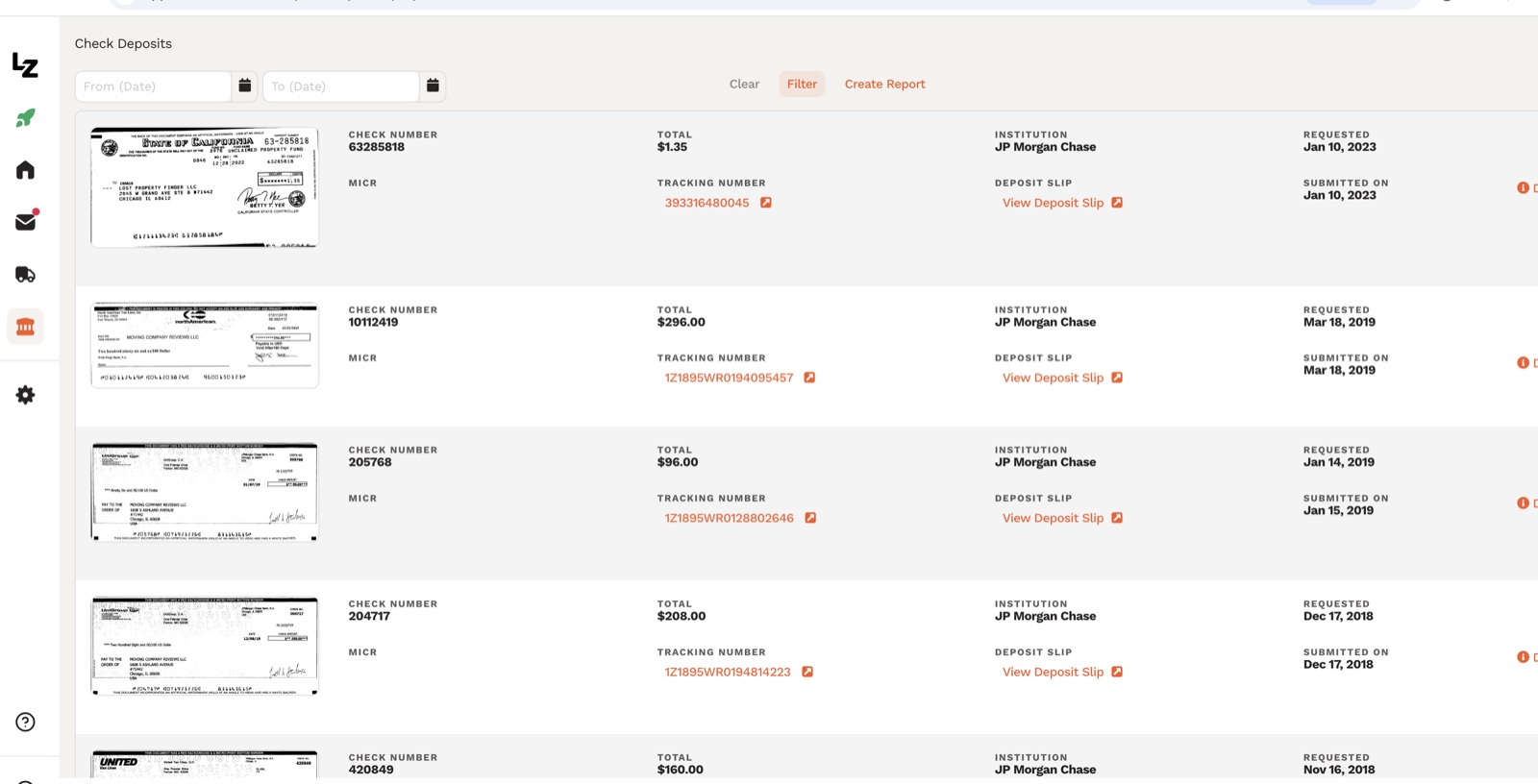 Checkstream in action. Real deposits I have made over the years. Each row links to the scanned check image and the deposit slip.
The Checkstream feature sends paper checks deposits directly to your bank. I do not get many paper checks these days, but I get enough that the feature earns its keep. The system is simple, quick, and works with almost every bank. I still write a few checks a year myself, so if you are out of practice, here is how to write a check the right way.
The pricing on Checkstream is one of the bigger things I would change about the product, but the operation itself works well (I know, I built it).
Shipments and forwarding
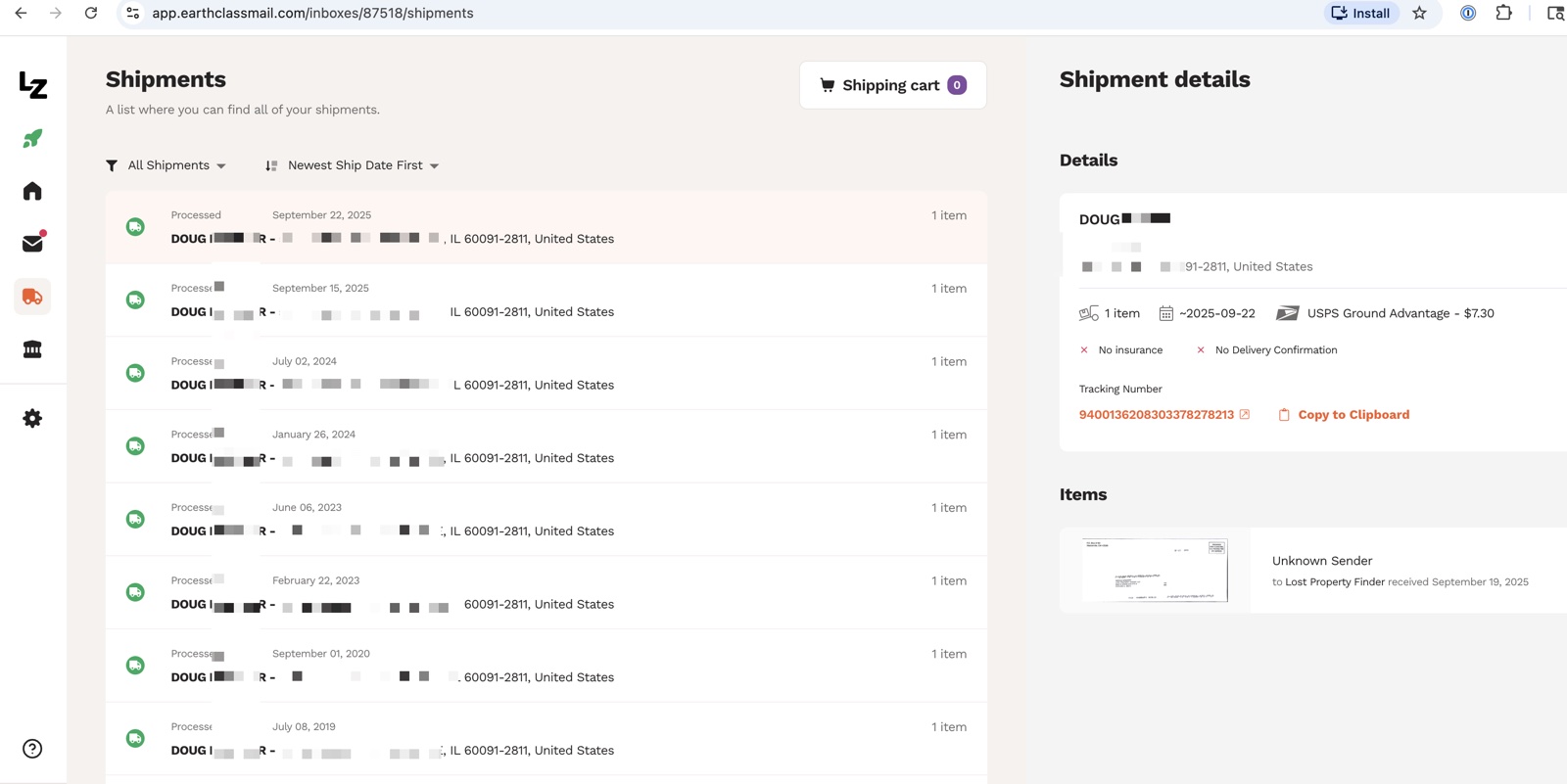 Forwarding history. USPS Ground Advantage at $7.30 a shipment, no insurance, no delivery confirmation. Simple and reliable.
When I want the physical piece of mail at my house, I click forward, pick a method, and pay the shipping. My account history shows most of my shipments running on USPS Ground Advantage at $7.30 per shipment, with no insurance or delivery confirmation included at the base level.
The shipments tab is where I notice how rarely I forward anything anymore. Most pieces of mail I never need the physical original of, and the scan is enough.
How much does Earth Class Mail cost?
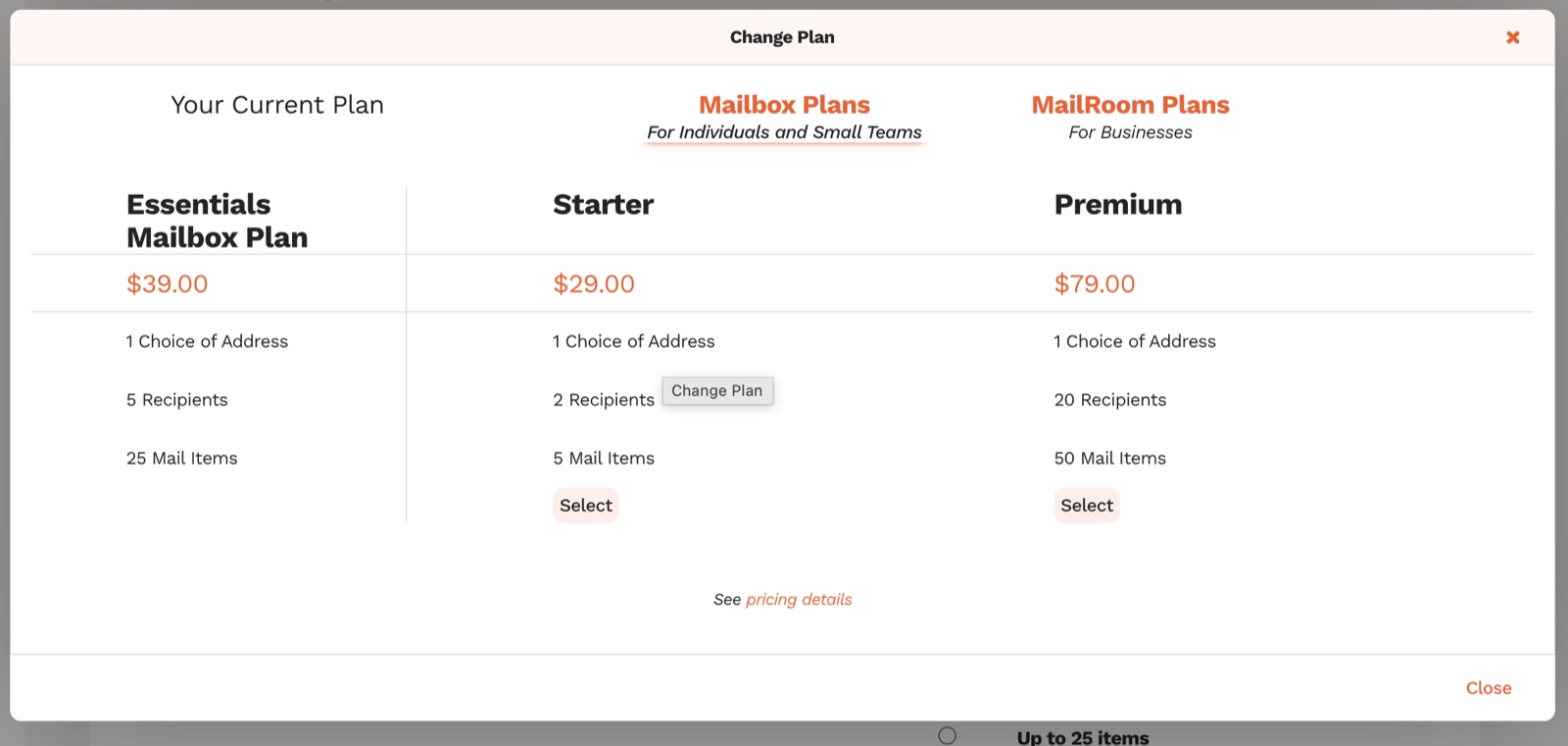 The three current plan tiers, pulled from the Change Plan modal inside my account. I am on Essentials at $39, and Premium is the right pick for a small team.
The current plan ladder, pulled from inside my account in May 2026:
| Plan | Price | Mail items / mo | Recipients | Best for |
|---|---|---|---|---|
| Starter | $29/mo | 5 | 2 | Almost nobody — 5 mail items is too few for a real business |
| Essentials (my plan) | $39/mo | 25 | 5 | Solo operators, single-member LLCs |
| Premium | $79/mo | 50 | 20 | A small business with multiple employees or entities |
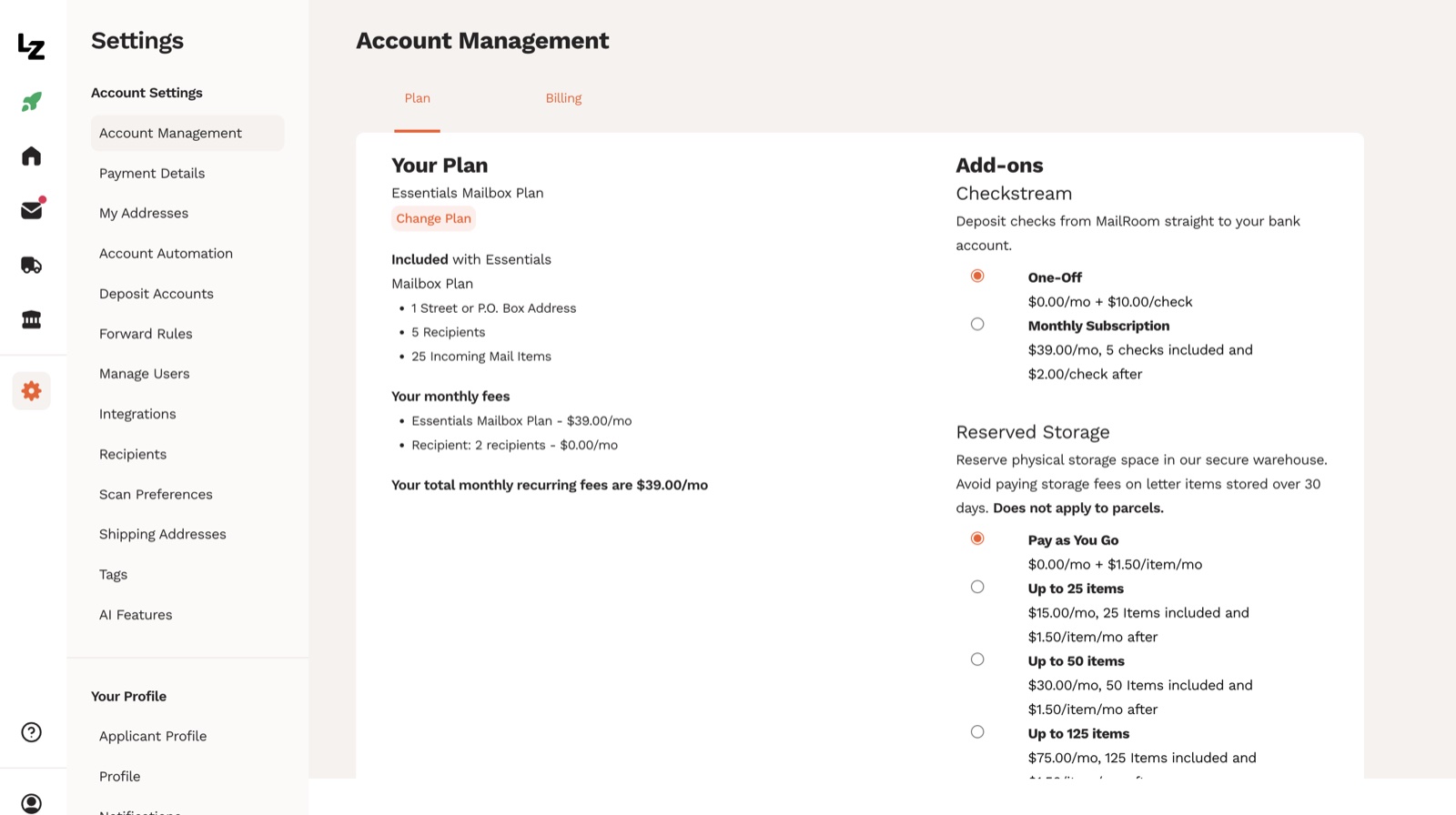 My current Essentials plan, $39/mo, plus the add-on pricing detail. Checkstream and Reserved Storage are the two add-ons that change the math.
The two add-ons worth knowing about:
- Checkstream (check deposit). Pay $10 per check on the pay-as-you-go plan, or $39/mo for a subscription that includes 5 checks with $2 per check after that. If you deposit 4 or more checks per month, the subscription is cheaper. Notice that the Checkstream subscription costs the same as the entire Essentials base plan.
- Reserved Storage. $1.50 per item per month on the pay-as-you-go plan, or $15/mo for 25 items, $30/mo for 50 items, $75/mo for 125 items on a subscription. Storage charges only apply once a piece has been at the warehouse longer than 30 days.
I pay $39 a month for Essentials, plus the occasional storage charge in months where I have been slow to forward a piece I wanted to keep. Most months the bill is $39, a few months a year it is $40.50, and the rhythm over 100 statements has been consistent.
What Earth Class Mail got right
I will be specific. "Good service, recommend" reviews do not help anyone make a real decision.
The address inventory is real. ECM uses real commercial mail centers instead of retail mailbox storefronts, so when my bank or my state asks where my business is located, the answer does not raise eyebrows.
The address does not go away. I have had the same Chicago address for many years, through two ownership changes at the company, through internal product rewrites, and through the brand swap to LegalZoom Virtual Mail. Moving a registered business address across the IRS, your bank, your state, your vendors, and every form you have ever filed is a multi-week chore and a huge pain in the butt.
Scanning works, but can be slow. Mail arrives, gets scanned, and hits my dashboard. Sometimes it takes longer than it should, but it works.
Checkstream works. I have been depositing checks remotely through ECM since 2017, and not one has gone missing.
Forwarding is reliable. Eight years of forwarded mail across the country, zero lost packages on my account.
Search and tagging are clean. Every piece of mail gets tagged, and I can filter by recipient, by status, or by date when I need to find a specific item later.
Where Earth Class Mail falls short in 2026
When I was CEO we tried to do too much at once, chasing the enterprise-mail crowd, the receipt crowd, the check-deposit crowd, and the team-permissions crowd in parallel, and the product menu got longer and the pricing matrix got more complicated as a result. Most home-office Schedule C filers (the people who run a sole proprietorship or single-member LLC and file taxes on the IRS Schedule C form) do not need any of that, and the current product still carries the operational weight of an enterprise tool. The basics customer pays for team permissions, multi-recipient routing, and enterprise integrations they will never open.
A handful of specifics:
The Checkstream subscription costs the same as the base plan. $39/mo for a subscription with only 5 checks included is a pricing decision that signals "we are treating this as a separate product line." For a solo operator who deposits a handful of checks a year, the math means almost everyone skips the subscription and pays per check.
Reserved Storage punishes long holds. $1.50 per item per month for anything sitting more than 30 days adds up faster than people expect. The base plan should include more generous storage, with the upgrade tier handling true volume.
No bundled bookkeeping or receipts. The scanned IRS letter lives in the ECM dashboard, but my tax-deductible receipts and mileage logs live in Shoeboxed. For a small business owner trying to keep a clean paper trail at tax time, the virtual address provider is one more separate system to check. If I had to do over, I would have focused on helping SMB owner who runs his/her business from a home office, and making that product shine for that use case.
Who should still use Earth Class Mail
If any of these describe you, staying is the right call.
You already have an ECM address on critical documents. Bank accounts, state filings, LLC documents, vendor records. Switching to a new provider means updating the address in every one of those places, which is weeks of work for a $5-a-month price difference. Stay put.
You are a small business that gets paper checks. Checkstream works. If you process at least five checks a month, the subscription pays for itself versus the time cost of mobile-deposit-from-home or running to the bank.
You need a metro address ECM happens to have good inventory in. Chicago, New York, San Francisco, and a handful of others have strong storefronts. If your business needs a presence in one of those specific cities and the available ECM location is good, the price is fair for the address quality.
The service has worked for you for years and you have no reason to switch. Stability has its own value. If you have been a customer for a while and the service has held up, do not switch because someone wrote a review.
Who should look elsewhere
I am going to recommend PhysicalAddress.com as the alternative to consider, and I want to be transparent: I have no affiliate relationship with PhysicalAddress.com, no commercial relationship, no referral fee. I am recommending them because of how they operate, not because I get paid if you sign up.
| Provider | Cheapest plan | Centralized scanning? |
|---|---|---|
| Physical Address | $7.98/mo | Yes — owns and operates all their own facilities |
| iPostal1 | $9.99/mo | No — 4,250+ partner pack-and-ship stores |
| Anytime Mailbox | $9.99/mo | No — 2,500+ partner mail centers |
| PostScan Mail | $10/mo | Hybrid — Anaheim HQ is theirs, 400+ other locations are partners |
| US Global Mail | $49/mo | Yes — Houston headquarters, company-owned operations |
| Stable | $59/mo | Yes — YC-backed, centralized AI-driven product |
| Earth Class Mail | $29/mo | Mixed — varies by location |
Forming a new LLC right now with no address tied to your business yet? Look at Physical Address. They start at $7.98/mo, they own and operate all their own mail facilities across about eight states, and the scanning happens at the location your mail arrives with no third-party middleman. Their check deposit is weaker than ECM, but if you do not process paper checks, that gap does not matter. For a full walk-through of how to set up a virtual address on your LLC filing, see my complete 2026 guide to virtual addresses for LLCs.
Want the cheapest legitimate option? Same answer. Physical Address at $7.98/mo is the cheapest centralized provider in the category.
A note on the rest of the cheap end. iPostal1 advertises 4,250+ locations and Anytime Mailbox advertises 2,500+, but neither company operates any of those facilities themselves. Your address is a local pack-and-ship store or coworking center, and the store owner is the one doing the scanning.
PostScan Mail sits in the middle. A small set of company-operated hubs runs centralized scanning, while the rest of their 1,000-plus addresses run on the same partner-store model as iPostal1. See our PostScan Mail review for the full breakdown.
The price is cheap on those services because the model is decentralized, which means quality varies by which store owner gets your address. Do you want the local pack-and-ship store owner snapping pictures of your IRS letters? Worth thinking about before you sign up.
Got high mail volume? Essentials caps at 25 pieces and Premium caps at 50. If you regularly receive more than 50 a month, ECM's per-piece overage charges add up quickly, and other providers price more sensibly for high-volume operators.
Want the address tied to the rest of your business paper trail? No virtual mailbox provider, ECM included, has fully solved this. The address provider lives in one place, the receipt tool lives in another, and the bookkeeping software lives in a third. Workable, but not ideal.
If you want the business-center tier -- meeting rooms, a real reception desk, the kind of address you can actually meet a client in -- see our Alliance Virtual Offices review. I worked with Alliance at Earth Class Mail as a wholesale customer ten years ago; they sell a different product class than ECM, at a different price point.
What I would build if I were running Earth Class Mail again
If I were back in the CEO chair, I would strip the product down. Most home-office solopreneurs and single-member LLCs do not need a 12-feature platform with enterprise permissions. They need seven things done well:
- A dependable address that does not go away, which is the single most important promise the product makes.
- An address that looks professional. A real business center, not a courier store or a UPS Store, and not a post office disguised as a suite.
- Comfort and security around mail handling. Confidence the operator is treating the mail right.
- Mail scanned fast when it arrives. Withing a day or two, not sitting in a stack for a week.
- Confidence you will get your mail. Boring, but rare in this category, and reliability beats flashy features every time.
- An easy way to act on mail when it shows up. Scan, forward, shred — three buttons, not a dashboard with twenty options.
- The address connected to the rest of your business paper trail. Receipts, tax records, mileage — one pile, one tool, one search bar.
That last one is the piece almost no virtual mailbox company has ever solved. Your virtual mailbox sits in one silo, your receipt tool in another, your bookkeeping software in a third, and at tax time the home-office owner is stitching three or four systems together hoping nothing fell through the cracks.
Here is the way I think about it. The point of a virtual mailbox is not to push a high volume of mail through it. It is to have an address — for privacy, for separation between business and personal, and for when you do get critical mail from the IRS or an insurance carrier or a state employment office, so that mail gets digitized right away, sits in a secure inbox, and gets acted on instead of buried in junk.
A product built around that promise, with the extras cut out, would be simpler, cheaper, and more useful than the current Earth Class Mail. The current product is good. A more focused version of it would be great.
Frequently asked questions
What is Earth Class Mail?
Earth Class Mail is a virtual mailbox service that was founded as Document Control in 2004 and rebranded to Earth Class Mail in 2007. The service provides a real US street address that receives mail on your behalf, scans the mail into a digital dashboard you can access from anywhere, and lets you forward, shred, or check-deposit the contents online. LegalZoom has owned the company since November 2021, and the customer-facing product is now branded "LZ Virtual Mail" though the earthclassmail.com URL still resolves.
Does LegalZoom own Earth Class Mail?
Yes. LegalZoom acquired Earth Class Mail in November 2021 for $63 million. The acquisition is reflected in the customer UI today, where the product is branded "LZ Virtual Mail." The URL earthclassmail.com still resolves to the product.
What happened to Earth Class Mail?
The short version. Earth Class Mail filed Chapter 11 bankruptcy in February 2015, and Xenon Ventures bought the company out of bankruptcy that year. Xenon recruited me as CEO from July 2015 to November 2017, and sold the company to Scaleworks in 2016 during my tenure.
Scaleworks expanded operations and acquired Shoeboxed in August 2018 (I had already left), then sold the company to LegalZoom for $63 million in November 2021. LegalZoom rebranded the product to LZ Virtual Mail inside the app, keeping the earthclassmail.com URL.
How much does Earth Class Mail cost?
As of May 2026, ECM offers three monthly tiers: Starter at $29 (1 address, 2 recipients, 5 mail items), Essentials at $39 (1 address, 5 recipients, 25 mail items), and Premium at $79 (1 address, 20 recipients, 50 mail items). Check deposits cost $10 per check on pay-as-you-go or $39/mo for the Checkstream subscription, and reserved storage runs $1.50 per item per month or $15-$75/mo on a subscription. I am on Essentials and most months I pay $39.
What are the competitors to Earth Class Mail?
The main names in the category are iPostal1, Anytime Mailbox, PostScan Mail, Physical Address, Stable, Davinci Virtual, Regus, US Global Mail, and Alliance Virtual Offices. Pricing ranges from $7.98 a month at the cheapest end to $99-plus at the premium office-network end.
How do I cancel Earth Class Mail?
Open the app, go to Settings, click Account Management, click Billing, and find the Cancel My Account button at the bottom of the page. The flow is direct, with no retention call required. Before you cancel, forward any pending mail you want the physical copies of, download anything important from your scan archive, and update your business address across the places it has been filed.
What do I need to update if I change my business address?
A short checklist for the address change after canceling:
- IRS: file Form 8822-B (Change of Address — Business). Fax it to the IRS at 855-214-7520 or mail it to the address listed on the form.
- Your Secretary of State: file an amendment to your articles of organization. The fee runs $25 to $50 in most states.
- Your bank: call the business banking line and request an address change on every account.
- Your registered agent: notify them of the new address so legal notices reach you.
- Every vendor that mails you invoices, statements, or 1099s.
Why I am qualified to write this
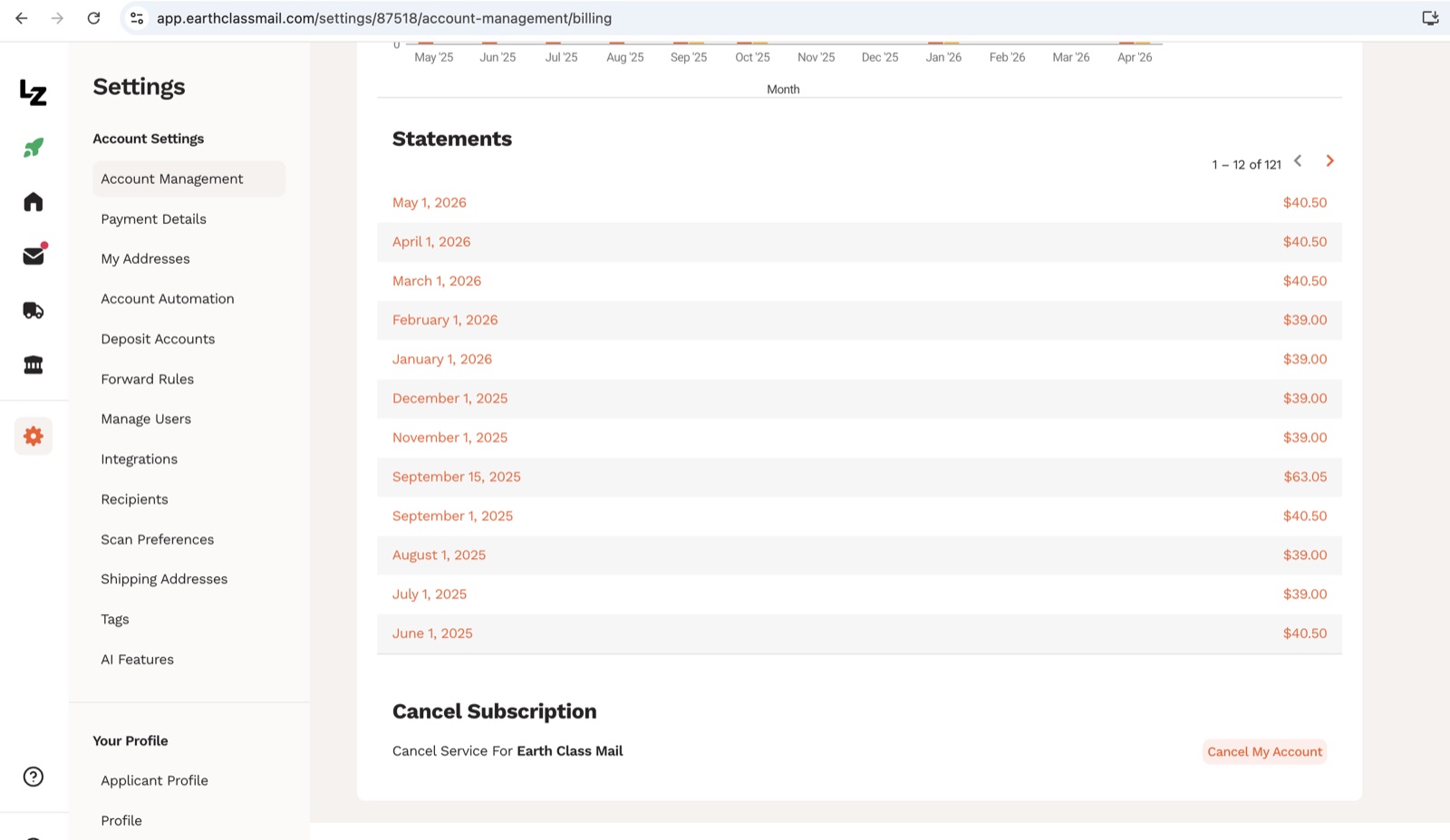 121 monthly billing statements on file, back to my first month as a customer in 2018.
I was CEO of Earth Class Mail from July 2015 to November 2017, recruited by Xenon Ventures to turn the company around after Chapter 11. I left in November 2017 and have had nothing to do with the company since, other than as a paying customer.
I have been on ECM continuously since July 2018, with 121 monthly billing statements on file, one IRS S-corp letter delivered on time last October, plenty of forwarded packages, a handful of check deposits, and a couple of storage add-on months when I forgot to forward a piece.
I am not paid by Earth Class Mail or LegalZoom, and I own Shoeboxed today. Shoeboxed sits in the receipt and small-business-paperwork space, which means my view on the virtual mail category is shaped by years of watching small business owners try to keep their paper trail straight. If that biases me toward thinking the address should be bundled with the rest of the paper trail, fair enough. I think it is the right read of the market.
Sources
- GeekWire — Earth Class Mail files for Chapter 11 bankruptcy (Feb 2015)
- Crunchbase — Scaleworks acquires Earth Class Mail from Xenon Ventures (2016)
- TechCrunch — Earth Class Mail acquires Shoeboxed (Aug 2018)
- LegalZoom Investor Relations — LegalZoom acquires Earth Class Mail for $63M (Nov 2021)
- USPS Customer Agreement for Premium PO Box Service Enhancements (PDF)
- Yelp Privacy Policy on publicly displayed business addresses
- Sterling Sky — Hiding your Google Business Profile address and ranking impact
- SBA — Register your business
- PhysicalAddress.com — We don't use third-party locations




 4.4 / 5 on