
 Copy link


A receipt book is the little carbon-copy pad you keep by the register to hand a customer proof they paid you. You fill in the date, your business name, what they bought, the total, and how they paid, then you tear off the top copy for them and keep the duplicate for your books.
Receipt books cover the handwritten corner of the types of receipts; the full guide sorts every other kind.
If you came here to do that today, here are the three things you need.
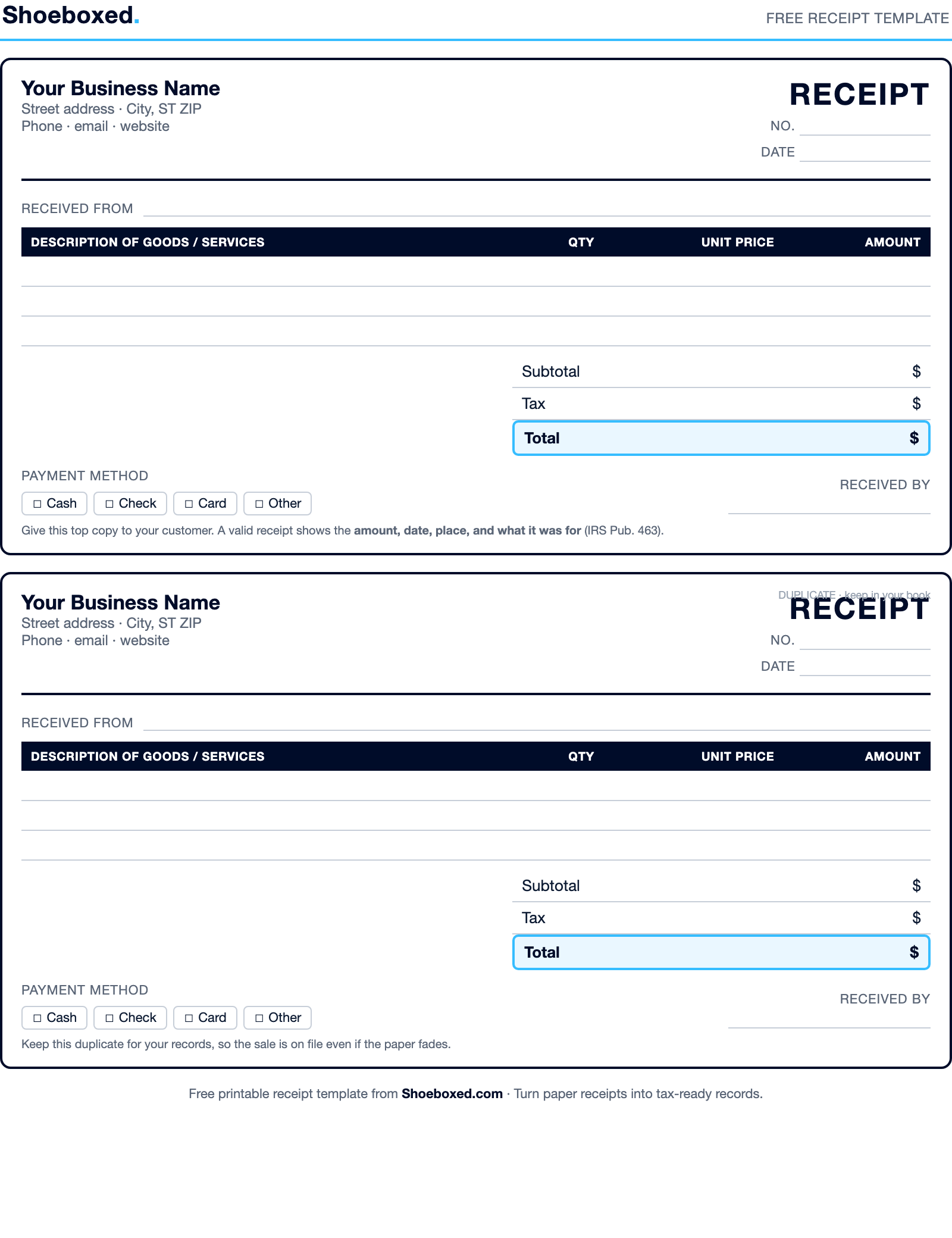
- The free template: download our printable receipt template (PDF), print it, and you have a receipt book at home.
- The steps: there are seven, and they take about a minute per receipt once you have done a few.
- A real example: scroll down and you will see a receipt filled out the right way, line by line.
I am Doug. I own Shoeboxed, and we have scanned and sorted paperwork for small businesses since 2007, more than 65 million documents so far. A lot of those are handwritten receipts, so I have seen plenty of receipt books, including the messy ones. Let me show you how to do this so your records hold up and your customers trust you.
What a receipt book is, and who needs one
A receipt book is a pad of pre-printed forms that each work as proof of payment. The forms are usually numbered in order, and they come in pads of 50 to 200 sets. Each set has two or three copies layered with carbon paper, so when you write on the top sheet, the same words press through onto the copies underneath.
You can buy one at any office supply store, or you can print our free template and make your own.
The people who lean on receipt books are the ones taking money in person. Think of a market vendor, a hair stylist, a handyman, a landlord collecting rent, a craft-fair seller, a tutor, or anyone who gets paid in cash or by check and needs to hand over proof on the spot. If your sales run through a card reader or an online checkout, the software already prints a receipt for you. A receipt book is for the moments when there is no screen between you and the customer.
It matters because a receipt is your record of income, and it is the customer’s proof of purchase. The IRS puts it plainly in Publication 583:
"You should keep supporting documents that show the amounts and sources of your gross receipts."
IRS, Publication 583
The yellow copy in your book is exactly that.
What goes on a receipt
Before the steps, here is the short version of what a good receipt shows. The IRS gives a clean rule for it in Publication 463:
"Documentary evidence will ordinarily be considered adequate if it shows the amount, date, place, and essential character of the expense."
IRS, Publication 463
Translate that into a receipt and you get five things:
- The date the money changed hands.
- Your business name and contact info, which covers the "place."
- What was sold, described well enough that a stranger knows what it was.
- The amount, including any tax.
- How they paid and who took the money, so the receipt is traceable.
Hit those five and your receipt does its job, whether you are writing it by hand or printing it.
How to fill out a receipt book, step by step
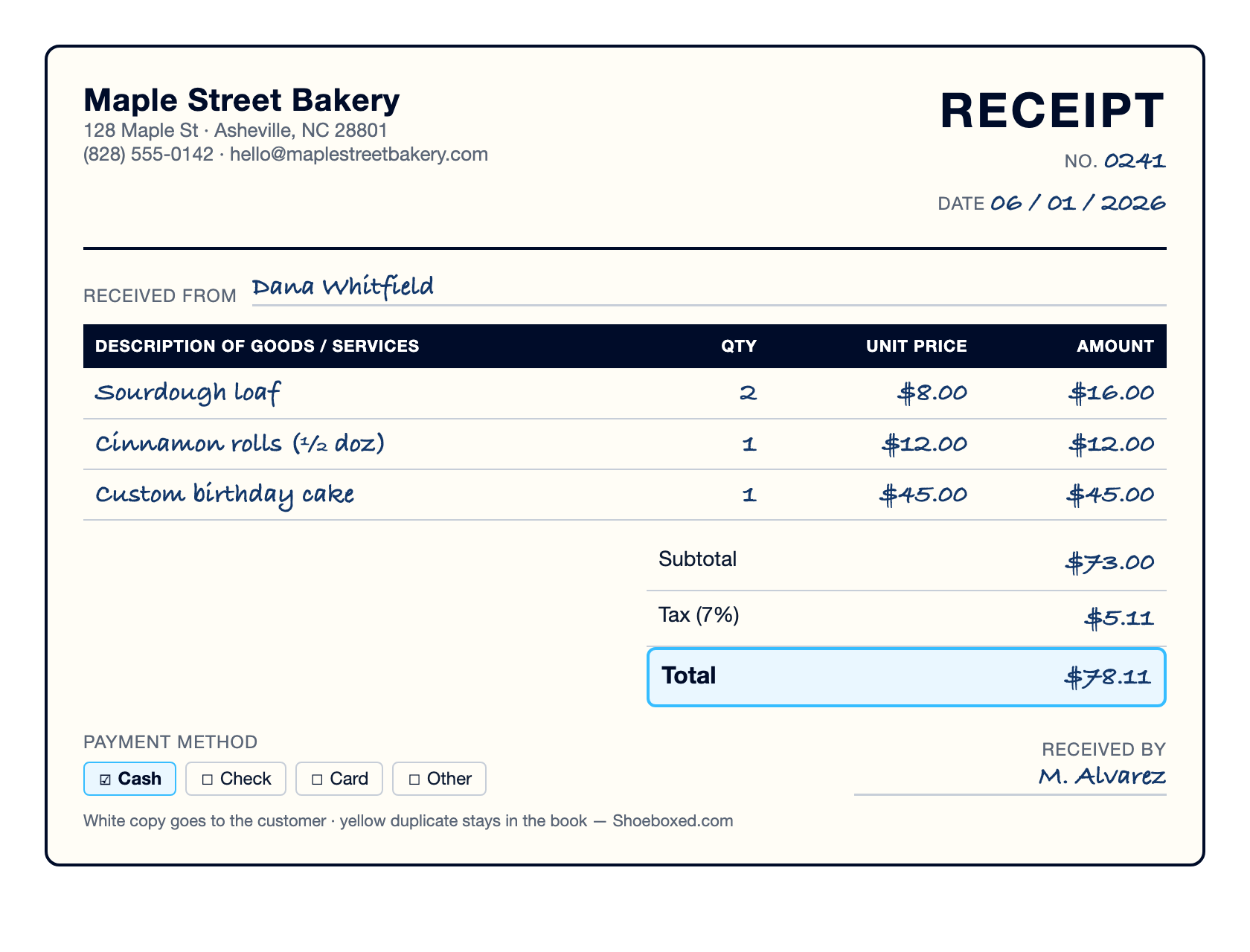
Grab a pen with dark ink and press down hard so the writing carries through to the copy underneath. Then work down the form in order.
Step 1: Write the date
Put the date at the top of the receipt, the day the customer paid you or received the goods. The receipt number is usually printed for you. If it is not, write the next number in sequence so your book stays in order.
Step 2: Add your business name and contact info
Many receipt books come with your business name printed at the top. If yours is blank, write your business name, address, and phone or email in the top-left corner.
If you do not have a business name yet, write your own full name instead. Either way, this is the “place” the IRS wants to see, and it tells the customer who they paid.
Step 3: Write who paid you
On the “received from” line, write the customer’s name. For a cash sale to a walk-up customer this can be short, but for anything you might need to look up later, a real name beats “cash customer.”
Step 4: Describe what was sold
List each item or service on its own line, and describe it well enough that someone reading it next year knows what it was. “Custom birthday cake” tells the story, while “cake” does not.
If you sold more than one of something, note the quantity. Leave a bit of space between lines so you can add a note later if you need to.
Step 5: Write the price for each line
Put the unit price next to each item, then the line total. If a customer buys two of a $25 shirt, the line total is $25 times 2, which is $50. Do the multiplication on the receipt so the math is visible.
Step 6: Add the subtotal
Add up every line and write the subtotal under the list, before tax. This is the cost of the goods and services on their own.
Step 7: Add tax, any fees, and the grand total
Multiply the subtotal by your sales tax rate and write the tax on its own line. Say your rate is 7% and the subtotal is $50. Multiply $50 by 0.07, which gives you $3.50 in tax. If you are not sure of your rate, search your state and city plus “sales tax rate,” or check a recent store receipt.
Add any other charges, like a delivery fee. Then add everything up and write the grand total at the bottom. That total is what the customer owes, and it lands in your books as income.
Last thing: note how they paid, cash or check, and sign or initial the “received by” line. Then tear off the top copy for the customer and leave the duplicate in the book.
If you would rather watch someone do it, this short video fills in a receipt by hand from start to finish.
Who gets which copy: white, yellow, and pink
This is the question I get most about receipt books, so here is the plain answer.
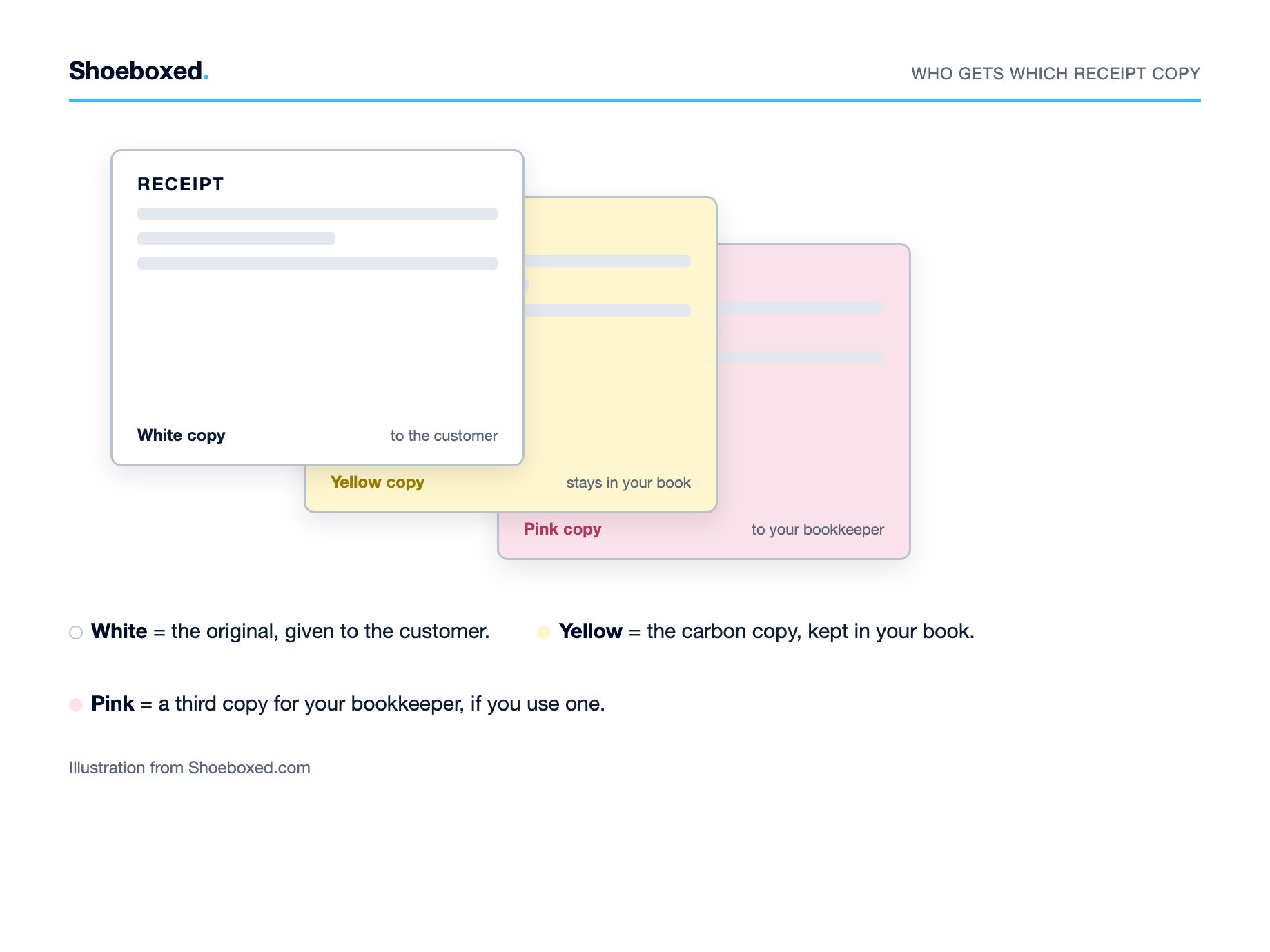
The white copy is the original, and it sits on top. You give it to the customer. The yellow copy is the carbon duplicate underneath, and it stays in the book as your record. That two-color setup covers most small businesses.
Some books add a pink copy for a third set. The white still goes to the customer and the yellow still stays in the book, and the pink goes to a second internal person, often the bookkeeper or a department that needs its own copy. If you are a one-person shop, you will almost never need the pink one. It exists for businesses where more than one person touches the sale.
How to fill out a rent receipt
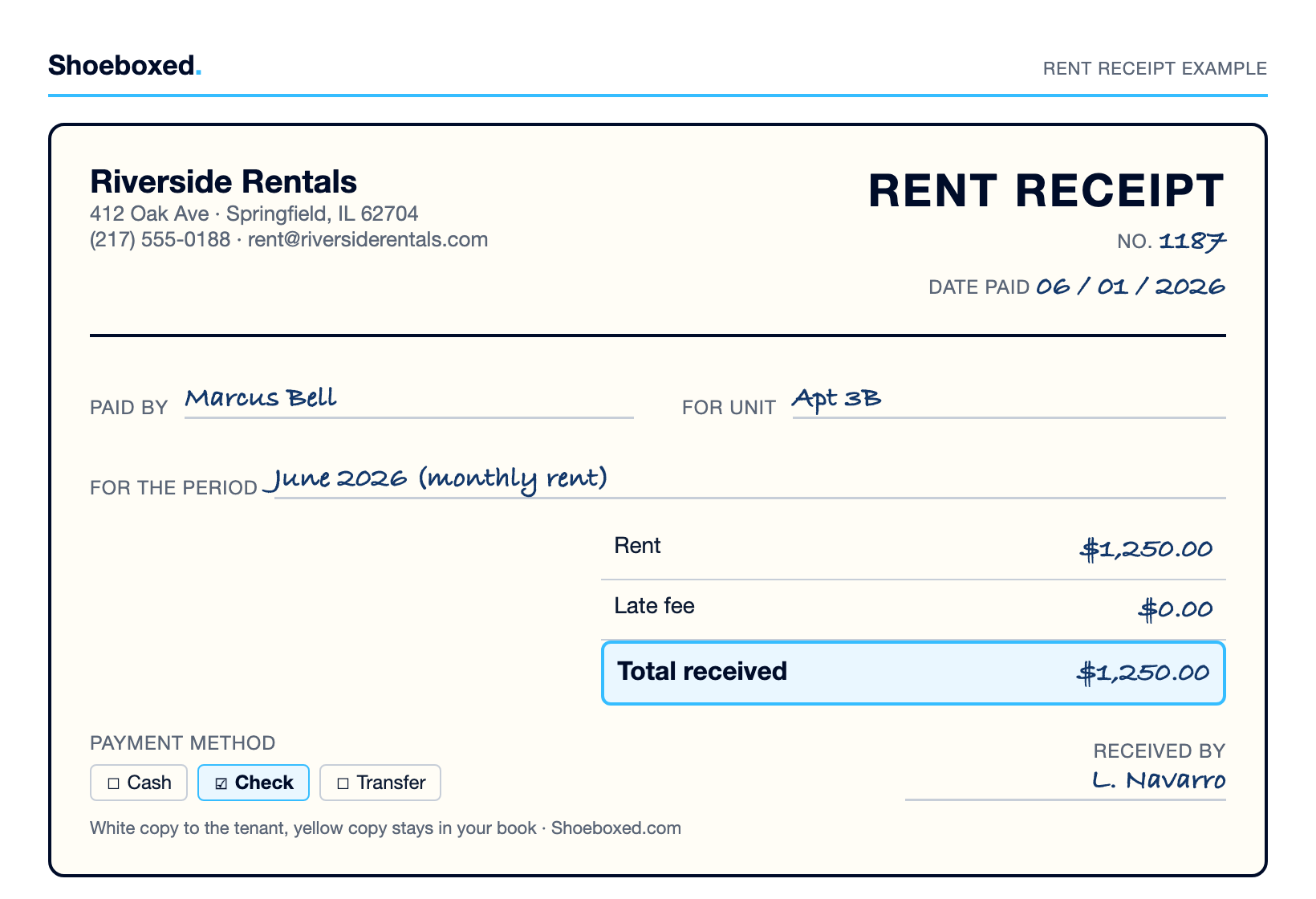
Rent receipts are the same idea with a few specific lines. If you are a landlord taking a rent payment, write down:
- Payment date: the exact day you received the rent payment.
- Paid by: the tenant's name, the person who handed it over.
- Received by: your name, since you are the landlord taking the payment.
- Rent amount: the full amount, including any late fee or other charge.
- Payment method: whether the rent came as cash, a check, or a transfer.
- Signature: whoever took the payment signs the line.
Give the white copy to your tenant and keep the yellow one. A rent receipt protects both of you, because it settles any “did I pay you in March?” question before it starts.
Why the receipt book still matters at tax time
A receipt book is not just a courtesy for the customer. It is your proof of income and, when you are the one buying, your proof of a deduction.
The IRS asks you to keep the records that back up your return. For most small businesses the simple answer is to keep everything for seven years and never think about it again. If you want the exact rule, here is how far back the IRS can look.
| Your situation | Keep records for |
|---|---|
| A normal tax return | 3 years |
| You left off more than 25% of your income | 6 years |
| You claimed a loss for a bad debt or worthless stock | 7 years |
Here is the catch with paper. A receipt book is only useful if you can find the yellow copy later, and a carbon copy fades, smudges, and goes missing. The book in your drawer is one spilled coffee away from being unreadable.
I see this every day in our own numbers. Of the 3.6 million receipts that came through Shoeboxed in the last two years, about 38% showed up with no category at all, just a photo of paper nobody had sorted yet. That is the natural state of receipts. They pile up faster than anyone keeps up with them, and the handwritten ones are the easiest to lose, which is exactly the pile that turns into a scramble at tax time.
Turn the paper into records you can use
This is the part where the receipt book and Shoeboxed meet. You write the receipt by hand, and then you let us turn it into a clean digital record so it is there at tax time whether or not the carbon copy survives.
You snap a photo of the yellow copy with the Shoeboxed app, on the App Store or Google Play, or you stuff a stack of them into one of our prepaid Magic Envelopes, the postage-paid envelopes we send you to fill and mail back. We pull out the vendor, date, total, and tax, and file each one into a category. After that the paper can fade all it wants, because the record lives somewhere safe and searchable.
If you work from home, there is a real deduction hiding in this too. Our free home office deduction calculator uses your address to estimate what your home office is worth on your taxes, and it takes about a minute. The same habit that keeps your receipt book organized is the one that finds money like that.
For more on keeping the paper under control, here is our guide to receipt organization and management. And if you track business spending in a spreadsheet, our Excel expense spreadsheet and income and expense worksheet both pair well with a receipt book.
Frequently asked questions about receipt books
What does a receipt book look like?
A receipt book is a bound pad of numbered forms, like the one at the top of this page. Sizes vary by how many receipts fit on a page. Some have one large receipt per page, and others fit three to five smaller ones on a single sheet. The more receipts per page, the smaller each form, so pick the size that gives you enough room to write.
What is the difference between an invoice and a receipt?
You send an invoice to ask for payment, usually after the work is done but before the customer has paid. You give a receipt to confirm you were paid. The invoice says “here is what you owe,” and the receipt says “thank you, we are square.” Invoice books exist too, and they tend to be larger than receipt books.
Where can I get a receipt book?
Any office supply store carries them, and so do most large retailers and online marketplaces. You can also print our free template and bind your own, which is handy if you want your business name on every page.
How do I make my own receipt book?
Start with a template you like, such as ours. Print as many pages as you want in your book, since store-bought books usually run 50 to 100 pages. Then stack the pages, line them up, and brush a thin layer of padding compound, sometimes sold as padding glue, along the top edge. A bottle runs about $10 to $15 at an office supply store or online. Let it dry fully and you have a tear-off pad of your own.
Is there a free app to make receipts?
Yes. If you just need to print a clean receipt, our free template above does the job, and plenty of free receipt-generator apps will make one on your phone. Shoeboxed is the other half of the job, turning the receipts you already have into organized digital records. If your goal is a record that survives tax season, scanning the paper beats hoping the carbon copy holds up.
Final thoughts
A receipt book is a simple tool, and knowing how to fill one out is a small skill that your customers, and your accountant, will thank you for. Write it clearly, keep the yellow copy, and you have done your part.
The only thing the paper cannot do is keep itself organized. That is the part we are good at. Write the receipt by hand, scan the copy, and let the record take care of itself.
About the author. I’m Doug. I bought Shoeboxed in late 2025 with an SBA loan after fifteen years of running other people’s companies as CEO. I’d used Shoeboxed myself back in 2010 at a previous gig and called it magical even then. I use it daily now. Small business owners deserve every dollar they’re legally entitled to keep, which is why I bought Shoeboxed and work hard to make it better.
Sources
- IRS, Publication 463, on what makes documentary evidence adequate (amount, date, place, essential character).
- IRS, How long should I keep records, on how far back the IRS can look.
- IRS, Publication 583, on keeping documents that show your gross receipts.




 4.4 / 5 on