Free Expense Reimbursement Form (PDF, Excel & Google Sheets)
A free employee expense reimbursement form with a receipt spot on every line and a built-in mileage row. Plus the one IRS rule that keeps reimbursements tax-free.


If an employee has ever handed you a fistful of receipts and a number on a sticky note, this one's for you. Here's a free expense reimbursement form that adds up the total, gives every receipt a home, and keeps you on the right side of one IRS rule most people have never heard of.
I run Shoeboxed, so receipts are my whole day. The reimbursements that go smoothly all look the same: one form, one line per expense, a receipt stapled to each one. The reimbursements that turn into a mess are the ones missing that last part. The form below is built so nothing slips through, and the rest of this page explains the rule that makes it matter.
Download the free expense reimbursement form
Download the Excel file (.xlsx) →
Want it in the cloud instead? Copy it to your Google Drive. Tap the link, sign in to Google, and pick Make a copy. It opens in Google Sheets, Excel, or Numbers.
Need a printable PDF? Open the Google Sheet copy and pick File, then Download, then PDF Document. You get a clean one-page form to print or email. No sign-up, no email required.
You get six tabs, and you only type in the first two:
- Reimbursement Form. The employee fills this out: their name, the pay period, then one line per expense with the date, a business purpose, a Y for "receipt attached," and the amount. There's a mileage row that multiplies business miles by the 2026 IRS rate, and the total adds itself up.
- Reimbursement Log. The approver or bookkeeper logs each request here, so you can see what's submitted, what's paid, and what's still outstanding.
- Read me first. A short how-to and a plain-language version of the IRS accountable-plan rule.
- Home Office Log and Mileage Log. If you run the business on a Schedule C yourself, these two cover the deductions owners most often miss. One works out your home office write-off both ways the IRS allows, the other logs your business miles at the 2026 IRS rate. And if you also bill your own clients as a contractor, our free invoice template handles the income side.
- 25% off Shoeboxed. A code for a quarter off any plan.
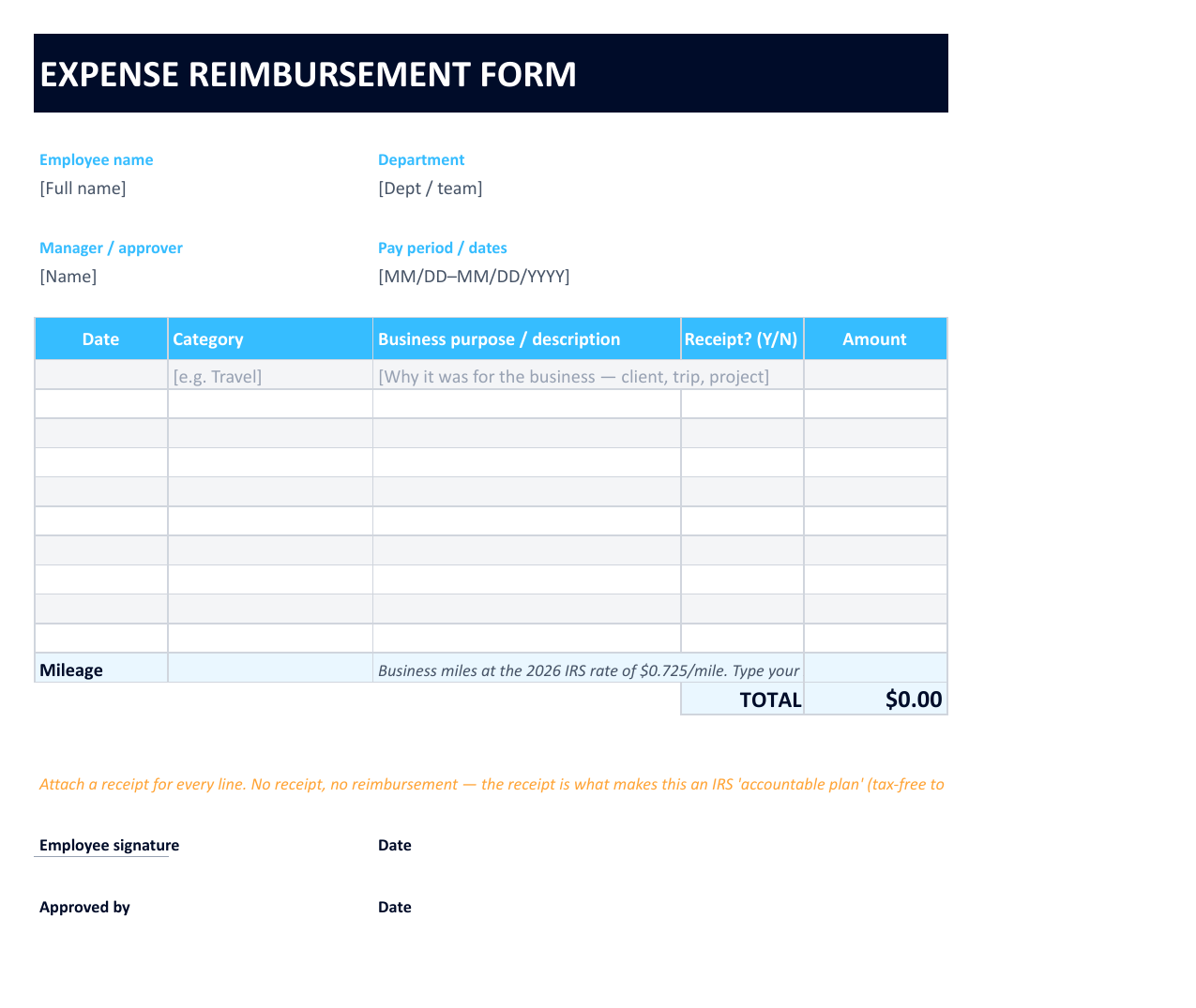 Here's the Reimbursement Form tab. The employee fills one row per expense, and the mileage row and the total calculate on their own.
If you only do one thing on this page, grab the form. Below, I'll walk through what goes on it and the one rule that decides whether the money counts as a clean reimbursement or as taxable pay.
What goes on an expense reimbursement form
A reimbursement form is short, but a few fields have to be there or it can't do its job. The template gives each one a spot:
- Who and when. The employee's name, their department, the approver, and the dates the expenses cover.
- One line per expense. The date, a category like travel or supplies, and the amount.
- The business purpose. A few words on why it was a business cost: the client, the trip, the project. This is the field people skip, and it's the one that saves you in an audit.
- A receipt for every line. A simple "receipt attached?" column, because every line needs proof behind it.
- Mileage. A row for business miles driven, multiplied by the IRS rate.
- The total, plus two signatures. One number, the employee's sign-off, and the approver's.
The business purpose and the receipt are the two fields that matter most, and they're the ones people rush past. The next section is why.
The one rule that keeps a reimbursement tax-free
Here's the rule almost nobody mentions, and it's the reason the form is built the way it is. When you pay an employee back the right way, the money is tax-free to them and a clean deduction for you. Do it the wrong way and the same dollars become taxable wages. The IRS calls the right way an "accountable plan," and it asks for three things, all spelled out in the regulation at Treas. Reg. 1.62-2:
- Business connection. The expense was a real business cost the employee paid.
- Substantiation. They show what it was for, with receipts, within a reasonable time.
- Return of excess. If you gave them an advance and they didn't spend all of it, they pay the rest back.
Hit all three and the IRS keeps that money out of the employee's pay entirely. In the regulation's own words, the amounts are "not reported as wages... on the employee's Form W-2, and are exempt from... employment taxes." Miss them and you have what the IRS calls a nonaccountable plan, and the same dollars get treated as taxable wages on the W-2.
That's the whole game. A receipt and a one-line business purpose are the difference between a tax-free reimbursement and a taxable paycheck. So the form has a receipt column on every line and a business-purpose field on every row, on purpose. It won't let you log a reimbursement that can't stand on its own later. Keep the finished form and its receipts for at least three years, the default window the IRS uses to look back.
How to reimburse an employee for mileage
When an employee drives their own car for work, you don't need gas receipts. You reimburse the miles. The simplest way is the IRS standard mileage rate, which is 76 cents per mile for miles driven from July 1, 2026 (72.5 cents before). An employee who drove 220 business miles in August gets 220 times $0.76, which is $167.20, and the mileage row on the form does that math the moment they type in the miles.
Mileage stays tax-free the same way receipts do: the employee logs the date, where they went, and why. Reimburse at the standard rate and the whole amount stays tax-free with no extra paperwork. Pay more than the standard rate, and the extra above it counts as taxable wages. The only way around that is to skip the mileage rate entirely and instead pay back the employee's actual car costs (gas, insurance, repairs, and the rest) with receipts to back them up, which is a lot more work. For almost everyone, the standard rate is the simple, safe way to handle it.
The hard part isn't the form, it's collecting the receipts
You can hand every employee this form today. The part that breaks down a month later is the receipts. People lose them, forget to attach them, or turn in a faded slip you can't read. And no receipt means no proof, which is the exact thing the accountable-plan rule hangs on.
I can tell you how often receipts go missing because catching them is what we do. We've scanned more than 3.4 million receipts across 12,000-plus businesses in the last two years, and almost 4 in 10 still show up with no category, no purpose, nothing but an amount. A receipt with no story behind it is only half a record, and a half-record is what gets a reimbursement bounced.
That gap is exactly what Shoeboxed closes. Your team snaps a photo of each receipt with our app, forwards an email receipt, or mails a stack in our prepaid Magic Envelope, and our software reads the vendor, date, and total, files each one, and keeps the image for as long as you have an account. The receipt is captured the day it happens instead of hunted for at month-end, so every line on the reimbursement form already has its proof attached. If you'd like to track the spending in a spreadsheet first, our free small business expense spreadsheet and our guide to scanning receipts pick up where this form leaves off.
When chasing paper wears thin
You can run this form on its own for as long as you like. The day the receipt-gathering turns into a chore, Shoeboxed Pro runs $29 a month with a 30-day money-back guarantee, and the bonus tab in your download takes 25% off any plan.


Frequently asked questions
What is an expense reimbursement form? It's a short document an employee fills out to get paid back for business costs they covered out of pocket. It lists each expense, the date, the business purpose, and the amount, with a receipt attached to every line. The receipts are what let you reimburse the money tax-free under IRS rules.
Are expense reimbursements taxable to the employee? Not if you reimburse under an IRS accountable plan. Money paid under an accountable plan is left out of the employee's income and isn't reported as wages on the W-2. To qualify, the expense needs a business connection, has to be substantiated with receipts in a reasonable time, and any excess advance has to be returned. Miss those and the reimbursement becomes taxable wages.
Does an employee need a receipt for every reimbursement? For an accountable plan the answer is yes, and every business expense needs a receipt behind it, which is what the IRS means by "substantiating" it. That's why a good reimbursement form has a receipt spot on every line and won't let a line through without one.
How do you reimburse employees for mileage? Multiply the business miles driven by the IRS standard mileage rate, which is 76 cents per mile for miles driven from July 1, 2026, and 72.5 cents before. The form on this page has a mileage row that does the math once the employee enters their business miles.
About the author
I'm Doug. I bought Shoeboxed in late 2025 with an SBA loan and 5% down, so I run a small business and pay people back out of the same checking account you do. Receipts are my whole day, which is why I care that a reimbursement form actually holds up at tax time. I write these guides because the surest way to grow Shoeboxed is to help business owners keep more of what they earn.
Sources
- IRS / Cornell Law, Treas. Reg. 1.62-2 (accountable plans: business connection, substantiation, return of excess; treatment of payments under accountable and nonaccountable plans): https://www.law.cornell.edu/cfr/text/26/1.62-2
- IRS, 2026 standard mileage rates (72.5 cents per business mile, January to June): https://www.irs.gov/newsroom/irs-sets-2026-business-standard-mileage-rate-at-725-cents-per-mile-up-25-cents
- IRS Announcement 2026-11 (76 cents per business mile from July 1, 2026): https://www.irs.gov/irb/2026-29_irb
- IRS, Publication 583 (recordkeeping and how long to keep records): https://www.irs.gov/publications/p583
- Shoeboxed customer data, aggregate: more than 3.4 million receipts processed across 12,000-plus accounts since January 2024, 38.1% arriving with no category.




 4.4 / 5 on