PCI Compliance for Small Business: What You Can Keep on File
A plain-English guide to PCI compliance for small business owners. Covers the receipt truncation rule, credit card data on paper, and the call-recording trap.


If you run a modern credit card terminal, your processor and your point-of-sale company handle most of the technical side. They deal with the firewalls and the password rules, but that still leaves you the paper and the phone. Your part of the job is spotting the credit card numbers that hide in your receipt drawer, your filing cabinet, and your call recordings.
Imagine you're a shop owner closing out the register, or a contractor who takes credit card numbers over the phone. Did you know that a credit card's security code can't stay in a call recording after the charge goes through? A receipt that prints six digits of the credit card number breaks a federal law. Keep reading for the three places credit card data hides in a small business, and what you can keep in each one.
Why listen to me on this? I own Shoeboxed, and since 2007 our team has scanned over 57 million receipts for more than 552,000 businesses. Paperwork with payment details on it crosses my desk all day.
What PCI compliance means for a small business
PCI DSS stands for Payment Card Industry Data Security Standard. Visa, Mastercard, and the other credit card brands wrote it, and the PCI Security Standards Council maintains it. It covers every business that handles credit card data, from a one-truck landscaper to a national chain.
Two things about it surprised me. First, PCI DSS is not a law. It works like a contract with your credit card processor, and the processor enforces it with fines or by closing your account. Second, one rule about printed receipts is a law, with dollar penalties written into it.
Here is where most owners meet all this in real life. Once a year your processor asks you to fill out a short form about how you handle credit card numbers (the SAQ, or Self-Assessment Questionnaire). Processors often bill a monthly non-compliance fee when that form is missing from your file. If a fee email is what brought you here, call the number on your credit card statement and ask for the form. Store less credit card data and that form gets easier to answer, because most of its questions cover data you would be storing.
What the law allows on a printed receipt
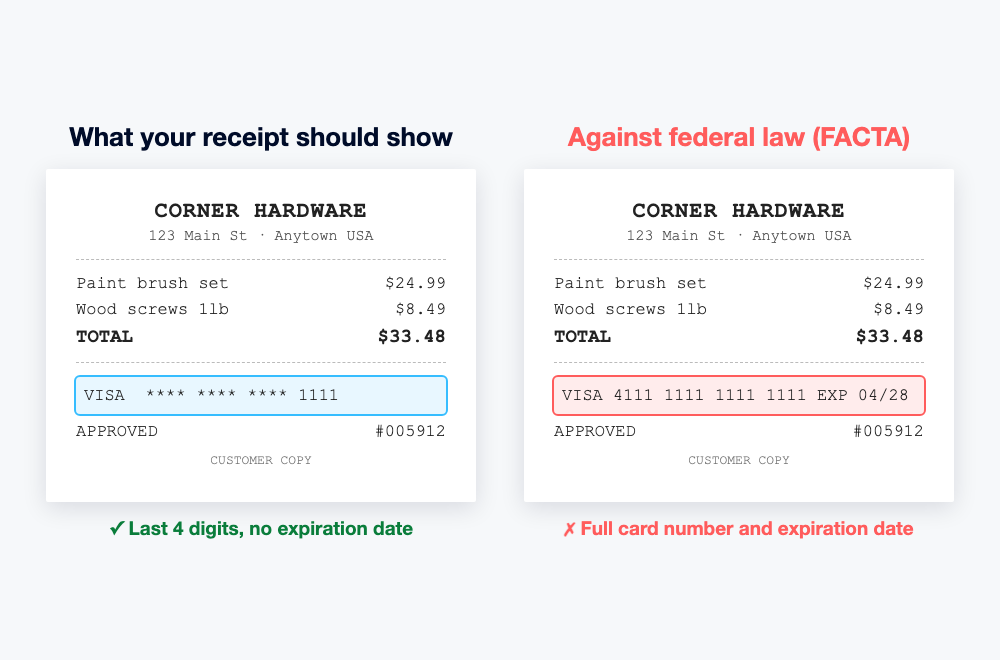
Pull a credit card receipt out of your register drawer and look at the credit card line. It reads something like **** **** **** 1111, with no expiration date. Federal law makes your terminal print it that way.
The rule comes from FACTA, the Fair and Accurate Credit Transactions Act (15 U.S.C. § 1681c(g)):
"No person that accepts credit cards or debit cards for the transaction of business shall print more than the last 5 digits of the card number or the expiration date upon any receipt."
The law does not cover a handwritten ticket or one of those old carbon-paper credit card imprints, only the receipts a machine prints. The law allows five digits, and on the receipts our team scans, the printed credit card line shows four.
Check your receipt printer tonight. Say you learn your machine prints full credit card numbers and you keep printing them anyway. Courts can call that willful, and the law then sets damages of $100 to $1,000 per violation, plus attorney's fees. If your printer shows more than five digits or an expiration date, call your point-of-sale company today. That is the name on the machine or on your credit card statement. Newer terminals cut the number down for you, and the trouble comes from old machines, or from a machine someone set up wrong.
This rule is also good news for your bookkeeping. A receipt that shows only four digits is not a credit card number, so PCI's storage rules do not touch the receipts you file for taxes. Scan them, store them, pile them in a shoebox for years.
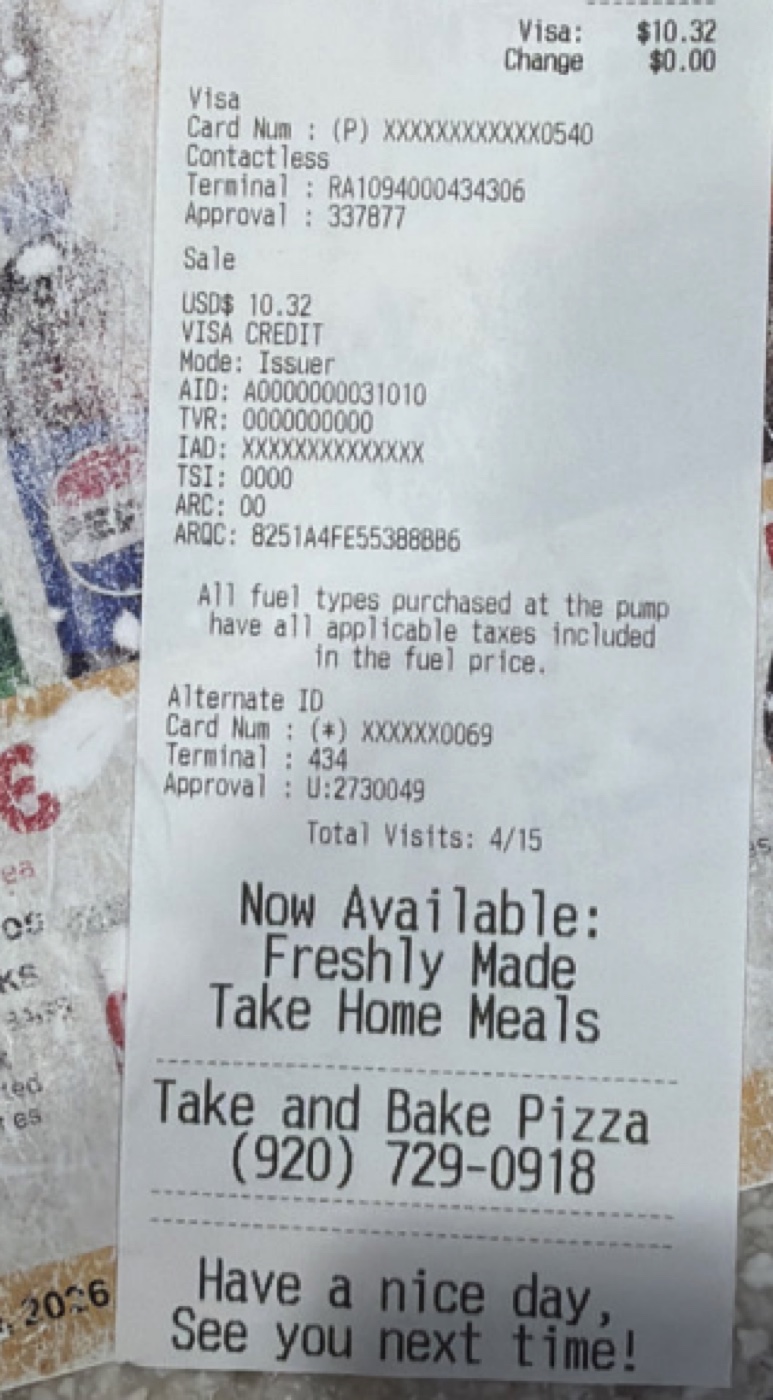
Here is what that looks like in the wild, on a receipt from a gas pump.
What you can keep in the filing cabinet
Before Shoeboxed, I ran Earth Class Mail, a company that turned business mail into scans. Between those two jobs I've watched a lot of small businesses run their day on paper. Full credit card numbers show up in the same spots. Someone writes one on a phone-order form, jots one on an invoice for a repeat customer, or leaves one on a sticky note during a busy Friday.
PCI DSS treats that paper the same as a database. Requirement 9 of the standard asks two things. Keep paper with credit card data locked away while you need it, and shred it once the business need ends. A customer can dispute a charge for months after the sale, so you may need the paper that long, and you shred it once that window closes. Only one or two people should have a key to that drawer. That means you, and maybe one other person.
Now for the security code, the three digits on the back of the credit card (or four on the front of an Amex). Customers read you that number on phone orders. Requirement 3 bans keeping it once the charge goes through:
"Do not store sensitive authentication data after authorization (even if it is encrypted)."
The ban covers every place you could write the code down. Paper counts, and so do spreadsheets, scans, and recorded phone calls. Customer permission doesn't change it. Cross the code out before you file the order sheet, and shred anything that lists it.
For repeat customers, skip the paper. Most credit card processors offer a card-on-file feature. They store the credit card, you never touch the number, and your records keep the name and the last four digits. Ask yours. You get the convenience without holding the risk.
That leaves one habit to build. Full credit card numbers get the locked drawer, and everything else can go wherever you keep your business records.
Your call recordings are storing credit card numbers
Recorded phone calls catch business owners who have everything else locked down. A customer calls to pay an invoice and reads their credit card out loud. They give you the sixteen digits, the expiration date, and the security code. If your phone system records calls, that recording now holds all three, and it sits on a server for months. If your phone setup doesn't record calls, you can skip this section with a clear conscience.
The PCI council took this question head on in its FAQ on recorded credit card data:
"Storage of card validation codes or values [...] in any form of digital audio recording, for example, .wav or .mp3 files, after authorization is therefore a violation of this requirement."
The security code can never stay in a recording once the charge goes through. The credit card number itself has to be guarded like any other stored credit card data, so the simple answer for a small shop is keeping all three off the recording. "I didn't know the recorder was running" is not a defense.
You have three ways out, and I'd try them in this order:
- Keep the number out of the call. Text or email a payment link, or ask your processor for its keypad-entry option, where the customer types the digits instead of saying them. If the number is never said out loud, there is nothing on the tape.
- Pause the recording during the credit card read. Many phone systems have a pause button. It only works when whoever answered the phone remembers to press it. On a busy afternoon somebody forgets, and a full credit card number lands in your archive anyway.
- Redact the recordings you keep. If you rely on recordings for coaching and disputes, clean them instead of deleting them.
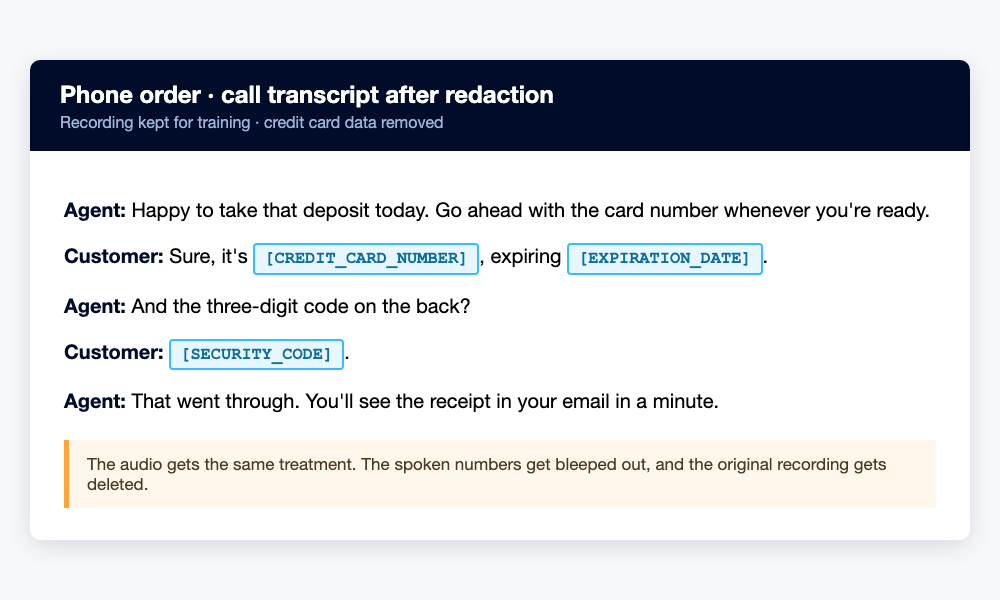
On that third route, start with a five-minute call to whoever runs your phone service, and ask what gets recorded and how long it is kept. If your support desk runs on Zendesk, its built-in redaction tools can wipe a credit card number a customer typed into a ticket. Zendesk notes those tools don't reach call transcriptions, though, and manual redaction depends on somebody remembering. A Zendesk redaction app takes the remembering out of it. It listens for the credit card number, bleeps it out of the audio, posts a transcript that reads [CREDIT_CARD_NUMBER], and deletes the original.
Whatever phone system you use, ask for that same setup. You want a tool for redacting credit card numbers from call recordings, so you keep the training value and drop the credit card data. That is what the council wants.
What you can keep on file, in one table
| The item | Can you keep it? | The rule |
|---|---|---|
| Printed receipts showing the last 4 digits | Yes, as long as you like | A receipt with only the last 4 digits is not a credit card number |
| Scans of those receipts | Yes, same reason | Keep them for your tax records |
| A full credit card number on paper | Yes, while you need it. Lock it up, then shred it | PCI DSS Requirement 9 |
| The 3 or 4 digit security code | Never, once the charge goes through | PCI DSS Requirement 3 |
| A credit card number in a spreadsheet or email | Avoid it. Let your processor keep the credit card on file | PCI DSS storage rules cover every format |
| A recording of a customer reading their credit card | The security code can never stay. Keep the number off too, or redact it | PCI council guidance on recorded credit card data |
Print that table and tape it wherever credit cards get handled. Almost every PCI problem in a small business starts with one of these six rows.
Keep your receipts, skip the credit card numbers
The credit card brands do not care about your receipts and expense paperwork, and that is the stuff you keep for years. The IRS wants the vendor, the date, and the total, not anyone's credit card number.
Shoeboxed takes the receipt side off your hands. Snap a photo in the app, forward email receipts, upload from your desktop, or mail the paper pile in a Magic Envelope. Our team in Durham scans it, our software pulls out the vendor, date, and total, and everything stays in your account for as long as you have one. Pricing starts at $9 a month with a 30-day money-back guarantee.
Prefer to start on your phone? The mobile app comes with a 7-day free trial, no payment required up front.


Common questions
Do small businesses have to be PCI compliant?
Yes. The standard covers every business that handles credit card data, whatever its size. You take on the rules through the agreement you signed with your credit card processor, and your processor is the one who checks, usually with a yearly self-check form called the SAQ.
Can I keep a customer's credit card number on file for repeat orders?
The safe way is to let your processor store it. Most credit card processors offer a card-on-file feature, so your side only keeps the name and the last four digits. If you keep a full number on paper, PCI DSS expects a locked drawer and a shredder when the need ends. Never keep the security code after the charge goes through, even if the customer says it is fine.
Can credit card numbers appear on printed receipts?
No more than the last five digits, and no expiration date. That is federal law under FACTA for any receipt your machine prints. Courts can treat ignoring it as a willful violation, which carries statutory damages of $100 to $1,000 per violation plus attorney's fees.
What should I do if my receipts show a full credit card number?
Call your point-of-sale company and get the terminal fixed before your next sale. Then gather the receipts you already printed and lock them up or shred them.
About the author
I'm Doug. I bought Shoeboxed in late 2025 with an SBA loan and 5% down, so I run a small business and sweat my own budget just like you do. I write these guides because the surest way to grow Shoeboxed is to help people keep more of what they earn, whether or not they ever pay us a dime.




 4.4 / 5 on