How to Stop Business Junk Mail (and Keep the Critical Stuff)
DMAchoice, Informed Delivery, and CatalogChoice are built for consumers, not businesses. Here's why they miss your mail and the 7-step playbook that actually works.


How to Stop Business Junk Mail (and Keep the Critical Stuff)
By Doug
My friend Jeff ran a company. One day a letter from their health insurance company got buried under a pile of junk mail. They missed it. They lost coverage.
Not good. Really not good.
That is the whole problem with business mail in one story. You are drowning in junk, and one piece you miss can cost you real money. A renewal notice. A state compliance letter. A 1099 correction. A cease-and-desist. If you run a company, your mailbox is the world's worst inbox. No filters, no preview, no sender verification. Just a stack on the counter that keeps growing while you try to remember whether the envelope with the cellophane window is a bill or a pitch.
This article is about stopping the junk without missing the rest. I'll walk through why the usual consumer tools do not work for businesses, what actually does, and a free tool we built at Shoeboxed to take most of it off your plate. Let's get into it.
Why your business mailbox is worse than your inbox
Back when I was CEO of Earth Class Mail, we had more than a thousand business customers using our virtual address. Uline sent a catalog to seemingly every one of them. Every month. Our warehouse had a literal throne built out of stacked Uline catalogs. It was absurd. Nobody had ordered a Uline catalog. Nobody wanted a Uline catalog. Uline had a list, the list had every business address we managed, and the catalogs kept showing up.

That is how business junk mail works. Your address is on somebody's list. You did not put it there. You probably cannot easily get it off.
Three things make it worse for businesses than for homes.
- Your address is public. The minute you register an LLC, file for a sales tax permit, get a business license, or open a commercial bank account, that record is scraped by data brokers and sold to mailers. You are on dozens of lists within a week of formation.
- The NCOA leak. The USPS National Change of Address system forwards your mail when you move. It also sells the change to list aggregators. Moving a business triggers a fresh wave of junk at the new address.
- EDDM doesn't care who you are. Every Door Direct Mail lets a mailer buy a ZIP code and a carrier route and send a piece to every address on it. No name, just "Postal Customer." There is no opt-out for EDDM because they never had your name in the first place.
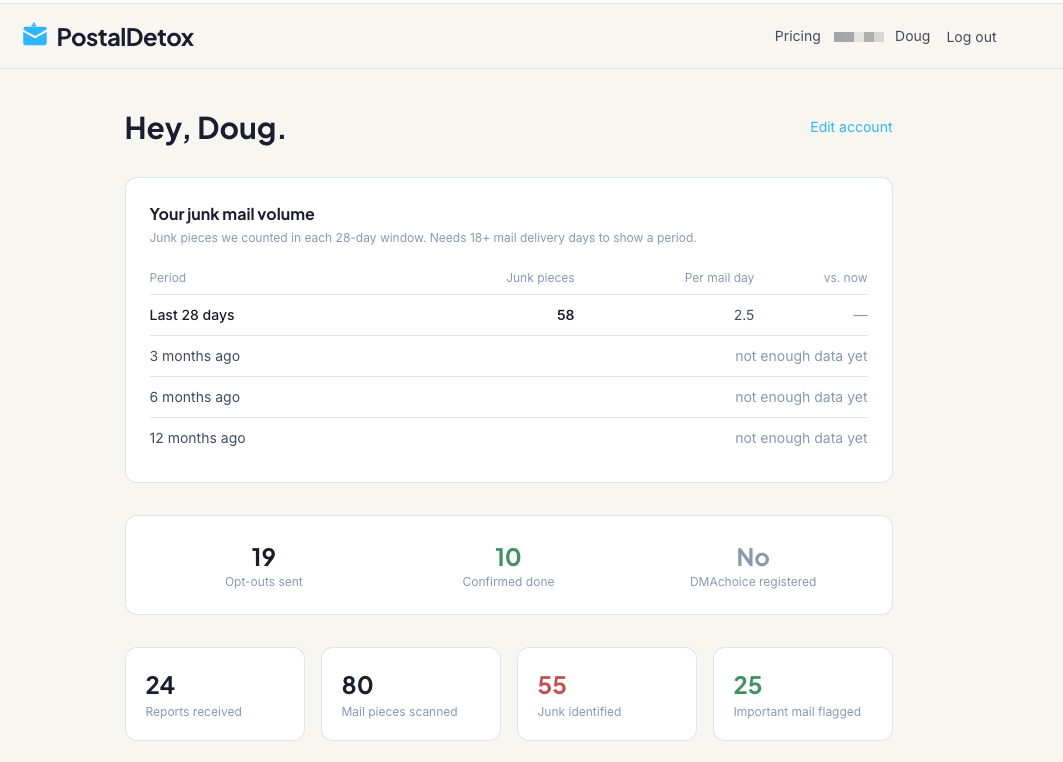
For context, at my own home address, PostalDetox counted 58 pieces of junk mail in the last 28 days. That is about 2.5 per mail-delivery day. And I am one guy. A person who runs a business from their home gets that plus a bunch of business-specific junk on top. All that junk makes missing critical business mail a real danger.
The consumer tools everyone recommends (and why they don't help your business)
Type "how to stop junk mail" into Google and the top three results send you to the same three tools. The FTC, the USPS, and DMAchoice. They work reasonably well for a residential mailbox. They mostly do not work for a business mailbox. Here is why.
DMAchoice
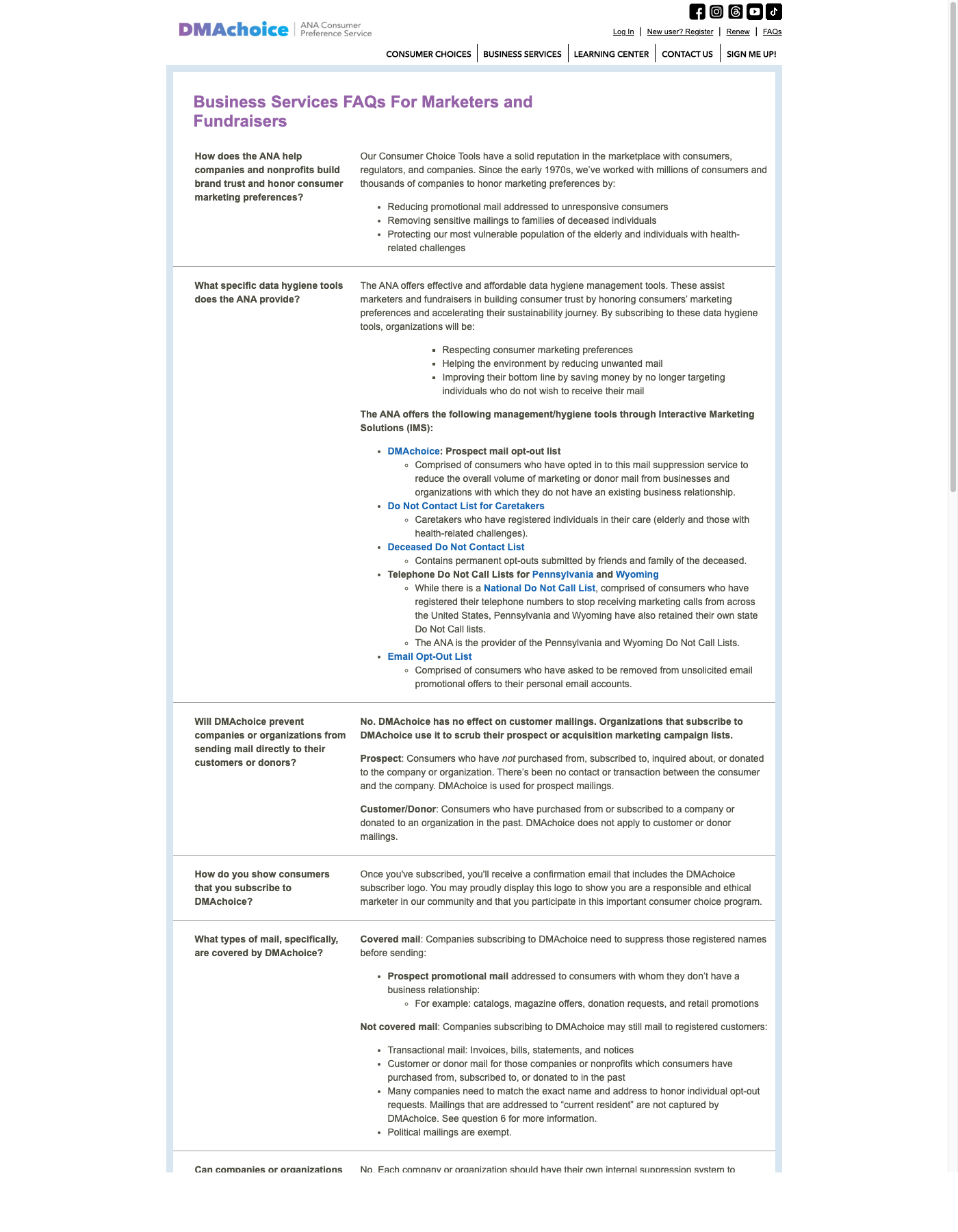
The Association of National Advertisers runs a suppression list and calls it a "consumer choice tool." You pay $8 online or $9 by mail, and for the next ten years, participating mailers are supposed to scrub their prospect lists against yours. Here is what jumps out when you actually read the DMAchoice business FAQ: business addresses are never mentioned at all. Every question is framed around "consumers." The scope is defined as "prospect mail addressed to consumers with whom [the mailer doesn't] have a business relationship." The registration form at dmachoice.org/register asks for an individual's name and home address, not a business. Customer and donor mail, EDDM addressed to "current resident," and political mail are all explicitly outside the scope too. If your mail is going to a business address, DMAchoice is not the tool.
USPS Informed Delivery
The free USPS service that emails you a preview of the mail coming to your address that day. It is genuinely useful. USPS does support enrollment for any "residential, business, or PO Box address in an eligible ZIP Code" — direct quote from the enrollment page. The friction for businesses is in the fine print: enrolling a business street or PO Box requires a separate USPS.com business account (more setup than the consumer path), and the mailbox has to be "uniquely coded" — USPS's own language for "one address, one recipient." That knocks out most virtual mailboxes, shared mailroom suites, and commercial mail-receiving agencies (CMRAs) where dozens of businesses share a single street address. If your business mail goes to a CMRA or a virtual mailbox, Informed Delivery is a reach.
CatalogChoice
Free, nonprofit, and it actually works for any address, business included. The catch is scope. CatalogChoice has around 9,000 catalog titles in its database. That will knock out your Uline, your Williams-Sonoma, your Grainger. It will not touch insurance solicitations, prescreened credit offers, commercial supply pitches, EDDM saturation, or the B2B lead-generation junk that makes up most business mail.
Net result: if you run a business, the three tools the entire internet recommends for "junk mail" cover somewhere between a small fraction and zero of what you actually receive.
What actually works: the one-by-one playbook
The only method that reliably stops business junk mail is contacting each mailer directly, one at a time, through their own channel. That is tedious. It is also the thing that works. Here are seven methods I have tested, ranked by effort and payoff.
1. Refuse First-Class mail at the box
If a piece is First-Class (usually a stamp or an indicia that says "First-Class") and you have not opened it, write "REFUSED, RETURN TO SENDER" on the front and drop it back in the outgoing slot. USPS returns it. Works well for solicitations disguised as personal mail. Does not work for Marketing Mail (the bulk stuff with a permit imprint) because USPS discards refused Marketing Mail, it doesn't return it.
2. Kill prescreened credit and insurance offers in one call
The four credit bureaus jointly run optoutprescreen.com, which suppresses prescreened offers for five years or permanently. It is free. It takes two minutes online or one phone call. It is the single best ROI move on this list and it kills an entire category of junk within about 90 days.
3. Email the mailer directly
Every real business with a customer service address will honor a "please remove this address from your mailing list" email. Send it from your own account, include the address from the mail piece, and keep a record. Most mailers process opt-outs in 30 to 90 days.
4. Call the phone number on the piece
Most mailers have a "remove me" script at their customer service line. It takes two minutes. The rep will ask for the code printed on the back of the mailer. Give them the code. Done.
5. Handle previous-resident mail
If you bought or leased a space and the prior tenant's mail keeps showing up, write "REFUSED, NO LONGER AT THIS ADDRESS" and return it. For the persistent stuff, your local postmaster has PS Form 3575-Z, which formally flags the name at your address. It is a little obscure. Your carrier will know it.
6. DMAchoice for any personal mail at a home-based business
If you are a Schedule C filer and your home is your business address, DMAchoice still helps with the personal-side direct mail (credit offers, charity solicitations, magazine sweepstakes). It will not touch anything marked for your business, but the $8 one-time fee is worth it for the residential half.
7. Keep a log
Date, sender, method, status. This sounds tedious and it kind of is. It is also the only way to tell whether a mailer is ignoring you or whether your opt-out went through. A simple spreadsheet works. Add a column for "follow-up needed" and revisit anything older than 90 days that is still showing up.
If you do the first two items only, you kill the worst 40% of your junk. If you work through all seven over a couple of months, you get most of the rest.
What you can't stop (and why it's OK)
Three categories of mail are effectively unstoppable. Knowing this in advance saves you from thinking the rest of the playbook "isn't working."
- EDDM saturation mail. Addressed to "Postal Customer" or "Resident." The mailer bought a ZIP and a route, not your name. There is no list to be removed from. Recycling bin is the only answer.
- Political mail. First Amendment protected. Every opt-out service explicitly excludes it. Election seasons stuff our mailboxes with junk. Unfortunately, there's no way around that.
- Mail from companies you do business with. Your bank, your insurance carrier, your utilities, your trade associations. They are legally allowed to send you statements, renewals, and offers related to your account. Contact them directly if you want the offers to stop.
If a service promises to stop 100% of your junk mail, they are selling. Nobody can. The real win is getting the volume down to a pile that takes ten seconds to sort.
We built a tool for this: PostalDetox
Running the seven-step playbook by yourself takes real hours. Most people won't. So we built a free tool at Shoeboxed called PostalDetox that does most of it for you.
Here is how it works, in plain English.
- You sign up for USPS Informed Delivery (it is free, from USPS, and takes a few minutes).
- You forward your daily Informed Delivery email to the PostalDetox address we give you.
- We identify each mailer using the image of the envelope, file the opt-out on your behalf through the sender's preferred channel (email, phone script, web form, or physical letter), and send you a daily report that shows what arrived, what is junk, what is critical, and which opt-outs are in flight.
That is the whole product. You forward one email a day. We do the rest.
PostalDetox is free (the basic plan) because our ideal customer at Shoeboxed is a Schedule C filer running a business from home. There are about 31 million Schedule C filers in the country, many of them running their business from their home. We'd like to make their lives a bit better. Who wouldn't like a little less junk mail, and a kick in the pants to pay attention to critical mail?
A few honest limitations exist:
- PostalDetox cannot stop EDDM saturation mail because nobody can
- It works best when Informed Delivery is set up cleanly, which is straightforward for a home address (those people running a biz from their home office we talked about)
Check it out if you'd like to reduce your junk mail. The base plan is free, and I find it pretty fun to automatically fire off emails to junk mailers telling them to knock it off.
You can try it at postaldetox.com. Free, no credit card required (unless you want the fancy we-send-stuff-for-you features).
FAQ
Why am I getting so much junk mail all of a sudden?
Usually one of three things happened. You moved, and the USPS National Change of Address system sold the forwarding record to list aggregators. You registered an LLC, filed for a permit, or started a business, and your new address is now public record and getting scraped. Or you landed on a mailer's EDDM route when somebody bought your ZIP. New businesses spike the worst, because every trade publication and supply-catalog list broker has your data within a week of formation.
How long does it take for junk mail to actually stop after I opt out?
Expect 30 to 90 days for most direct mailer opt-outs to take effect. Prescreened credit offers stop in about 90 days after you register at optoutprescreen.com. DMAchoice takes up to 90 days to propagate to member mailers. Individual mailers you email or call typically process your opt-out in 30 to 60 days. Anything still arriving four months later is a mailer ignoring you or one that never had your opt-out on file, so it is time to follow up.
Can I stop junk mail at a PO Box, virtual office, or shared business address?
Yes, but the consumer tools mostly won't help you. DMAchoice excludes business addresses by policy. USPS Informed Delivery requires a uniquely coded mailbox, which knocks out most commercial mail-receiving agencies and virtual mailboxes. Your reliable path is the one-by-one playbook above. Email, call, or mail each sender directly through their own opt-out channel. That method works regardless of address type because you are contacting the mailer's customer service, not a national database that screens by residential status.
Is it illegal for companies to keep sending me junk mail?
No. There is no federal Do Not Mail law. Unlike CAN-SPAM for email or the Do Not Call registry for phone, postal advertising is not federally regulated for opt-out. DMAchoice is voluntary and only covers ANA member companies. Most reputable mailers still honor direct opt-out requests because it is cheaper than mailing to an uninterested address, but they are not legally required to. Political mail is specifically First Amendment protected and cannot be blocked at all.
The upshot
Business junk mail is not like consumer junk mail. It is its own problem, and the tools everyone recommends are built for the consumer version. The good news is the fix is not complicated. Kill the prescreened offers in one call. Email the repeat offenders. Refuse the First-Class imposters at the box. Keep a log so you can tell what's working.
And if you want all of that handled without doing it yourself, PostalDetox is free. You forward one email a day. We do the rest. Built for Schedule C filers, paid for by Shoeboxed, priced at zero.
Good luck, may your mailbox get just a bit lighter!




 4.4 / 5 on