Best receipt tracking apps for small business, with 2026 prices
Compare receipt tracking apps by job, with 2026 prices. I own Shoeboxed, so I show you what we do best and where another app fits you better.


The best receipt tracking app depends on what you need it to do. Here is where to start.
- Shoeboxed, if you have receipts & mileage to track. We also scan paper receipts, and have a super-friendly US-based support team you can talk to.
- Wave Receipts, if you work alone and want no limit on scans.
- Zoho Expense, if you pay employees back for what they buy.
- QuickBooks, if you already keep your books there.
I own Shoeboxed, so keep that in mind as you read. The prices below come from each app's own pages and app store listings on November 4, 2026.
This page covers receipts you keep for taxes. If you want cash back on groceries, try Fetch or Ibotta.
Which receipt tracking app fits your job, with 2026 prices
| Your job | Start with | Also look at | Price to start |
|---|---|---|---|
| Get rid of a pile of paper receipts | Shoeboxed. You mail the pile in, and our team scans it | Neat, if you want to feed your own scanner | Pro costs $29 a month and scans 50 paper receipts a month |
| Track receipts and mileage in one app | Shoeboxed. Your phone logs the trips, and we text you once a day to sort them | Zoho Expense, Everlance | $9 a month or $97 a year, and every plan includes free unlimited mileage tracking |
| Keep tax records for one person, with most receipts by email or phone photo | Wave Receipts. Wave puts no limit on scans | SparkReceipt, Smart Receipts, Shoeboxed Starter | $8 a month or $72 a year |
| Pay employees back for what they buy | Zoho Expense. Managers approve and the company pays people back | Expensify, Ramp | Free for 3 users at 20 scans each a month. Standard costs $3 per user a month billed yearly |
| Keep your books in QuickBooks | QuickBooks. Receipts land inside your books | Shoeboxed Pro, which connects to QuickBooks Online | Simple Start costs $38 a month. The $0 plan comes without the mobile app, says the pricing page |
| Handle receipts for many bookkeeping clients | Dext. It sells to accounting and bookkeeping firms | Shoeboxed Paper Plus, for clients with lots of paper | Ask Dext for a firm quote. The business plan costs $25.21 a month billed yearly |
My own app is my pick for two of those six jobs, because of the mail-in scanning and the mileage text. It also shows up as a second choice in three more rows.
What you get with Shoeboxed if you have paper receipts or drive for work
Here is what we do, and why I think it is worth paying for.
- Free unlimited mileage tracking with every plan. Every paid plan includes it, even the $9 Starter plan. Your phone logs each trip by GPS, and you sort your trips by answering one text a day.
- Paper scanning. You stuff your receipts in a Magic Envelope and mail it to us. Our team in Durham, North Carolina scans them, and our software pulls out the date, total, vendor, and category.
- An app for iPhone and Android. You can take a picture of a receipt, and your receipts and trips end up in one account.
- 19 years of keeping receipts. Since 2007, Shoeboxed has scanned over 57 million receipts for more than 552,000 small businesses.
- Support from real people in the US. Call us at (888) 369-4269, Monday to Friday, and a person picks up.
- An A+ rating from the BBB. Shoeboxed is a BBB Accredited Business.
How to clear a shoebox of paper receipts, and what 1,000 receipts cost
A pile of 1,000 paper receipts costs $685 for a year on the Shoeboxed Pro plan, by my math. You request a Magic Envelope, stuff your receipts in, and mail it to us. Our team in Durham scans the paper, and our software pulls out the date, total, vendor, and category.
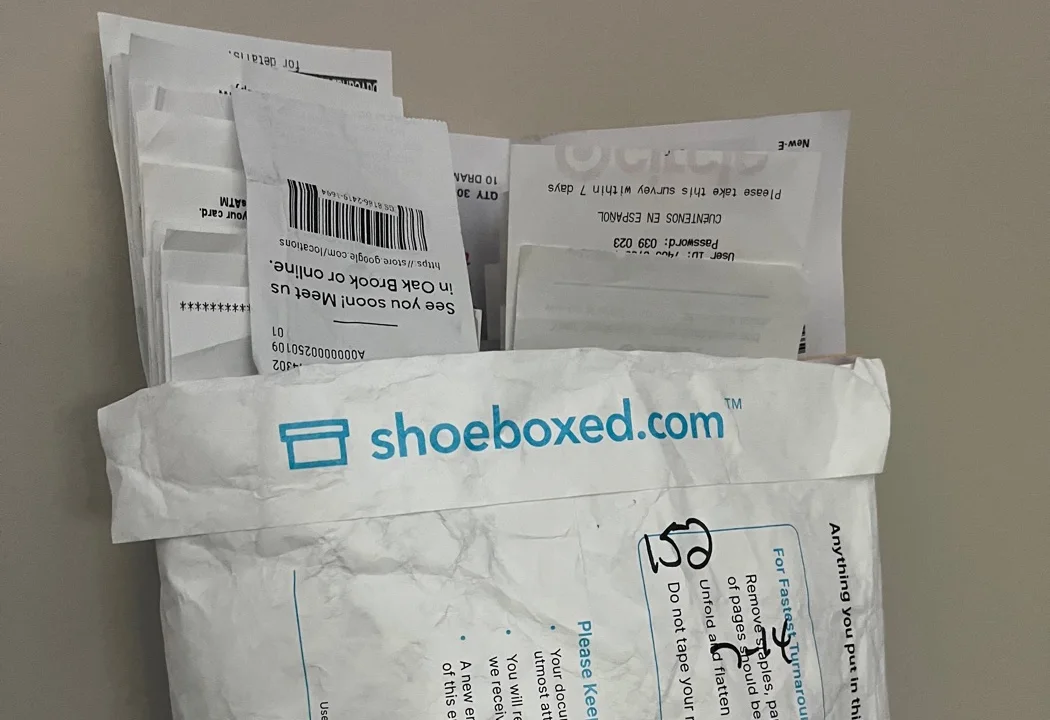
Stuff your receipts in a Magic Envelope and drop it in the mail. We scan every one.
None of the other apps' pages talk about mailing your paper in. Neat's receipt page says you can import with a compatible scanner, so you feed the scanner yourself.
I figured this table from our price list, with yearly billing and the whole pile sent within one plan year. Each receipt counts as one paper scan, and the totals leave out the $9 price of any extra envelopes.
| Yearly plan | Paper scans included | 500 receipts | 1,000 receipts | 2,000 receipts |
|---|---|---|---|---|
| Starter, $97 | 20, then $2.00 each | $1,057 | $2,057 | $4,057 |
| Pro, $297 | 600, then $0.97 each | $297 | $685 | $1,655 |
| Plus, $797 | 1,800, then $0.87 each | $797 | $797 | $971 |
| Paper Plus, $1,997 | 3,600, then $0.77 each | $1,997 | $1,997 | $1,997 |
Starter costs the least up to 120 receipts, Pro up to about 1,100, and Plus up to about 3,200. Pro comes with one envelope each quarter, and Plus comes with one a month.
If you would rather do the work yourself, you can take a picture of each receipt with any receipt app. You can also feed them through your own scanner into Neat, at $200 a year.
The best apps for tracking receipts and mileage in one place
I picked Shoeboxed for this job because your trips and your receipts end up in one account, and you sort your trips by answering one text a day.
Turn on tracking in our mobile app, and we log your trips by GPS and send you that text with all your trips numbered. You reply with which trips were business, in plain words. Each business trip becomes a PDF receipt with a map, saved in your Shoeboxed account next to your other receipts.
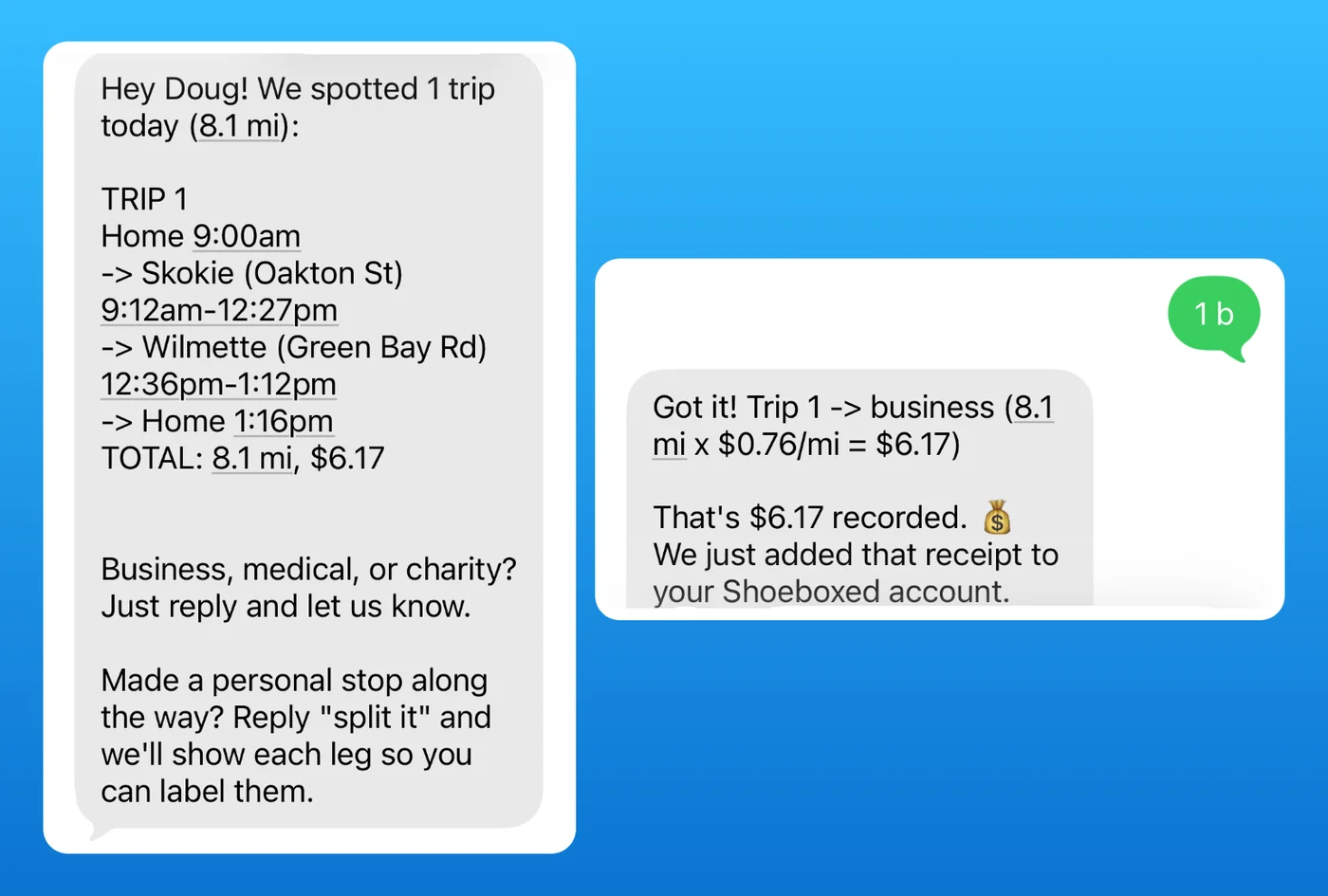
We text you each evening. Reply to mark which trips were work.
Every Shoeboxed plan includes free unlimited mileage tracking, and plans cover 3 to 10 users. Even the Starter plan includes it, at $97 a year, with your receipts in the same account. The mobile app comes with a 7-day free trial and no payment up front.
Five other apps list mileage tracking, so here is what each one offers.
- MileIQ gives you 40 free drives a month, and $11.66 a month billed yearly buys unlimited drives. That comes to about $140 a year, and its pricing page does not mention receipts.
- Everlance Basic costs $0 for 30 automatic trips a month and lists receipt uploads. On November 4, its pricing page listed Starter at both $69.99 and $89.99 a year, so confirm the price at checkout.
- Zoho Expense lists GPS mileage on its free plan.
- QuickBooks says its free plan tracks business miles. Its mileage page says you swipe each trip to mark it business or personal. But its pricing page says the free plan does not include the mobile app, so check before you count on it.
- SparkReceipt Pro logs trips by GPS or by hand, at $69 a year.
The IRS wants the mileage for each business use and your total miles for the year. Our free mileage log template shows what to record, and our IRS mileage calculator shows what those miles come to in dollars.
The best apps for tax-time records when you work alone
Until I bought Shoeboxed, I waited until the last week before the tax deadline to do the books for my little LLC and my other small companies. I'd scramble, usually mess something up, and then pay my CPA extra to fix it. A receipt app fixes that only if you can hand your tax person a clean file at the end.
The IRS says your records should show who you paid, how much, proof that you paid, the date, and what you bought. Check that you can search your receipts, export them, and let your tax person see them.
- Wave Receipts, $72 a year. You can photograph a receipt or forward it by email, and Wave creates a bookkeeping record for it. It fits best if you use Wave for your books.
- SparkReceipt Elite, $129 a year. SparkReceipt lists a Schedule C export on this plan, and your accountant can view your records at no extra charge.
- Smart Receipts Pro, $99.99 a year. You can export your records as PDF or spreadsheet files. On the free plan, you type each receipt by hand.
- Shoeboxed Starter or Pro, $97 or $297 a year. Our software builds a list of your expenses with the date, vendor, and total for each one. You can export that list at any point and invite your bookkeeper into the account. You can forward receipts by email or send a photo from the app. Starter includes 50 digital scans a month, and Pro includes 250 and finds receipts in your Gmail.
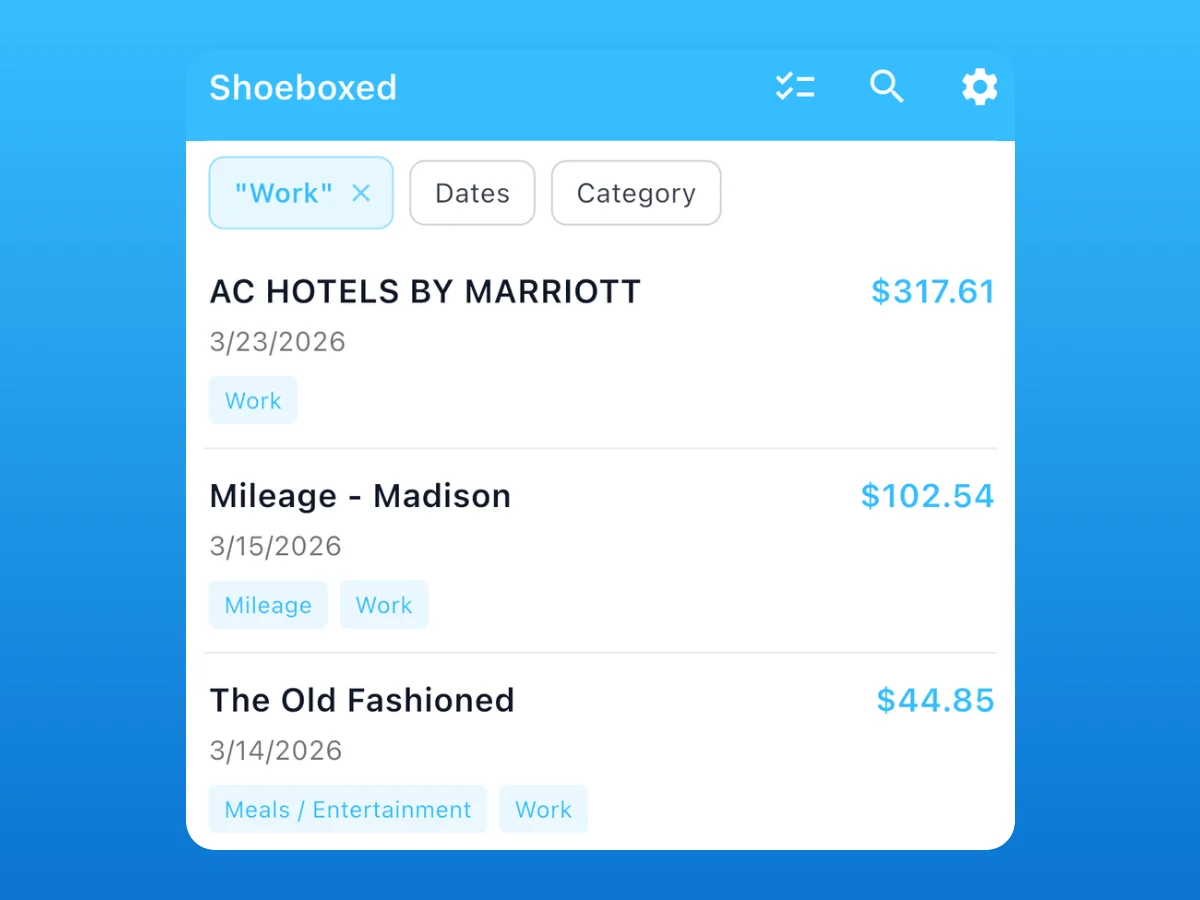
Shoeboxed builds this list for you. Export it when your tax person asks.
Before you pay, check how long the app keeps your receipts. The usual IRS rule is to keep records for three years from when you file. A receipt from January 2026 goes on the return you file in April 2027, so keep it until April 2030.
Shoeboxed Starter stores digital scans for 3 years, so export each year's records if you stay on it. Pro and up keep digital scans for as long as your account stays active.
What a year costs if you keep 30 receipts a month
Say you run a one-person business with 30 digital receipts a month. I did this math from each app's price list, using the yearly price where the app offers one.
| App and plan | Cost for a year | What you get at that price |
|---|---|---|
| QuickBooks Free | $0 | QuickBooks' pages disagree. One says this plan captures receipts, and the pricing page says it has no mobile app |
| Zoho Expense Standard | $36 | 200 scans a month. The free plan stops at 20 a month, so 30 receipts needs this one |
| SparkReceipt Pro | $69 | 50 documents a month, plus GPS or typed mileage |
| Wave Receipts | $72 | No limit on scans |
| Shoeboxed Starter | $97 | 50 digital scans a month, 20 paper scans a year, and unlimited mileage |
| Smart Receipts Pro | $99.99 | Reads your receipts, lets you forward them by email, and exports PDF and spreadsheet files |
| Neat | $200 | Stores receipts and documents, and its page lists human verification of the data |
| Dext, business plan | $302.50 | 250 documents a month and 5 users, the plan size shown on Dext's page |
| QuickBooks Simple Start | $456 | Full bookkeeping software at the $38 list price. With its 50% off for 3 months, my math gives $399 |
For one person, Wave Receipts puts no limit on scans at $72 a year. Shoeboxed Starter costs $25 more a year. That includes free unlimited mileage tracking, 20 paper scans a year, and a US support team you can call.
I left three more apps out of this table because I could not pin down what each price buys.
- Expensify. I do not have its plan prices, and its App Store listing shows a $4.99 monthly subscription.
- SimplyWise. A receipt and tax report app with 4.9 stars from 38,000 App Store ratings.
- Easy Expense. It scans receipts and tracks mileage, with 4.9 stars from 2,500 ratings.
SimplyWise and Easy Expense both list several prices in the app, so read the subscription screen before you pay.
The best apps for paying employees back for what they buy
I would start with Zoho Expense. You pay per person, and its Standard plan lists approvals and direct bank payments. The free plan covers 3 users at 20 scans per user a month.
This table uses yearly billing, by my math.
| App and plan | Cost for a year, 5 people | What you get |
|---|---|---|
| Ramp Free | $0 | Ramp lists automatic receipt collection and matching, plus a corporate card. Ask Ramp if you must use its card |
| Zoho Expense Standard | $180 | 200 scans per person a month, approvals, and direct bank payments |
| Zoho Expense Premium | $300 | 1,000 scans per person a month and more approval options |
Expensify's help page describes a plan called Collect for simple approvals and paying people back.
Shoeboxed Pro costs $297 a year for 5 users. It keeps everyone's receipts in one account for your bookkeeper, and you pay people back on your own.
If your problem is getting the receipts out of people's pockets, read how to get employees to turn in receipts.
What to use if you already keep your books in QuickBooks
Start with the QuickBooks app, because your receipts land in the same place as your books. That saves you a second login and a second bill. Its pricing page says the app comes with Lite plans and above, and not with the free plan.
You need a second app only if you want someone else to scan your paper. Shoeboxed Pro, Plus, and Paper Plus all connect to QuickBooks Online and Xero. Neat lists a QuickBooks connection that sends expense data with the receipt images attached. See our guide to QuickBooks receipt management.
What to use if you are a bookkeeper with many clients
Dext's price page has a separate tab for accounting and bookkeeping firms. I do not have those prices, so look at that tab or ask Dext for a quote. Its business plan includes a connection to accounting software.
Shoeboxed Paper Plus is for a bookkeeper whose clients still hand over grocery bags of paper. It costs $179 a month or $1,997 a year, with 300 paper scans a month, 2 Magic Envelopes a month, 5,000 digital scans a month, and 10 users. Your client can also invite you into their own Shoeboxed account, so you can export their records.
SparkReceipt lets an accountant view a client's records at no extra charge.
Four jobs where I would send you to another app
A lower price for digital receipts
Wave Receipts costs $72 a year with no limit on scans. Zoho Expense Standard costs one person $36 a year by my math, with 200 scans a month. Shoeboxed Starter costs $97 a year with 50 digital scans a month.
If you photograph or forward every receipt, those two cost you less.
Paying employees back
Zoho Expense Standard costs $3 per user a month billed yearly. It lists approvals and direct bank payments to employees. Expensify's Collect plan lists simple approvals and paying employees back.
Shoeboxed stores everyone's receipts and builds the reports, and you pay people back on your own.
Matching each receipt to a bank transaction in your books
QuickBooks says its app finds the bank transaction and attaches the receipt image to it. Shoeboxed Pro connects to QuickBooks Online and Xero, but you would have two apps to log in to.
Splitting one receipt across several projects
Dext sells an add-on it describes as "One receipt, a dozen cost codes," which means you can split one receipt line by line. The add-on starts at $20.50 a month or $0.50 a document.
Our software pulls the vendor, date, total, and category from each receipt. If you bill the lumber on one receipt to three projects, Dext's add-on is built for that.
How to try any receipt app on 10 of your own receipts
Your own receipts will show you how well an app reads the kind of paper you have. Zoho Expense, QuickBooks, SparkReceipt, Neat, and the Shoeboxed mobile app all list a free plan or free trial. Try the two you like best on the same 10 receipts.
- Pull 6 paper receipts. Mix in a faded gas receipt, a handwritten one, a long hardware store one, a restaurant one with a tip, a crumpled one, and a coffee-stained one.
- Add 4 email receipts, including a PDF invoice.
- Compare what the app read with the paper, and count how many vendors, dates, and totals you had to fix.
- Search for one vendor by name and see whether the app finds it.
- Download the 10 receipts into a file and open it, because your tax person will get that file.
- Find out what happens to your receipts if you stop paying. Shoeboxed lets you download your records even if you stop being a customer.
Answers to eight common questions about receipt tracking apps
How do I keep track of receipts for my business?
Pick one place for every receipt, and put each one there the day you get it. Take a picture of paper receipts and forward email receipts to the same app. See how to organize receipts for taxes for the habits that go with any app.
Is there an app for digital receipts?
Yes, several apps on this page take digital receipts. Shoeboxed, Wave, Smart Receipts Pro, and Expensify all let you forward an email receipt to them.
What is the best free app for tracking receipts?
Zoho Expense is my pick. Its free plan covers 3 users, 20 scans per user a month, and GPS mileage. QuickBooks' pages disagree on its free plan. One says it captures receipts, and the pricing page says it has no mobile app. On the Smart Receipts free plan, you type receipts in by hand.
Have miles to track too? The Shoeboxed mobile app comes with a 7-day free trial, and every plan includes free unlimited mileage tracking.
Does QuickBooks have a receipt scanner app?
Yes, QuickBooks has one. QuickBooks says its scanner reads the amount, date, and location, and attaches the image to a bank transaction it finds in your books.
What is the $75 rule for receipts?
The IRS generally wants a receipt for travel, gift, and car expenses. IRS Publication 463 lists an exception when your expense, other than lodging, is less than $75. You still have to record the expense and the business reason. I would keep the receipt anyway, because a picture of it shows the date and the amount if anyone ever asks. See our guide to the IRS $75 receipt rule.
Are receipt scanning apps worth it?
Yes, a receipt app is worth it when it catches deductions you would have missed. Say you pay 22% in income tax, and leave self-employment tax out of the math. A $441 deduction then saves you about $97 in tax, which covers a plan that costs $97 a year. A plan that costs $36 a year takes about $164 in deductions.
Does the IRS accept scanned receipts?
Yes, the IRS accepts them if they stay readable and you can find them. The IRS says the same rules apply to electronic records as to paper.
The IRS covers electronic records in Revenue Procedure 97-22. That document asks for copies you can print clearly and a way to look them up, among other requirements. Ask your tax person before you shred the originals. See our guide to scanned receipts.
How long should I keep business receipts?
Keep them for three years from when you file, which is the usual rule on the IRS records page. The same page lists longer periods for a few cases, so ask your tax person if one of these fits you:
- Keep them six years if you leave income off your return, and that income is more than 25% of the gross income you reported.
- Keep them seven years if you claim a loss from worthless securities or a bad debt.
- Keep employment tax records at least four years.
- Keep them with no end date if you never file a return or you file a fraudulent one.
Keep every business receipt ready for tax time with Shoeboxed
Shoeboxed starts at $9 a month for the Starter plan, with free unlimited mileage tracking. The Pro plan costs $29 a month, scans 50 paper receipts a month, and finds receipts in your Gmail. On the web you get a 30-day money-back guarantee, so you can try it risk-free. Start a Shoeboxed account →
The mobile app comes with a 7-day free trial, and you pay nothing up front.


Who wrote this page
I'm Doug. I bought Shoeboxed in late 2025 with a Small Business Administration loan and 5% down. Most of my career ran on a W-2 paycheck, and owning Shoeboxed showed me that every expense I track changes my tax bill. Shoeboxed makes money when you pick it, so I told you where the other apps win.
Sources for every price and rule on this page
These prices and rules come from the pages below, as of November 4, 2026. Prices change, so check the app's own page before you buy.
- IRS: What kind of records should I keep?
- IRS: How long should I keep records?
- IRS Publication 463: Travel, Gift, and Car Expenses
- IRS Revenue Procedure 97-22
- Shoeboxed pricing page
- Wave receipts page and pricing page
- Zoho Expense pricing page
- Expensify receipt scanning page, help page on plan types, and App Store listing
- QuickBooks pricing page, mileage page, and its article on receipt scanners
- Dext business pricing page
- Neat pricing page and track receipts page
- SparkReceipt pricing page
- Smart Receipts home page
- Ramp pricing page
- Everlance pricing page
- MileIQ pricing page
- SimplyWise and Easy Expense App Store listings


 4.4 / 5 on
