How Do I Change My Plan?
Frequently asked questions about how to use Shoeboxed.

Question: How do I change my Plan?
Answer:
It's super easy to change your Shoeboxed plan at any time. Please make sure to **read the benefits **of your new plan before making a change, as features and turnaround time vary!
** Here's how:**
Step 1. Log into your account and click your name at the top of the screen, then select Account settings.
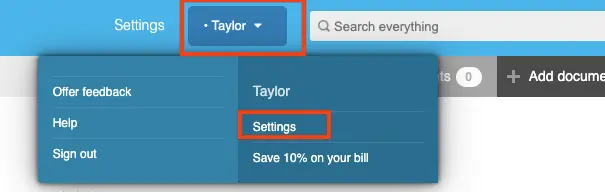
Step 2. Click Change my plan.
From here you can select a new plan (monthly or annual).
👉 Visit Shoeboxed's Knowledge Base for more information on how to use Shoeboxed like a pro!
About Shoeboxed!
Shoeboxed is a receipt scanning service with receipt management software that supports multiple methods for receipt capture: send, scan, upload, forward, and more!
You can stuff your receipts into one of our Magic Envelopes (prepaid postage within the US). Use our receipt tracker + receipt scanner app (iPhone, iPad and Android) to snap a picture while on the go. Auto-import receipts from Gmail. Or forward a receipt to your designated Shoeboxed email address.
Turn your receipts into data and deductibles with our expense reports that include IRS-accepted receipt images.
Join over 1 million businesses scanning & organizing receipts, creating expense reports and more—with Shoeboxed.
Try Shoeboxed today!
Work From Home? You Could Be Missing $500–$3,000/Year
Self-employed, 1099, or freelancer? Enter your address and we'll pull your real property data to estimate your home office deduction.
Free · 30 seconds · No signup required




 4.4 / 5 on